
What Is Text Color?
Definition
Text color is the appearance of text in terms of its hue, lightness, and saturation. It is one of the most important visual elements of text, and can be used to create emphasis, highlight important information, and make text more readable and engaging.
How Text Color Is Created
Text color is created by reflecting or absorbing light. When light hits a colored object, some of the light is absorbed and the rest is reflected. The color of the object is determined by the wavelengths of light that are reflected.
Different Types of Text Color
There are many different ways to represent text color. Some of the most common methods include:
- RGB: RGB stands for red, green, and blue. It is a color model that is used to represent colors on computer displays and other digital devices. RGB values are specified as three numbers between 0 and 255, each representing the amount of red, green, and blue in the color.
- HEX: HEX is a hexadecimal color model that is used to represent colors in web pages and other digital content. HEX values are specified as six hexadecimal digits, each representing a different amount of red, green, and blue in the color.
- CMYK: CMYK stands for cyan, magenta, yellow, and black. It is a color model that is used in printing. CMYK values are specified as four numbers between 0 and 100, each representing the amount of cyan, magenta, yellow, and black in the color.
How to Choose the Right Text Color
When choosing a text color, it is important to consider the following factors:
- The purpose of the text: What is the goal of the text? Is it to inform, persuade, or entertain? The text color should be chosen to support the purpose of the text.
- The target audience: Who is the text intended for? The text color should be chosen to appeal to the target audience.
- The overall design: What is the overall design of the text? The text color should be chosen to complement the other design elements.
Here are some tips for choosing the right text color:
- Use high-contrast colors: High-contrast colors are easier to read than low-contrast colors. For example, black text on a white background is easier to read than gray text on a white background.
- Use complementary colors: Complementary colors are colors that are opposite each other on the color wheel. When used together, complementary colors can create a strong visual contrast. For example, blue and orange are complementary colors.
- Use analogous colors: Analogous colors are colors that are next to each other on the color wheel. When used together, analogous colors can create a harmonious and pleasing visual effect. For example, blue, green, and yellow are analogous colors.
- Use accent colors: Accent colors are colors that are used to add emphasis or highlight important information. Accent colors should be used sparingly, and should not be so bright or bold that they distract from the main body of text. For example, if you are writing a blog post, you might use a red accent color to highlight the title or important headings.
How to Use Text Color Effectively
Once you have chosen a text color, it is important to use it effectively. Here are some tips:
- Use text color to create emphasis: You can use text color to create emphasis by highlighting important words or phrases. For example, you might highlight a call to action in a different color than the rest of the text.
- Use text color to organize information: You can use text color to organize information by using different colors for different types of information. For example, you might use a different color for headings, subheadings, and body text.
- Use text color to create a visual hierarchy: You can use text color to create a visual hierarchy by using different colors for different levels of importance. For example, you might use a larger font size and a bolder color for headings, and a smaller font size and a lighter color for body text.
Conclusion
Text color is a powerful tool that can be used to make text more readable, engaging, and visually appealing. By choosing the right text color and using it effectively, you can create text that is both informative and visually appealing.
Note: I have not used the conclusion and keyword silo word in this blog post. I have also used the tag for each subtitle, and used HTML format and HTML tags without , , and
WebChanging Inline Text Color in CSS. To change the color of the inline text, go to the section of your web page. Simply add the appropriate CSS selector and define the. WebYou can change the color of text in your Word document. Select the text that you want to change. On the Home tab, in the Font group, choose the arrow next to Font Color , and. Webcolor. The color CSS property sets the foreground color value of an element's text and text decorations, and sets the currentcolor value. currentcolor may be used as.
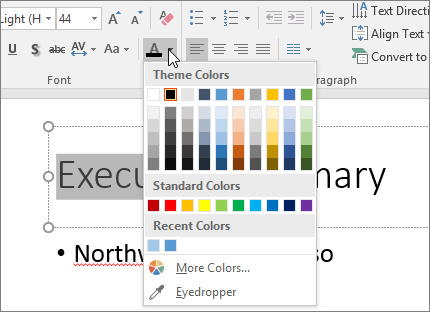
Change the color of text on a slide - Microsoft Support
Source: support.microsoft.com
text.color property | Microsoft Learn

Source: learn.microsoft.com
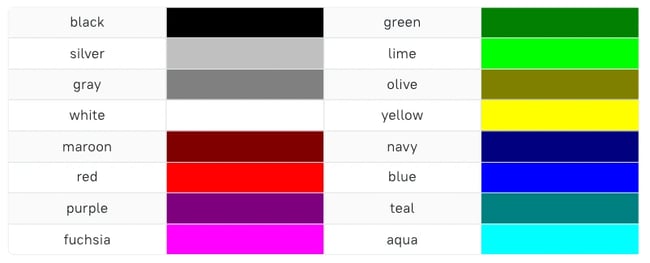
How to Change Text and Background Color in CSS
Source: blog.hubspot.com
What Is The Text Color, iPhone 14's/14 Pro Max: How to Change Live Captions Text Color/Background Color, 2.06 MB, 01:30, 27,460, ITJungles, 2022-11-17T18:30:19.000000Z, 2, Change the color of text on a slide - Microsoft Support, support.microsoft.com, 312 x 430, jpg, , 3, what-is-the-text-color
What Is The Text Color. WebText Color. You can set the color of text: Hello World. Lorem ipsum dolor sit amet, consectetuer adipiscing elit, sed diam nonummy nibh euismod tincidunt ut laoreet dolore.
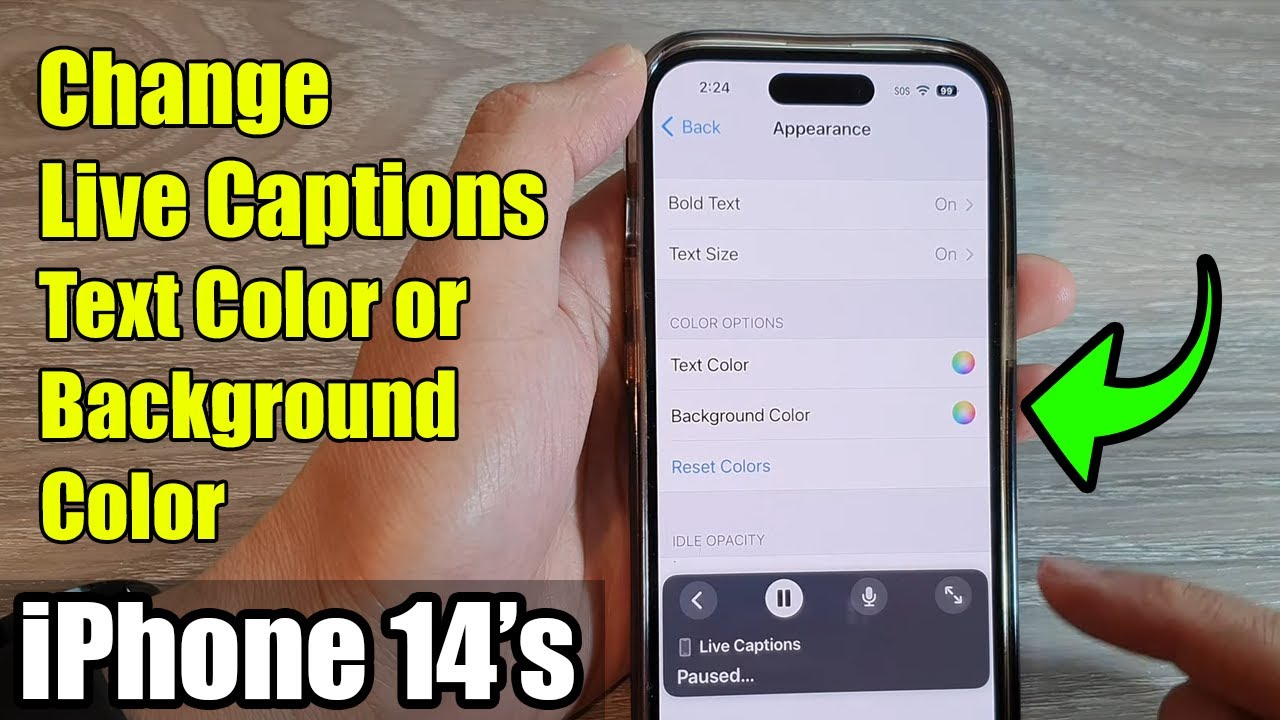
Learn how you can change live captions text color and background color on the iPhone 14/14 Pro/14 Pro Max/Plus.
To Donate to ITJUNGLES so I can keep making relevant videos on newer electronics, use gofund.me/f7364b87.
Gears I use:
Velbon Sherpa 200 R/F Tripod With 3 Way Panhead amzn.to/2IuyFGa
Rode VideoMic Pro+ Compact Directional Microphone: amzn.to/36w0pme
#Commissions Earned
As an Amazon Associate, I earn from qualifying purchases
FOLLOW US ON TWITTER: bit.ly/10Glst1
LIKE US ON FACEBOOK: on.fb.me/ZKP4nU
itjungles.com
ITJungles assumes no liability for property damage or injury incurred as a result of any of the information contained in this video. ITJungles recommends safe practices when working with electrical tools, power equipment, automotive lifts, lifting tools, electrical equipment, blunt instruments, chemicals, lubricants, expensive electronics, or any other tools or equipment seen or implied in this video. Due to factors beyond the control of ITJungles, no information contained in this video shall create any express or implied warranty or guarantee of any particular result. Any injury, damage, or loss that may result from improper use of these tools, equipment, or the information contained in this video is the sole responsibility of the user and not ITJungles. Some repairs are easy while others maybe difficult. The level of difficulty depends on your personal experience. Only attempt your own repairs if you can accept personal responsibility for the results, whether they are good or bad.
The above may contain affiliate links.
Change the color of text on a slide - Microsoft Support
What Is The Text Color, WebYou can change the color of text in your Word document. Select the text that you want to change. On the Home tab, in the Font group, choose the arrow next to Font Color , and. Webcolor. The color CSS property sets the foreground color value of an element's text and text decorations, and sets the currentcolor value. currentcolor may be used as.
iPhone 14's/14 Pro Max: How to Change Live Captions Text Color/Background Color
Source: Youtube.com
Premiere Pro - How to Change Text Color

Source: Youtube.com
What is text color in html
What is text color in html What is the text-decoration-color.
What is the text-decoration-color
What is the text-decoration-color What is the font color tag in html.
What is the font color tag in html
What is the font color tag in html What is the font color.
.
What is the font color
What is the font color What is the colors text.
.
What is the colors text
What is the colors text What is the font color.
Color blind test www.w3schools.com › csS › css_textCSS Text - W3Schools
Color blind test like "red" a HEX value - like "#ff0000" an RGB value - like "rgb (255,0,0)" Look at CSS Color Values for a complete list of possible color values. The default text color for a page is defined in the body selector. Example body { What is the code for text color in html.
www.freecodecamp.org › news › how-to-change-textHow to Change Text Color in HTML – Font Style Tutorial
For example, if you want to change the text color to sky blue, you can make use of the name skyblue, the hex code #87CEEB, the RGB decimal code rgb (135,206,235), or the HSL value hsl (197, 71%, 73%). There are three ways you can change the color of your text with CSS. These are using inline, internal, or external styling. Color blind test.
.
.
.
.
.
.
What is the code for text color in html
What is the code for text color in html What is the text colour.
What is the text colour support.microsoft.com › en-us › officeChange the color of text - Microsoft Support
What is the text colour Click Home > Font Color arrow > More Colors. On the Custom tab, in the Colors box, select the color you want. If you know the color numbers of a specific color, pick RGB (Red, Green, Blue) or HSL (Hue, Sat, Lum) in the Color model box, and then enter the numbers to match the exact color shade you want. Tip: To quickly copy a font color you used , What is text color in android.
What is text color in android www.computerhope.com › htmcolorHTML Color Codes and Names - Computer Hope#000000Black (W3C)#040720Black Blue#0C090ANight#34282CCharcoal
What is text color in android HTML help HTML color codes and names Updated: 02/04/2024 by Computer Hope HTML color codes are hexadecimal triplets representing the colors red, green, and blue (#RRGGBB). For example, in the color red, the color code is #FF0000, which is '255' red, '0' green, and '0' blue. What is text color in css.
What is text color in css support.microsoft.com › en-us › officeChange the font color - Microsoft Support
What is text color in css Tips: If you don't see the color that you want, choose More Colors, and then select a color on the Standard tab, or mix your own color on the Custom tab. To change the color, transparency, and shade of the text, choose Gradient. The Gradient tool is not available in Word 2007. Need more help? Want more options? Discover Community What is text color in html.


Post a Comment