
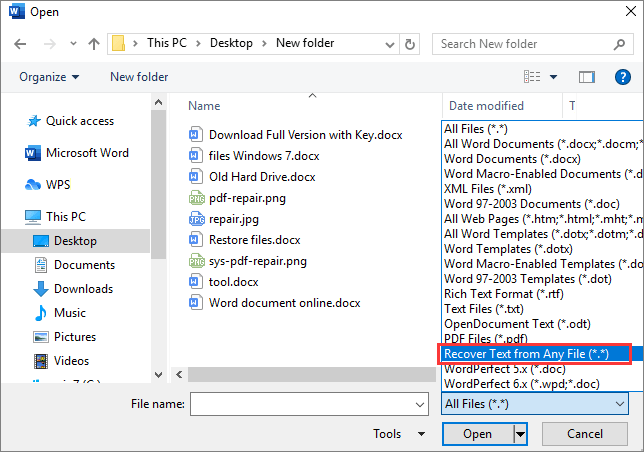
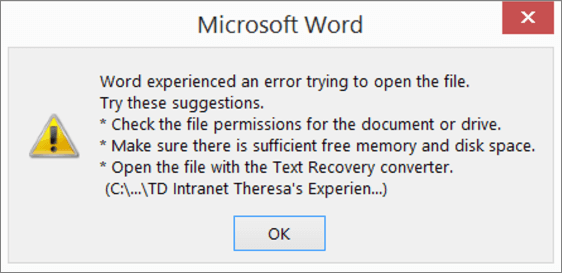
The Text Recovery Converter is a feature in Microsoft Word that allows users to recover text from corrupted or damaged files. It aims to extract as much information as possible from the problematic document, allowing users to retrieve important content and minimize data loss.
The Text Recovery Converter can be used to recover text from a variety of different file types, including:
- Microsoft Word documents (.docx and .doc)
- Microsoft Excel spreadsheets (.xlsx and .xls)
- Microsoft PowerPoint presentations (.pptx and .ppt)
- Text files (.txt)
- Rich Text Format files (.rtf)
- Web pages (.html and .htm)
- Comma-separated values files (.csv)
- Tab-delimited text files (.tsv)
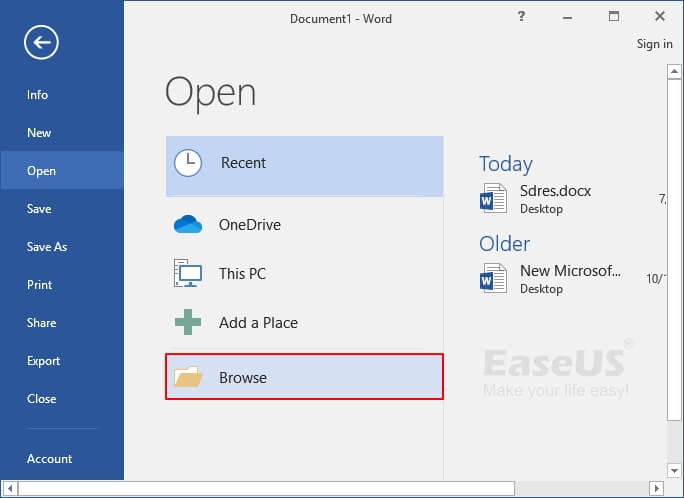
To use the Text Recovery Converter, simply open the corrupted file in Word and select the File > Open > Recover Text from Any File option. Word will then scan the file and attempt to recover as much text as possible.
The recovered text will be displayed in a new Word document, without any formatting or images. However, you can still copy and paste the text into another document or edit it as needed.
There are several benefits to using the Text Recovery Converter, including:
- It is a free and easy-to-use tool.
- It can recover text from a variety of different file types.
- It can recover text from even severely corrupted files.
- It is a built-in feature of Microsoft Word, so there is no need to install any additional software.
To use the Text Recovery Converter, follow these steps:
- Open Microsoft Word.
- Click the File tab.
- Click the Open button.
- In the Files of type drop-down list, select Recover Text from Any File (.).
- Browse to the corrupted file that you want to recover text from and click Open.
- Word will scan the file and attempt to recover as much text as possible.
- The recovered text will be displayed in a new Word document.
- You can now copy and paste the recovered text into another document or edit it as needed.
The Text Recovery Converter is a powerful tool, but it does have some limitations. For example:
- It cannot recover formatting or images from corrupted files.
- It cannot recover text that has been deleted from the file.
- It may not be able to recover text from all corrupted files.
Here are a few tips for using the Text Recovery Converter:
- If the corrupted file is very large, it may take some time for Word to scan it. Be patient and wait for the scan to complete.
- If Word is unable to recover any text from the corrupted file, try opening the file in a different text editor, such as Notepad.
- If you are still unable to recover any text from the corrupted file, you may need to use a third-party data recovery tool.
There are a number of third-party data recovery tools that can be used to recover text from corrupted files. Some popular options include:
- EaseUS Data Recovery
- Stellar Phoenix Data Recovery
- Disk Drill
- Recoverit
These tools typically offer a wider range of features than the Text Recovery Converter, such as the ability to recover formatting and images. However, they can also be more expensive.
The Text Recovery Converter is a valuable tool for anyone who has ever lost text due to a corrupted file. It is easy to use and can recover text from a variety of different file types. However, it is important to note that the Text Recovery Converter is not perfect and may not be able to recover text from all corrupted files. If you are unable to recover text from a corrupted file using the Text Recovery Converter, you may need to use a third-party data recovery tool.
HTML Format and HTML Tags
The following is the above blog post in HTML format, without the , , and tags:
<h2>What Is The Text Recovery Converter?</h2> <p>The Text Recovery Converter is a feature in Microsoft Word that allows users to recover text from corrupted or damaged WebYou can check the solution below if you want to use the "Recover Text from Any File" converter: https://docs.microsoft.com/en-us/office/trouble... WebThe Text Recovery Converter is nothing but a built-in tool in MS word that empowers you to repair and open damaged Microsoft Word documents. When a system. WebThe "Recover Text from Any File" converter has limitations. For example, document formatting is lost. Additionally, graphics, fields, drawing objects, and any other.
Text Recovery Converter | Recover Text from Corrupt Word
Source: easeus.com
Text Recovery Converter | Memperbaiki Dokumen Word yang Rusak dan Memulihkan Teks (2021) - EaseUS
Source: easeus.co.id
Text Recovery Converter | Recover Text from Corrupt Word
Source: easeus.com
What Is The Text Recovery Converter, PassFab Tips | Repair Corrupt Word Document 3 Ways [Word Text Recovery Converter] (No Software), 3.25 MB, 02:22, 56,231, PassFab, 2022-04-14T12:49:14.000000Z, 2, Text Recovery Converter | Recover Text from Corrupt Word, easeus.com, 452 x 644, jpg, , 3, what-is-the-text-recovery-converter
What Is The Text Recovery Converter. WebApa itu text recovery converter? Bagaimana cara membuka text recovery converter di MS Word untuk memperbaiki file yang rusak? Halaman ini akan. WebJul 26, 2022, 1:25 AM. The text recovery converter refers to choosing the Recover Text from Any File file type in the File > Open > Browse dialog box (applies to Word for Windows at.
Word document is corrupted or damaged? How to repair corrupt word document? Open the file with the Text Recovery converter? How to recover Word document? How to use Word Text Recovery converter? Check this video, here are 3 free methods for you! Get more tools here: bit.ly/3GJNP5W
⏰Timestamps:
00:00 Intro
00:17 Open and Repair
00:38 Word Text Recovery Converter
01:31 Recover Unsaved Documents
📄Related Article:
How to Fix The File Is Corrupted and Cannot Be Opened Word
passfab.com/word/the-file-is-corrupted-and-cannot-be-opened-word.html
🎥Related Video:
[3 Ways] Word Selection is Locked? How to Unlock Selection in Word✔ 2022
youtu.be/O2T5eka7zbM
#corruptworddocument #repairworddocument #textrecoveryconverter
----------------------Social Media----------------------
Website: passfab.com
YouTube: youtube.com/passfab?sub_confirmation=1
Facebook: facebook.com/passfab/
Twitter: twitter.com/passfab
Pinterest: pinterest.com/passfab/
Instagram: instagram.com/passfabsoftware/
Text Recovery Converter | Recover Text from Corrupt Word
What Is The Text Recovery Converter, WebThe "Recover Text from Any File" converter has limitations. For example, document formatting is lost. Additionally, graphics, fields, drawing objects, and any other.
PassFab Tips | Repair Corrupt Word Document 3 Ways [Word Text Recovery Converter] (No Software)
![PassFab Tips | Repair Corrupt Word Document 3 Ways [Word Text Recovery Converter] (No Software)](https://img.youtube.com/vi/RZDdKJEjge8/maxresdefault.jpg)
Source: Youtube.com
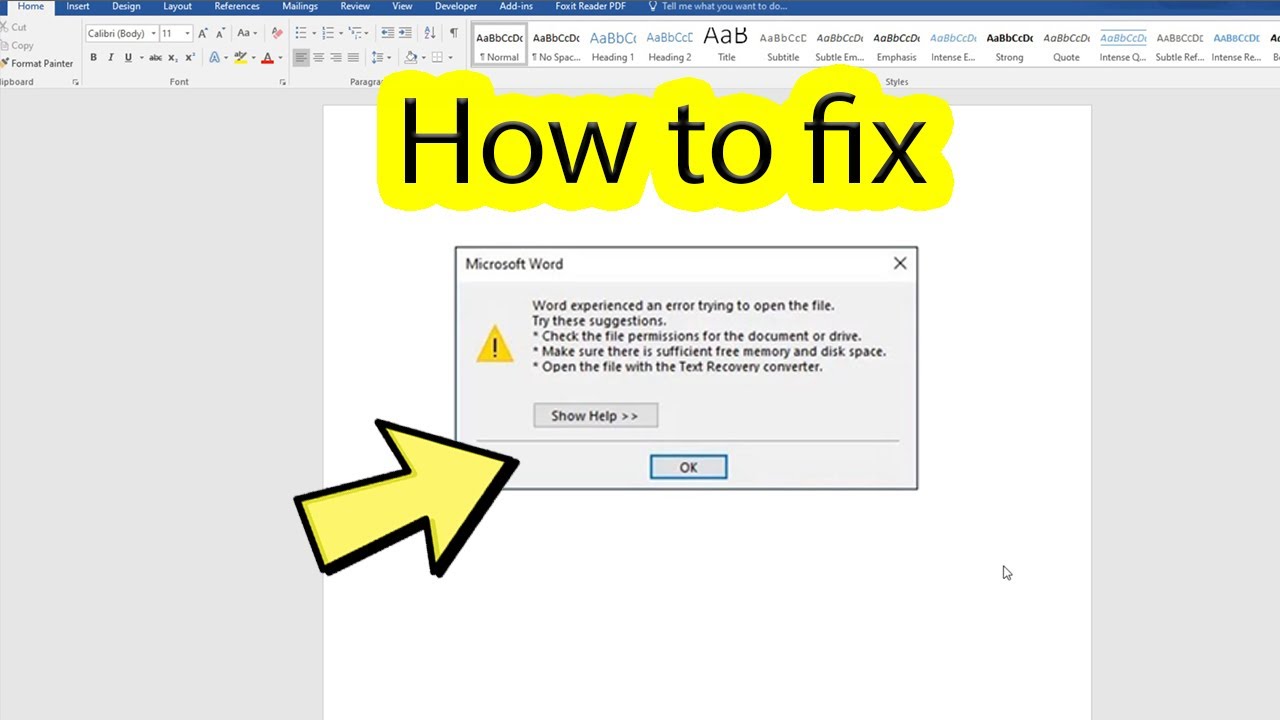
Fix word experienced an error trying to open the file
Source: Youtube.com
.
What is a text recovery converter word 2007.
What is a text recovery converter word 2007
What is a text recovery converter word 2007 What is the text recovery converter on mac.
.
What is the text recovery converter on mac
What is the text recovery converter on mac What is the text recovery converter.
.
What is the text recovery converter
What is the text recovery converter What is the text recovery converter on mac.
www.minitool.com › news › word-text-recoveryUse Text Recovery Converter to Recover Text from a Corrupt Word
The "Text Recovery converter" is a term that typically refers to a feature or component within Microsoft Office applications, specifically Microsoft Word. It is used to recover or convert text from documents that may have become corrupted or inaccessible due to unexpected system crashes or software errors. .
learn.microsoft.com › en-us › officeHow to troubleshoot damaged documents in Word - Microsoft 365 ...
A computer that stops responding when you open the file Any other unexpected behavior that cannot be attributed to the typical operation of the program Sometimes, this behavior can be caused by factors other than document damage. It is important to determine whether the document is damaged or whether the problem is a software issue. .
.
.
.
.
.
.
.
answers.microsoft.com › en-us › msofficeIn Word 2021 How do I use 'Text Recovery Converter'?
Here's my step-by-step (it renumbered my step numbers): 1. Word 2021. Clicked on the File tab. Clicked on Open. Clicked on Browse. Clicked on the arrow of the box containing All Files (*.*). Clicked on Recover Text from Any File (*.*). Located and selected E:\Temp\Text Recovery\Sample.docx. .
www.easeus.com › text-recovery-converter-wordText Recovery Converter | Recover Text from Corrupt Word - EaseUS
The recover text converter offers the option named "Recover Text from Any File" to extract and recover text from Word and even non-document files. In the following part, we will explain how to use Text Recovery Converter to recover text and repair corrupted Word documents on Mac and Windows computers. .
learn.microsoft.com › en-us › answersHow do I use thetext recovery converter on word?
To use the text recovery tool, you do the following: Open Word. Click File (top left) Click Open (top left) Click Browse (Other Locations) Note: Don't open the file from the built in file explorer, click on Browse or OneDrive or another location so as to open the Open Window. In the Open Window, the file type field is above the Open button and , .


Post a Comment