
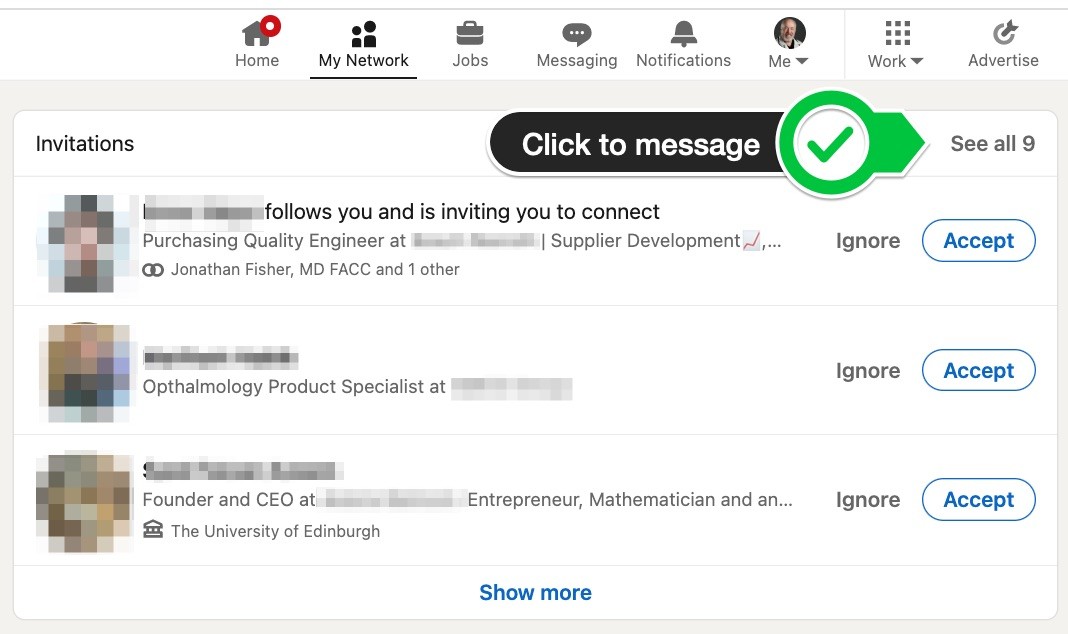
What are LinkedIn connections?
LinkedIn connections are people who you know or have met professionally. They can be former colleagues, classmates, business associates, and even people you've met at industry events. When you connect with someone on LinkedIn, you can see their profile, share content with them, and send them messages.
A LinkedIn connection request is a message that you send to someone asking them to connect with you on LinkedIn. When you send a connection request, you can also include a note explaining why you want to connect.
Why should you send LinkedIn connection requests?
There are many reasons why you should send LinkedIn connection requests. Here are a few:
- To network with people in your industry
- To learn more about different companies and career opportunities
- To find mentors and sponsors
- To build relationships with potential clients and partners
- To stay up-to-date on industry news and trends
How to write a LinkedIn connection request
When you write a LinkedIn connection request, it's important to be specific and explain why you want to connect. You should also personalize your request by mentioning something that you have in common with the person. Here are a few tips for writing a LinkedIn connection request:
- Start by introducing yourself and explaining what you do.
- Mention something that you have in common with the person, such as a shared interest, employer, or school.
- Explain why you want to connect. Are you looking to network, learn more about their company, or something else?
- Keep your message brief and to the point.
- Proofread your message before sending it.
Examples of good LinkedIn connection requests
Here are a few examples of good LinkedIn connection requests:
- "Hi [name], I'm a software engineer at Google AI. I saw that you're also a software engineer, so I wanted to connect and learn more about your work."
- "Hi [name], I'm a recent graduate of Stanford University with a degree in computer science. I'm a big fan of your work at [company], and I'm hoping to connect to learn more about your career path."
- "Hi [name], I'm a sales representative at Salesforce. I saw that you're a marketing manager at [company], and I'm reaching out to see if you'd be interested in connecting to discuss how we can work together."
How to increase your chances of getting your LinkedIn connection requests accepted
Here are a few tips for increasing your chances of getting your LinkedIn connection requests accepted:
- Send personalized messages. Don't just send a generic message to everyone. Take the time to write a personalized message that explains why you want to connect.
- Be specific about what you're looking for. If you're looking for a job, say so. If you're looking for a mentor, say so. The more specific you are, the more likely people are to accept your connection request.
- Connect with people you have something in common with. This could be a shared interest, employer, or school.
- Send follow-up messages. If someone doesn't accept your connection request right away, don't be afraid to send a follow-up message. Just be sure to keep your follow-up messages brief and polite.
How to manage your LinkedIn connections
Once you've started connecting with people on LinkedIn, it's important to manage your connections effectively. Here are a few tips:
- Regularly review your connections and remove anyone you don't know or no longer want to be connected to.
- Organize your connections into groups. This can help you to stay in touch with the people who are most important to you.
- Send regular updates to your connections. This could include sharing articles, blog posts, or other relevant content.
- Engage with your connections by commenting on their posts and liking their shares.
By following these tips, you can use LinkedIn connection requests to build a strong network of professional connections.
How to use LinkedIn connection requests to achieve your career goals
LinkedIn connection requests can be a powerful tool for achieving your career goals. Here are a few ways to use them:
- To find new job opportunities. If you're looking for a new job, you can use LinkedIn connection requests to reach out to recruiters and hiring managers. You can also use them to connect with people who work at companies you're interested in working for.
- To learn new skills. If you're interested in learning a new skill, you can use LinkedIn connection requests to connect with people who have that skill. You can then ask them for advice or mentorship
WebDon't send your connection request through the search bar, or the suggested connections tab, as you really should try and include a message with each request. This. Web1. LinkedIn Connection Request To Somebody You Know. When you're adding a friend or somebody familiar on LinkedIn, you don't need to overthink it – simply.
How to send a connection request on LinkedIn
Source: Youtube.com
LinkedIn Invite Message: A LinkedIn Connection Request Message Template

Source: Youtube.com
What Is A Connection Request On Linkedin, How to send a connection request on LinkedIn, 7.6 MB, 05:32, 74,002, Sonal Bahl - Career Strategist, 2021-03-18T11:23:17.000000Z, 2, How I manage LinkedIn connection requests, 634 x 1068, jpg, , 3, what-is-a-connection-request-on-linkedin
What Is A Connection Request On Linkedin.
Wait, stop, don't do it!!!!
🛑
Noooooooooo! It's gone.
Eesh.🤦🏻♀️
Ok: if you're on mobile, and you see a profile you would like to connect with.
❌ Do NOT, just click on 'connect.' I know that's the default button, but it really is a design FLAW!!
Do NOT click on 'connect.'
I repeat because I want to emphasise.When you click on 'connect' :
the invite is gone. Before you can say 'mamma mia!'
It's gone.
✅ Do this instead:
Click on 'more' and then send a personalised connection request.
See the video for details.
How do you personalise?
Search for this word on LI for my connection request model: WICMIAAT
On a separate note:
If you want to connect with someone who has chosen 'follow' instead or 'connect' as their primary button:
If you know how to personalise a connection request but CHOOSE to ignore, expect a much lower acceptance rate.
There's no context.
The more time you spend crafting a HIGHLY customised connection request, the chances of the other person accepting it are 10/10.
Especially when they have hundreds of thousands of followers.
Make an effort.
Stand out.
WICMIAAT:
What's In Common And Make It Authentic & About Them.
Interested in more?
Join SuperCharge Club, an affordable monthly membership with LIVE coachins to get your career supercharged:
superchargeyourself.com/
#LinkedInTips
Piano Rock Instrumental by Hyde - Free Instrumentals soundcloud.com/davidhydemusic
Creative Commons — Attribution 3.0 Unported— CC BY 3.0
creativecommons.org/licenses/b...
Music promoted by Audio Library youtu.be/AlAxo66T11w
What Is A Connection Request On Linkedin, Web1. LinkedIn Connection Request To Somebody You Know. When you're adding a friend or somebody familiar on LinkedIn, you don't need to overthink it – simply.
How I manage LinkedIn connection requests - Source: linkedin.com

How to Write the Perfect LinkedIn Connection Request (with Examples) - Source: linkedin.com

How to Write a Compelling LinkedIn Connection Request - Source: dux-soup.com
What is a good linkedin connection request message www.linkedin.com › pulse › how-write-perfectHow to Write the Perfect LinkedIn Connection Request (with ...
What is a good linkedin connection request message Your connection request is a great way to start a new relationship with a business associate off on the right foot. Recognition, gratitude, praise, or admiration are excellent ways to build strong , What happens when you ignore a connection request on linkedin.
What happens when you ignore a connection request on linkedin
What happens when you ignore a connection request on linkedin What happens when you withdraw a connection request on linkedin.
What happens when you withdraw a connection request on linkedin
What happens when you withdraw a connection request on linkedin What is the connection request limit on linkedin.
.
What is the connection request limit on linkedin
What is the connection request limit on linkedin What is a connection request on linkedin.
.
What is a connection request on linkedin
What is a connection request on linkedin What is the connection request limit on linkedin.
www.linkedin.com › pulse › how-write-good-linkedinHow To Write A Good LinkedIn Connection Request Message
.
swordfish.ai › news › best-linkedin-connectionBest LinkedIn Connection Request Messages to Send [With 20 ...
Writing the right connection request can open doors to new professional opportunities. Here are ten LinkedIn message templates to help you write effective messages for various networking scenarios: 1. Connecting with Industry Enthusiasts. "Hi [Name], I'm [Your Name], a fellow enthusiast in [industry/field]. .
.
.
.
www.yesware.com › blog › linkedin-connection-requestLinkedIn Connection Request Message Templates and Tips
4. Find the request in question and click "Withdraw.". Note that LinkedIn will prohibit you from sending a new request to that particular connection for a three-week period. After three weeks, you can re-initiate a connection request, if you choose. 10 Tips for Sending Highly Effective Connection Request Messages. .
.
.
www.grammarly.com › blog › connection-requestHow to Write a Connection Request Message on LinkedIn
A LinkedIn connection request message is a message used to grab the attention of the person you want to network with. When you visit a potential connection's LinkedIn profile and click "Connect," you'll be given two options: "Send" and "Add a Note.". If you hit "Send," LinkedIn will send this message along with your request: .
www.linkedin.com › pulse › how-correctly-sendHow to Correctly Send a LinkedIn Connection Request
LinkedIn does this to attempt to minimize the amount of spam requests people get, and to a certain extent, it sort of works. However…there's an easy way around that pesky requirement of , .
cultivatedculture.com › linkedin-connection-requestsHow To Send LinkedIn Connection Requests That Get Accepted ...
How To Withdraw A LinkedIn Connection Request. First, you're going to click on the My Network icon at the top of your LinkedIn tab: Next, click on the See All requests button on the top right of the next screen: On the next screen, click the Sent button to see all of the requests you've sent: Now hit the Withdraw button for any requests you , How many connection requests on linkedin.
How many connection requests on linkedin
How many connection requests on linkedin What is a good linkedin connection request message.


Post a Comment