
Introduction
Change requests (CRs) are a formal way to propose and manage changes to IT services and infrastructure. They are used to ensure that changes are properly planned, implemented, and tested, and that the impact on users is minimized.
ServiceNow is a cloud-based IT service management (ITSM) platform that includes a change management module. The ServiceNow change management module provides a systematic approach to managing CRs, from initial submission to approval, implementation, and closure.
Types of change requests in ServiceNow
There are three main types of change requests in ServiceNow:
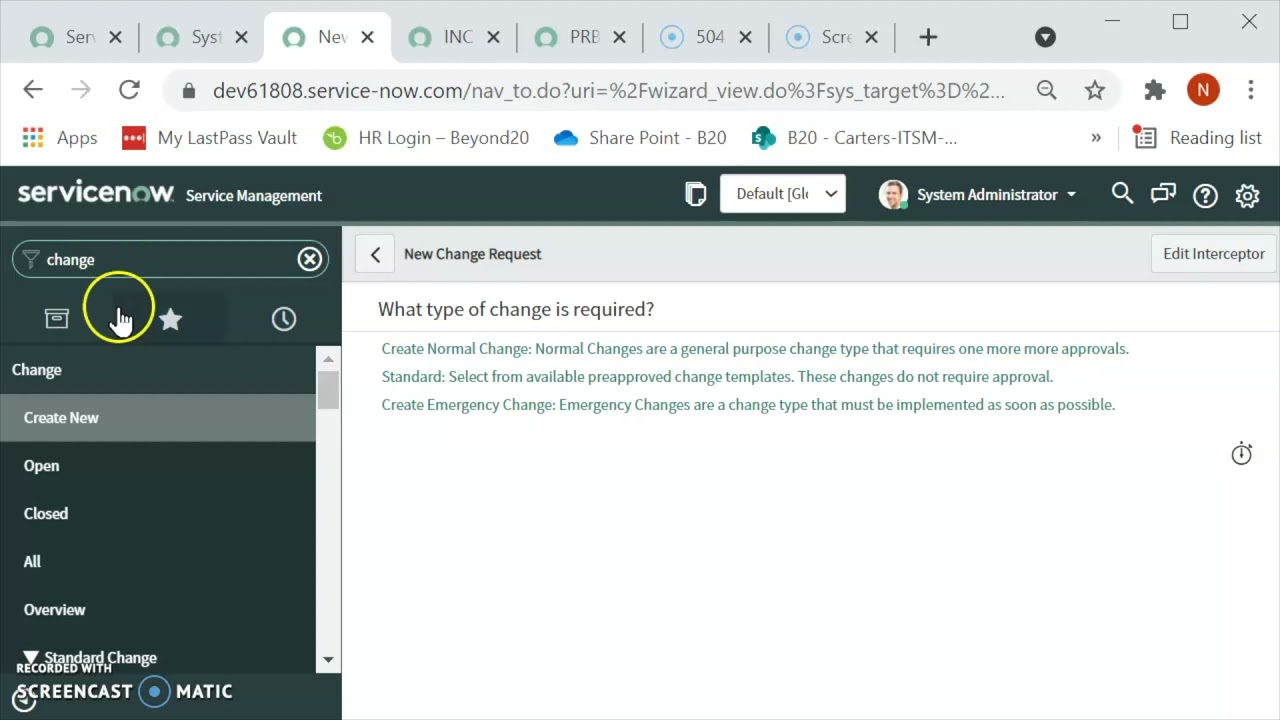
- Standard changes: These are low-risk, routine changes that follow a predefined procedure. Standard changes are typically approved by a change manager or other authorized individual.
- Normal changes: These are changes that are more complex or risky than standard changes, but can still be managed within a reasonable timeframe. Normal changes are typically approved by a change advisory board (CAB).
- Emergency changes: These are changes that must be implemented immediately to avoid a serious disruption to service. Emergency changes are typically approved by a senior manager or executive.
Creating a change request in ServiceNow
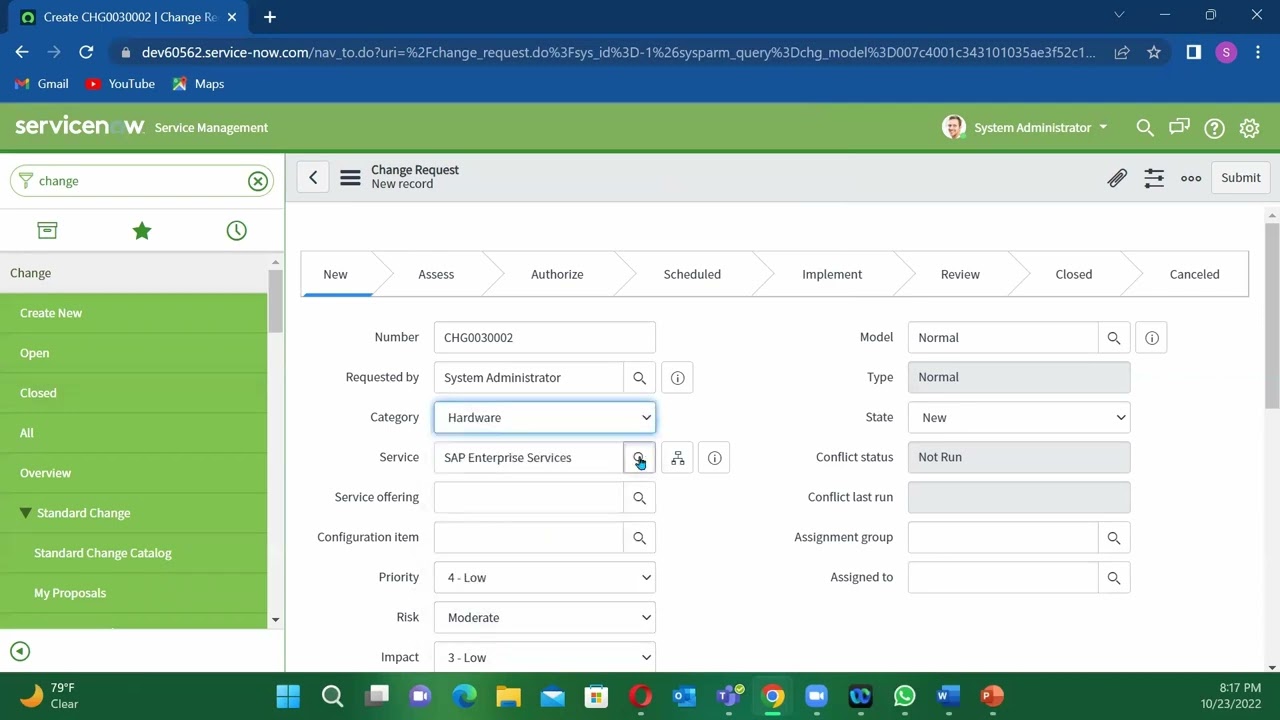
To create a change request in ServiceNow, follow these steps:
- Navigate to the Change module.
- Click the New button.
- Enter the following information:
- Change type: Select the type of change request you are creating.
- Short description: Enter a brief description of the change.
- Detailed description: Enter a detailed description of the change, including the reason for the change, the scope of the change, and the expected impact on users.
- Affected CIs: Select the configuration items (CIs) that will be affected by the change.
- Change manager: Select the change manager who will be responsible for approving the change request.
- Click the Submit button.
Change request workflow in ServiceNow
The change request workflow in ServiceNow typically follows these steps:
- Submission: The change request is submitted by a user or group.
- Review: The change manager reviews the change request and determines the appropriate approval process.
- Approval: The change request is approved by the appropriate approver(s), such as a change manager, CAB member, or senior manager.
- Implementation: The change is implemented by the change manager or other authorized individual.
- Testing: The change is tested to ensure that it has been implemented correctly and that it is working as expected.
- Closure: The change is closed once it has been successfully implemented and tested.
Benefits of using ServiceNow to manage change requests
There are many benefits to using ServiceNow to manage change requests, including:
- Improved visibility and control: ServiceNow provides a central repository for all change requests, which gives IT organizations complete visibility and control over their change management process.
- Reduced risk: ServiceNow's change management module helps organizations to identify and assess the risks associated with proposed changes, and to take steps to mitigate those risks.
- Improved compliance: ServiceNow's change management module helps organizations to comply with industry best practices and regulations.
- Increased efficiency and productivity: ServiceNow's change management module automates many of the manual tasks involved in managing change requests, which frees up IT staff to focus on more strategic initiatives.
Best practices for managing change requests in ServiceNow
Here are some best practices for managing change requests in ServiceNow:
- Use a defined change management process: ServiceNow provides a built-in change management workflow, but you can also customize the workflow to meet your specific needs. Be sure to define a clear and concise change management process, and communicate it to all users.
- Identify and assess risks: Before approving any change request, it is important to identify and assess the potential risks associated with the change. ServiceNow provides a number of tools to help you with this task, such as risk matrices and impact assessments.
- Get approval from the right people: Before implementing any change, it is important to get approval from the appropriate approvers. This will help to ensure that the change is necessary and that it will not have a negative impact on the business.
- Test changes thoroughly: Before implementing any change, it is important to test it thoroughly to ensure that it has been implemented correctly and that it is working as expected. ServiceNow provides a number of tools to help you with this task, such as test cases and change plans.
- Communicate with stakeholders: It is important to communicate with all stakeholders throughout the change management process. This will help to ensure that everyone
WebView and work on the change tasks assigned to you. You can view the details, activities, and other related change tasks by a single tap on the ITSM mobile agent app. Tap on the. WebIn Change approval policies, approval definitions are used to generate approvals according to your business requirements. A change approval policy is a course of action that can. WebServiceNow Change Management provides the tools and resources necessary for optimizing, monitoring, and streamlining change in any organization. ServiceNow. WebChange Management. Simplify, automate, and accelerate change velocity using built-in AI, data-driven flows, and fit-for-purpose change models—for faster time to value.
HOW TO CREATE A CHANGE REQUEST USING 2022 VERSION OF SERVICENOW
Source: Youtube.com
Overview of Change Management in ServiceNow
Source: Youtube.com
What Is A Change Request In Servicenow, HOW TO CREATE A CHANGE REQUEST USING 2022 VERSION OF SERVICENOW, 29.32 MB, 21:21, 10,041, Goshen-Light-World, 2022-10-24T23:18:16.000000Z, 2, Knowledge Base Article - Service Portal, 450 x 800, jpg, , 3, what-is-a-change-request-in-servicenow
What Is A Change Request In Servicenow. WebLoading... You can create a template that can be used to create change requests with pre-defined supporting tasks. Templates simplify the process of submitting new records by populating fields automatically. Web"Create Standard Change Request" and "Create Standard Change Request from Incident" Actions in Flow Designer create Normal type Change Request. These actions where. WebHow search works: Punctuation and capital letters are ignored. Special characters like underscores (_) are removed. Known synonyms are applied. The most relevant topics.
How to create a change request is a most know as either a scrum master, Agile coach or as a Servicenow system admin. Here is a link to get the free version for 2022 ServiceNow developer.servicenow.com/dev.do
Also, you need to have an instant to make full use of these free version
#Agile, #Scrum, #servicenow #agilecoach
What Is A Change Request In Servicenow, WebServiceNow Change Management provides the tools and resources necessary for optimizing, monitoring, and streamlining change in any organization. ServiceNow. WebChange Management. Simplify, automate, and accelerate change velocity using built-in AI, data-driven flows, and fit-for-purpose change models—for faster time to value.
Knowledge Base Article - Service Portal - Source: ut.service-now.com
Knowledge Base Article - Service Portal - Source: ut.service-now.com
Knowledge Base Article - Service Portal - Source: Knowledge Base Article - Service Portal
.
What is a change request.
What is a change request
What is a change request Normal change request in servicenow.
.
Normal change request in servicenow
Normal change request in servicenow What is a change request in servicenow.
.
What is a change request in servicenow
What is a change request in servicenow Normal change request in servicenow.
www.servicenow.com › products › change-managementChange Management - ServiceNow
Track the dependencies and relationships of supported IT services to maintain continuity. Get answers to your questions and discover how ServiceNow can help you transform your business with modern digital workflows. Our change management application enables increased deployment frequency, faster time to value, and fewer related change failures. .
change.walkme.com › servicenow-change-managementServiceNow Change Management: A Quick and Dirty Guide
One party initiates a change request, or a change proposal in ServiceNow's case. This request is submitted to the proper authority, who reviews, then accepts or rejects the change. If passed, the request is moved down the pipeline to the implementation team, testers, and so on, until complete. .
.
.
.
support.servicenow.com › kbCreate a change task to fulfill a change request - ServiceNow
Loading, Loading... .
.
.
support.servicenow.com › kbCreate a change request from an incident - ServiceNow
Learn how to create a change request from an incident in ServiceNow, a leading IT service management platform. Follow the steps and examples in this article. .
www.process.st › how-to › create-change-request-inHow to Create a Change Request in ServiceNow - Process Street
Here's a quick guide: Access the ServiceNow platform and go to Change Management. Click "Create New.". Fill in the details – description, priority, impact analysis, risk assessment. Submit for review and approval. Providing accurate info is key. This ensures thorough analysis of potential risks and impacts. .
www.servicenow.com › products › itsmWhat is IT Change Management? - ServiceNow
RFC is a formal request for implementing a specific change. The RFC should contain all information necessary for evaluating and approving or rejecting the change, with the level of detail depending upon the size of the change and its potential impact and risk. The RFC is a detailed request for change but is not the change itself. .
docs.servicenow.com › task › t_CreateAChangeProduct Documentation | ServiceNowCreate a change request from an incident - ServiceNowChange Management - ServiceNowCreate a change task to fulfill a change request - ServiceNow
Right-click the form header and select Create Normal Change, Create Standard Change, or Create Emergency Change. From an existing change record. If the administrator enabled the change request copy option, you can create a new change by copying an existing change record. Open the change record that you want to copy.Learn how to create a change request from an incident in,Track the dependencies and relationships of supported IT...Create a change task to fulfill a change request -... .


 are a formal way to propose and manage changes to IT services and infrastructure. They are used to ensure...)
Post a Comment