
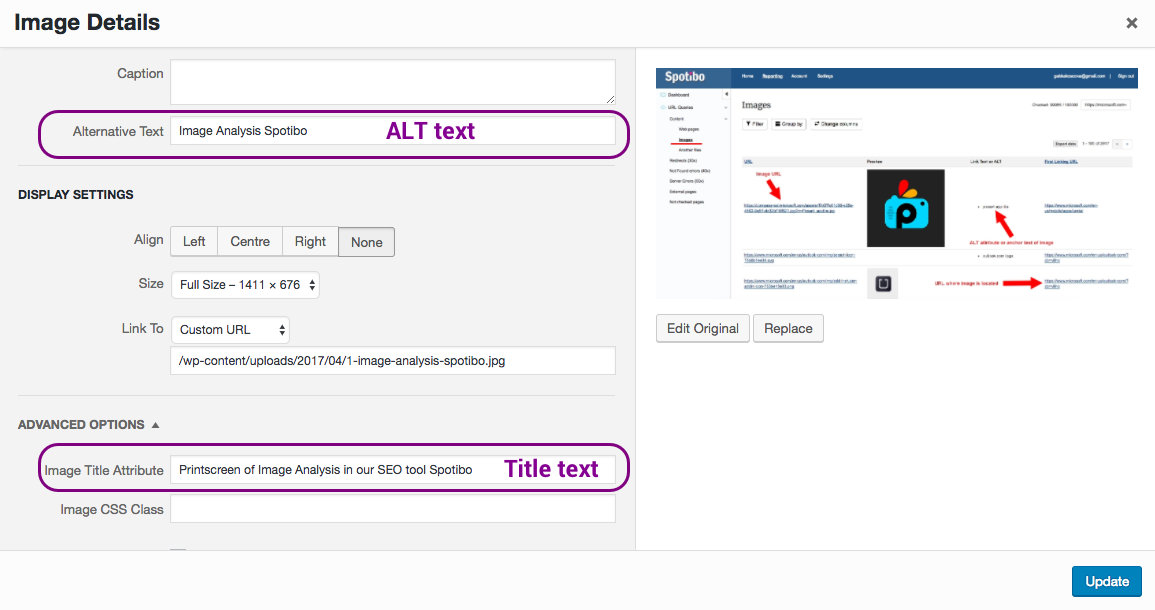
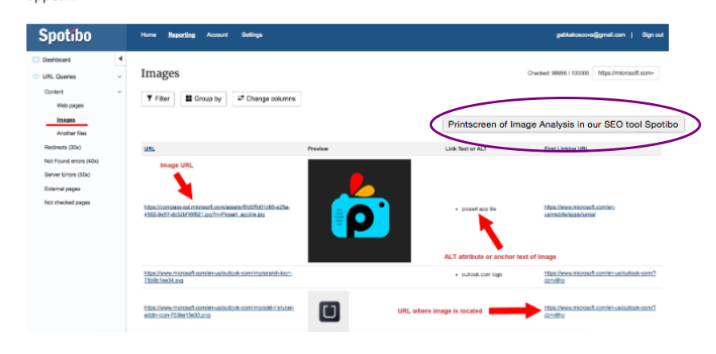
Title text is a short description of an image or other HTML element that is displayed when the user hovers over it with the mouse. It is specified using the title attribute. Unlike alt text, title text is not visible on the page itself, and it is not used by search engines to index the image or page.
Why use title text?
Title text can be used to provide additional information about an image or other HTML element that is not immediately obvious. For example, you might use title text to:
- Explain the purpose of a button or link
- Provide more information about an image, such as the photographer's name or the date it was taken
- Define an acronym or abbreviation
- Describe a complex diagram or chart
- Provide a translation of text in a foreign language
How to use title text
To add title text to an image or other HTML element, simply add the title attribute to the element's opening tag. The value of the title attribute should be a brief description of the element. For example, to add title text to an image, you would use the following code:
<img src="image.jpg" alt="This is an image of a cat." title="This image was taken by John Smith in 2023."> When the user hovers over the image, they will see the title text displayed in a tooltip.
Best practices for writing title text
Here are a few tips for writing effective title text:
- Be clear and concise. The title text should be a brief description of the element, not a long essay.
- Use keywords. If you are trying to optimize your website for search engines, you can include relevant keywords in the title text. However, don't keyword stuff, as this can make the title text look spammy.
- Be helpful. The title text should provide additional information that is not immediately obvious to the user.
- Be consistent. Use the same style and tone for all of the title text on your website.
Examples of title text
Here are a few examples of effective title text:
- Image:
<img src="image.jpg" alt="This is an image of a cat." title="This image was taken by John Smith in 2023."> - Button:
<button title="This button will take you to the home page.">Home</button> - Link:
<a href="https://www.example.com" title="This link will take you to the Wikipedia website.">Wikipedia</a> - Acronym:
<abbr title="World Wide Web">www</abbr> - Diagram:
<img src="diagram.png" alt="This is a diagram of the human heart." title="This diagram shows the different parts of the human heart."> - Foreign language:
<span title="This text is in Spanish.">Hola!</span>
Conclusion
Title text is a useful way to provide additional information about images and other HTML elements on your website. By following the best practices above, you can write effective title text that will help your users and improve your website's SEO.
Keyword silo
A keyword silo is a way of organizing your website's content around a central keyword or topic. It is a hierarchical structure, with the most important keyword at the top and the less important keywords below it.
Keyword silos can help to improve your website's SEO by making it easier for search engines to understand the structure and content of your website. They can also help to improve the user experience by making it easier for visitors to find the information they are looking for.
How to create a keyword silo
To create a keyword silo, you first need to identify the central keyword or topic for your website. This should be a keyword that is relevant to your business and that you want to rank for in search engines.
Once you have identified your central keyword, you can start to create a list of related keywords. These keywords should be less important than your central keyword, but they should still be relevant to your business and the content on your website.
Once you have a list of related keywords, you can start to organize them into a hierarchical structure. The most important keyword should be at the top, and the less important keywords below it.
For example, if your central keyword is "shoes", your keyword silo might look like this:
- Shoes
- Men's shoes
- Women's shoes
- Kids' shoes
- Athletic shoes
- Dress shoes
- Shoe brands
- Nike
- Adidas
- New Balance
- Asics
- Brooks
Benefits of using a keyword silo
There are a number of benefits to using
WebThe <title> HTML element defines the document's title that is shown in a browser 's title bar or a page's tab. It only contains text; tags within the element are. WebMaking the web more beautiful, fast, and open through great typography WebCapitalization in Titles: Rules. Grammarly. Updated on April 25, 2023. Knowing the right way to capitalize your title depends on which style guide you're. Webtitle: text: Defines the title of a link, which appears to the user as a tooltip. href: url: Specifies the linked document, resource, or location. name WebIf you refer to the title of a source within your paper, capitalize all words that are four letters long or greater within the title of a source: Permanence and Change. Exceptions apply to.
The difference between ALT text and Title text - Spotibo blog
Source: blog.spotibo.com
The difference between ALT text and Title text - Spotibo blog
Source: blog.spotibo.com
The difference between ALT text and Title text - Spotibo blog
Source: blog.spotibo.com
What Is Title Text, titletext[1]what is a room, 9.73 MB, 07:05, 23,436, sean_27, 2020-05-27T16:27:12.000000Z, 2, The difference between ALT text and Title text - Spotibo blog, blog.spotibo.com, 610 x 1155, jpg, , 3, what-is-title-text
What Is Title Text.
this is the first episode of a show i am working on
The difference between ALT text and Title text - Spotibo blog
What Is Title Text, WebCapitalization in Titles: Rules. Grammarly. Updated on April 25, 2023. Knowing the right way to capitalize your title depends on which style guide you're. Webtitle: text: Defines the title of a link, which appears to the user as a tooltip. href: url: Specifies the linked document, resource, or location. name WebIf you refer to the title of a source within your paper, capitalize all words that are four letters long or greater within the title of a source: Permanence and Change. Exceptions apply to.
titletext[1]what is a room
![titletext[1]what is a room](https://img.youtube.com/vi/CrjYKLr0Alw/maxresdefault.jpg)
Source: Youtube.com
How to Add Cinematic Title Text in Premiere Pro (CC 2019)
Source: Youtube.com
What is title font
What is title font What is a title text feature.
What is a title text feature
What is a title text feature What is title in textual aids.
What is title in textual aids
What is title in textual aids What is header text.
.
What is header text
What is header text What is title text.
.
What is title text
What is title text What is header text.
What is the title of academic text.
.
.
.
.
.
.
.
What is the title of academic text
What is the title of academic text What is pre header text.
What is pre header text
What is pre header text What is document header text in sap.
What is document header text in sap
What is document header text in sap What is title and vertical text slide layout.
What is title and vertical text slide layout
What is title and vertical text slide layout What is title font.


Post a Comment