
A text box is a control element of a graphical user interface (GUI) that allows users to input text. It is typically a rectangular box with a border, and it can be used to enter any type of text, such as a name, address, email address, or message.
Text boxes are used in a wide variety of applications, including:
- Web browsers: Text boxes are used to enter search terms, URLs, and other information on web pages.
- Word processing programs: Text boxes are used to insert captions, sidebars, and other text elements into documents.
- Spreadsheet programs: Text boxes are used to enter data into cells and to create labels and titles.
- Presentation programs: Text boxes are used to add text to slides and to create charts and graphs.
- Programming languages: Text boxes are used to create user interfaces for programs and to collect data from users.
Different Types of Text Boxes
There are two main types of text boxes:
- Single-line text boxes: Single-line text boxes are used to enter a single line of text. They are typically used for things like names, addresses, and phone numbers.
- Multi-line text boxes: Multi-line text boxes are used to enter more than one line of text. They are typically used for things like messages, descriptions, and notes.
How to Use a Text Box
To use a text box, simply click inside the box and start typing. You can use the arrow keys to move around inside the box, and you can use the Delete key to erase text.
Once you have finished typing, you can click outside the box to deselect it. You can also use the Tab key to move to the next text box on the page.
Formatting Text Boxes
Text boxes can be formatted in a variety of ways, including:
- Changing the font, size, and color of the text
- Changing the background color of the text box
- Adding a border to the text box
- Changing the alignment of the text inside the text box
To format a text box, simply right-click inside the box and select the desired formatting options.
Using Text Boxes in Web Pages
To add a text box to a web page, you can use the HTML <input> element. The <input> element has a number of attributes that you can use to specify the type of text box, the size of the text box, and other options.
For example, the following code would create a single-line text box with the name "name":
<input type="text" name="name"> You can also use the <textarea> element to create a multi-line text box. The <textarea> element has the same attributes as the <input> element, but it also has a rows attribute and a cols attribute that you can use to specify the height and width of the text box in rows and columns, respectively.
For example, the following code would create a multi-line text box with the name "message" that is 10 rows high and 20 columns wide:
<textarea name="message" rows="10" cols="20"></textarea> Using Text Boxes in Word Processing Programs
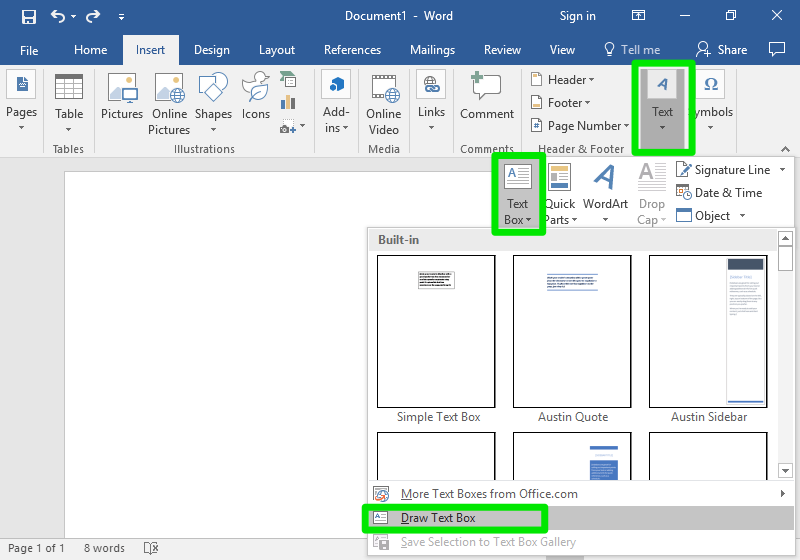
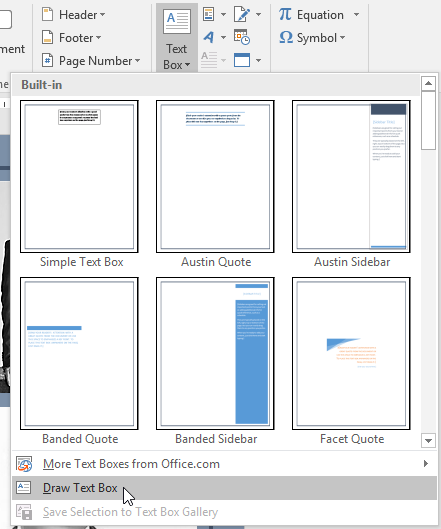
To add a text box to a word processing document, such as Microsoft Word, simply click the "Text Box" button on the ribbon. This will open a drop-down menu with a variety of text box shapes to choose from.
Once you have selected a text box shape, click and drag anywhere on the document to create the text box. You can then type inside the text box and format it as desired.
Using Text Boxes in Spreadsheet Programs
To add a text box to a spreadsheet cell, such as Microsoft Excel, simply click the "Insert Text Box" button on the ribbon. This will create a text box inside the selected cell.
You can then type inside the text box and format it as desired.
Using Text Boxes in Presentation Programs
To add a text box to a slide in a presentation program, such as Microsoft PowerPoint, simply click the "Text Box" button on the toolbar. This will create a text box on the slide.
You can then type inside the text box and format it as desired.
Tips for Using Text Boxes
Here are a few tips for using text boxes effectively:
- Use text boxes to draw attention to important information.
- Use text boxes to organize information on a page.
- Use text boxes to
WebText boxes let you emphasize or bring focus to specific text in a Microsoft Word document. You can choose from a variety of preformatted text boxes, or draw and. WebAfter you insert a text box on a form template, you can customize it by accessing and changing its properties and settings in the Text Box Properties dialog box. To open the. WebThe box symbol is a text symbol that can easily copy and paste into any social media, website, and emails. The following table shows the name and meaning of the box symbol.
Text Boxes | Computer Applications for Managers
Source: courses.lumenlearning.com
Word 2016 (Bahasa Indonesia): Kotak Teks
Source: edu.gcfglobal.org
Text Boxes | Computer Applications for Managers

Source: courses.lumenlearning.com
What Is The Text Box, Word: Text Boxes, 3.87 MB, 02:49, 319,617, GCFLearnFree, 2016-02-08T16:30:06.000000Z, 2, Text Boxes | Computer Applications for Managers, courses.lumenlearning.com, 560 x 800, jpg, , 3, what-is-the-text-box
What Is The Text Box. WebSimple text box for writing, editing, copy/pasting. Text area for typing notes and code Built by Jamon Holmgren • GitHub Source • Infinite Red • Code Mode • Writing Mode • 0 lines, 0 words, 0 characters, 0 elapsed seconds WebThe <textarea> tag defines a multi-line text input control. The <textarea> element is often used in a form, to collect user inputs like comments or reviews. A text area can hold an.
In this video, you'll learn the basics of working with text boxes in Word 2019, Word 2016, and Office 365. Visit edu.gcfglobal.org/en/word/text-boxes/1/ for our text-based lesson.
This video includes information on:
• Moving and resizing text boxes
• Changing the shape style of a text box
• Changing the text box shape
We hope you enjoy!
Text Boxes | Computer Applications for Managers
What Is The Text Box, WebAfter you insert a text box on a form template, you can customize it by accessing and changing its properties and settings in the Text Box Properties dialog box. To open the. WebThe box symbol is a text symbol that can easily copy and paste into any social media, website, and emails. The following table shows the name and meaning of the box symbol.
Word: Text Boxes
Source: Youtube.com
Word 2010 Tutorial Inserting Text Boxes Microsoft Training Lesson 13.4

Source: Youtube.com
What is the message box
What is the message box What is the text box command.
What is the text box command
What is the text box command What is the text box in excel called.
What is the text box in excel called
What is the text box in excel called What is the text box in word.
.
What is the text box in word
What is the text box in word What is the text box.
.
What is the text box
What is the text box What is the text box in word.
What is text box in excel support.microsoft.com › en-us › officeAdd, copy, or delete a text box - Microsoft Support
What is text box in excel Copy a text box. Click the border of the text box that you want to copy. Press Ctrl+C. Note: Make sure the pointer is on the border of the text box, not inside it. If the pointer is inside, pressing Ctrl+C will copy the text, not the text box. Select a location and press Ctrl+V to paste the text box. Textbox in vb.
What is text box in excel.
.
.
.
.
.
.
Textbox in vb learn.microsoft.com › design › controlsText box - Windows apps | Microsoft Learn
Textbox in vb The TextBox control lets a user type text into an app. It's typically used to capture a single line of text, but can be configured to capture multiple lines of text. The text displays on the screen in a simple, uniform, plaintext format. TextBox has a number of features that can simplify text entry. What is text box in html.
What is text box in html en.wikipedia.org › wiki › Text_boxText box - Wikipedia
What is text box in html A text box [a] is a control element of a graphical user interface, that should enable the user to input text information to be used by a program. [1] [2] Human Interface Guidelines recommend a single-line text box when only one line of input is required, and a multi-line text box only if more than one line of input may be required. What is text box in powerpoint.
What is text box in powerpoint support.microsoft.com › en-us › officeAdd, copy, or remove a text box in Word - Microsoft Support
What is text box in powerpoint A text box is an object you can add to your document that lets you put and type text anywhere in your file. Text boxes can be useful for drawing attention to specific text and can also be helpful when you need to move text around in your document. Windows Web macOS Add a text box What is text box in ms word.
What is text box in ms word www.computerhope.com › jargon › tWhat is a Text Box? - Computer HopeWhat is TextWord Processing
What is text box in ms word Alternatively called a text field, a text box is a section or object on a page that allows a user to enter text. Text boxes are used on the Internet for pages requiring user input. You may also see a text box in a word processing program when creating a form that requires a user to enter information. Examples of text boxes Creating an HTML text boxText may refer to any of the following:. 1. In general, text,Word processing describes creating or editing a document... What is the message box.


 that allows users to input text. It is typically a rectangular box with ...)
Post a Comment