
What Is My Xbox IP Address?
How to Find Your Xbox IP Address
There are two ways to find your Xbox IP address: through the console itself or through your router.
Finding your Xbox IP address through the console:
- Turn on your Xbox console and press the Xbox button on your controller to open the guide.
- Select Profile & system > Settings > General > Network settings.
- Select Advanced settings.
- Your Xbox IP address will be listed next to IP address.
Finding your Xbox IP address through your router:
- Log in to your router’s web interface.
- Look for a list of connected devices. Your Xbox should be listed on this list.
- Next to your Xbox, you should see its IP address.
Why Do You Need Your Xbox IP Address?
There are a few reasons why you might need your Xbox IP address:
- To troubleshoot network problems. If you’re having trouble connecting your Xbox to the internet or to other players, you may need to provide your Xbox IP address to support.
- To set up port forwarding. Port forwarding allows you to open specific ports on your router so that certain applications can send and receive data over the internet. This can be useful for games that require port forwarding to work properly.
- To connect to your Xbox remotely. There are a few apps and services that allow you to connect to your Xbox remotely and play games or manage your account. To use these apps and services, you’ll need to enter your Xbox IP address.
How to Change Your Xbox IP Address
If you need to change your Xbox IP address, you can do so through the console itself or through your router.
Changing your Xbox IP address through the console:
- Turn on your Xbox console and press the Xbox button on your controller to open the guide.
- Select Profile & system > Settings > General > Network settings.
- Select Advanced settings.
- Under IP settings, select Manual.
- Enter the new IP address, subnet mask, gateway, primary DNS address, and secondary DNS address.
- Select Save.
Changing your Xbox IP address through your router:
- Log in to your router’s web interface.
- Look for a section where you can manage DHCP reservations.
- Find your Xbox in the list of connected devices and click on it.
- Enter a new IP address for your Xbox.
- Click on Save.
Troubleshooting Xbox IP Address Problems
If you’re having problems with your Xbox IP address, there are a few things you can try:
- Restart your Xbox console and your router.
- Try connecting your Xbox console to a different Ethernet port on your router.
- Try connecting your Xbox console to your router using a wireless connection instead of an Ethernet cable.
- Try changing your Xbox IP address to a static IP address.
- Contact your internet service provider (ISP) for help.
Additional Information about Xbox IP Addresses
- Your Xbox IP address is assigned to your console by your router.
- Your Xbox IP address may change over time, especially if you’re using a dynamic IP address.
- You can set up a static IP address for your Xbox console to prevent its IP address from changing.
- You can find your Xbox IP address in the console’s network settings.
- You may need your Xbox IP address to troubleshoot network problems or to set up port forwarding.
FAQ
Q: What is the difference between a dynamic IP address and a static IP address?
A: A dynamic IP address is an IP address that is assigned to your device by your router. It can change over time, especially if you restart your router or modem. A static IP address is an IP address that is assigned to your device permanently. It will not change unless you manually change it.
Q: How do I set up a static IP address for my Xbox console?
A: To set up a static IP address for your Xbox console, follow these steps:
- Turn on your Xbox console and press the Xbox button on your controller to open the guide.
- Select Profile & system > Settings > General > Network settings.
- Select Advanced settings.
- Under IP settings, select Manual.
- Enter the new IP address, subnet mask, gateway, primary DNS address, and secondary DNS address.
- Select Save.
**Q: Why do I need to troubleshoot my Xbox
WebBy default, Xbox consoles are configured to obtain IPv4 address information automatically via DHCP. However, there are some situations where you may want to set a static IPv4. WebMost important, IPv6 expands the number of possible IP addresses (the unique numbers that represent every device on the internet). And—most useful for Xbox—the expansion.
How to find an Xbox One IP address without a TV – Quora
Source: quora.com
Create a Port Forward for Xbox One in your Router
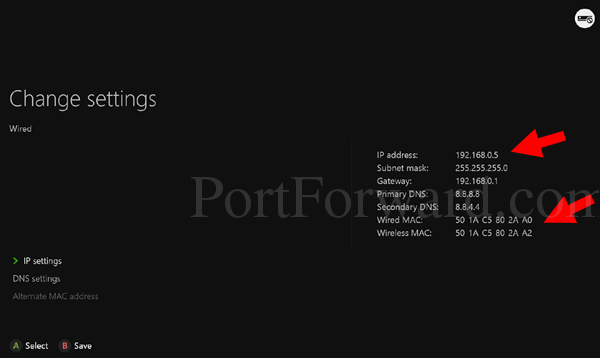
Source: portforward.com
Create a Port Forward for Xbox One in your Router
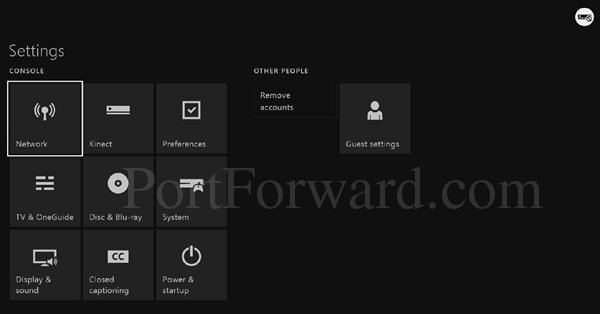
Source: portforward.com
What Is My Xbox Ip, How to Find Xbox One IP Address, 2.72 MB, 01:59, 519,825, Max Dalton, 2019-05-24T23:41:03.000000Z, 2, How to find an Xbox One IP address without a TV – Quora, quora.com, 287 x 602, jpg, , 3, what-is-my-xbox-ip
What Is My Xbox Ip. WebHere are the steps you can follow to find the IP address of your Xbox console: Turn on your Xbox console and go to the "Settings" menu. Navigate to "Network.
This video shows you how to find your Xbox One IP address.
See more videos by Max here: youtube.com/c/MaxDalton
Check out more great tutorials by Max here: maxdalton.how/
Timestamps:
Steps to Find Xbox One IP Address: 0:33
Other great Xbox videos:
How to Install Xbox Game Pass for PC: youtu.be/V3SfW7QHJ9Y
How to Set Home Xbox: youtu.be/RDtQRLJaY4k
How to Download Xbox One Clips to iPhone, iPad or Android: youtu.be/yxSWCa9jjV8
How to Take Apart Xbox One Controller: youtu.be/8fsYv-9rliM
How to Format and Add External Hard Drive to Xbox One: youtu.be/j1HTYc_3N5g
Video Transcript:
Some issues with your Xbox One console will require you to know your Xbox One IP address to solve them. This can include problems connecting to your Xbox One through your computer, or issues associated with the security settings on your wireless router. To work through these problems you’ll need to know your Xbox One IP address so you can manually enter that information.
Now let’s walk through the steps to find your Xbox One IP address.
Step 1. Start at your Xbox Live home screen, highlight your account name in the upper left corner of the screen, and then press “A” on your Xbox controller. A menu appears.
Step 2. Use the left analog stick to highlight the “System” icon on the far right side of the row of icons that appear along the top of the menu. The System icon looks like a gear. Press “A.” The System menu appears.
Step 3. Choose “Settings” in the list of options that appear in the Settings menu. The Settings screen appears.
Step 4. Choose “Network” in the list of options along the left side of the screen, and then choose “Network Settings” in the choices that appear on the right side of the screen. The Network screen appears.
Step 5. Choose “Advanced Settings” on the left side of the screen. The Advanced Settings screen appears.
Step 6. Select “IP Settings” in the list of options on the left side of the screen. The IP address for your Xbox One will appear to the right of the IP Address field. You can also see your subnet mask and gateway information.
How to find an Xbox One IP address without a TV – Quora
What Is My Xbox Ip, WebMost important, IPv6 expands the number of possible IP addresses (the unique numbers that represent every device on the internet). And—most useful for Xbox—the expansion.
How to Find Xbox One IP Address
Source: Youtube.com
Xbox Series X/S: How to Fix Cannot Obtain IP Address Tutorial! (Network Settings) 2023
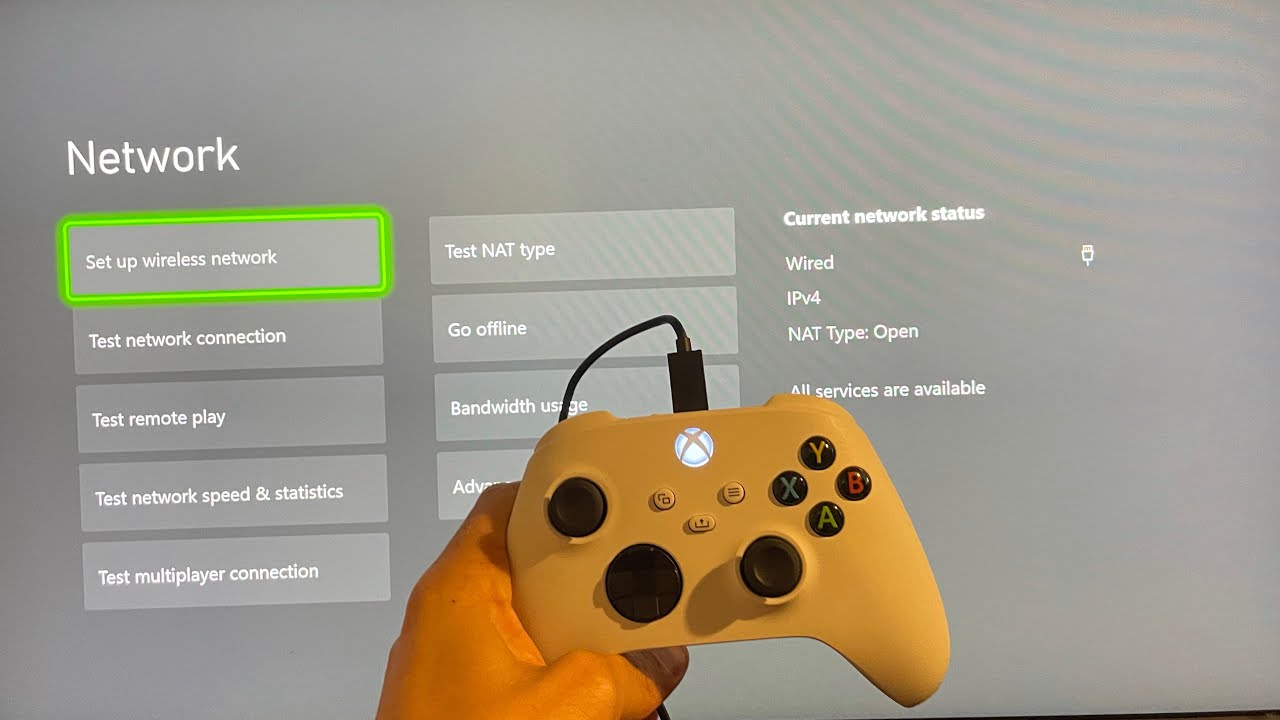
Source: Youtube.com
Need to Find Your Xbox One IP Address?
When not researching and testing computers, game consoles or smartphones, he stays up-to-date on the myriad complex systems that power battery electric vehicles . , Jessica Kormos is a writer and editor with 15 years’ experience writing articles, copy, and UX content for Tecca.com, Rosenfeld Media, and many others. … Open System > Settings > Network > Network settings > Advanced settings. The IP address will display on the screen. What is my xbox console ip address.
What is my xbox console ip address Xbox Support
What is my xbox console ip address You need to enable JavaScript to run this app What is my xbox one ip address.
What is my xbox one ip address
What is my xbox one ip address What is my xbox ip.
.
What is my xbox ip Static IP Address for Xbox One
What is my xbox ip You will need to pick a number between 2 and 254 that is outside of your router’s DHCP range to assign to your Xbox One. In the example above, this Linksys router uses the range 100-149 to assign IP addresses to devices on the internal network. I chose to assign my Xbox to 201. What is my xbox ip address.
.
What is my xbox ip address How to find your Xbox One’s IP address or set up a static IP …
What is my xbox ip address You can quickly and easily find your Xbox One’s IP address by heading to your Xbox console’s settings. Here’s how to do it. What is my xbox ip.
Setting up a static IP address for Xbox One – Ubisoft Support
Article · HomepageArticle .
.
How to Find the IP Address of Xbox One Without TV | An Expert Guide It is not necessary to find an IP address from the Xbox live Gamertag of Xbox lives. The user uses the tip of the console. You can find your IP address by heading to Settings, selecting the network, and Xbox One’s Advanced Settings. Connect the controller to the computer, and then choose Stream to start playing. Learn More: How Do I Connect My , .
How to find an Xbox One IP address without a TV – Quora
Answer (1 of 14): All three answers I have seen to this question are great. Nothing new to suggest from me. But I just have to ask the OP, What good is an Xbox One without a TV? .
How to find your Xbox One’s IP address or set up a static IP address on the console
You can quickly and easily find your Xbox One’s IP address by heading to your Xbox console’s settings. Here’s how to do it. .
How To Find Xbox One IP Address Without TV – TV To Talk About
And to successfully initiate a private and live game session, you will need to provide the IP address to other participants so they can connect directly to your Xbox. That is, the IP address will give external players access to connect with you. .
How to Find Your Xbox IP Address Without a TV
This process is straightforward , or an IP scanner app. This is likely going to be the fastest option for most people assuming that they know the login information to get into their router’s admin dashboard. To find your Xbox in your router dashboard, here is what you need … .
4 Easy Ways to Find Someone’s IP Address on Xbox | Free PC Tech
If using an IP address was illegal, then using an Xbox resolver would be illegal too. However, the Xbox resolvers are not liable for what a person does with the IP they extract. , The most obvious answer is using a VPN. However, Xbox does not support VPNs as PS does. .
How to find my Xbox IP address – Quora
Answer (1 of 3): First allow me to point out that the IP address of your Xbox will in all likely be a ‘private’ address starting with either 192.168.0.x or 192.168.1.x. Further that address will be a DHCP address from your ISP’s modem/router. That being said, depending on how many devices , .
How to stream Xbox games to a Windows 10 PC – CNET
You will also want to make sure that game streaming is enabled. This can be found in the Preferences section of the Settings menu. Step 4: Select the “Connect” option from the left side bar of the Xbox app. Your Xbox should appear on the screen. If it doesn’t, click enter the console’s IP address. .
How to Play Xbox One Games on Your PC | Digital Trends
The Xbox platform now reaches beyond the console. Now, you can stream and natively play games on your computer. Here’s how to play Xbox One games on your PC. .
How to Find My Xbox IP Address – ItStillWorks
The Nintendo Wii mainly relies on the use of wireless controllers, particularly the Wii Remote. The unique motion-sensitive design allows you to play games using gestures in addition to moving thumb sticks and pressing buttons. This approach makes gaming on the system more immersive and fun, , .


Post a Comment