
An IP address is a unique numerical address that is assigned to every device connected to the internet. It is used to identify and locate devices on the internet, and to direct traffic between them.
Your system IP address is the IP address that is assigned to your computer or other device by your internet service provider (ISP). It is a public IP address, meaning that it is visible to other devices on the internet.
How to find your system IP address
There are a number of ways to find your system IP address. The most common way is to use the command prompt.
Windows:
- Open the command prompt.
- Type the following command:
ipconfig /all - Press Enter.
- Your system IP address will be listed next to "IPv4 Address".
Mac:
- Open System Preferences.
- Click on "Network".
- Select your network connection from the list on the left.
- Your system IP address will be displayed next to "IPv4 Address".
What can I do with my system IP address?
Your system IP address can be used for a number of purposes, including:
- Connecting to other devices on the internet: Your system IP address is used to direct traffic between your device and other devices on the internet. For example, when you visit a website, your system IP address is used to send your request to the website’s server.
- Troubleshooting network problems: If you are having problems connecting to the internet, your system IP address can be used to troubleshoot the problem. For example, your ISP may ask you for your system IP address so that they can check their records for any problems.
- Setting up port forwarding: Port forwarding is a technique that allows you to direct incoming traffic to a specific port on your device. This can be useful for running certain types of servers, such as game servers or web servers. To set up port forwarding, you will need to know your system IP address.
How to protect your privacy
Your system IP address is a public IP address, meaning that it is visible to other devices on the internet. This means that it is possible for someone to use your system IP address to track your online activity or to target you with attacks.
There are a number of things you can do to protect your privacy, including:
- Use a VPN: A VPN encrypts your traffic and routes it through a remote server. This makes it much more difficult for someone to track your online activity or to target you with attacks.
- Use a firewall: A firewall is a security system that monitors incoming and outgoing network traffic. It can be used to block unauthorized traffic, which can help to protect your devices from attack.
- Be careful about what information you share online: Avoid sharing personal information online, such as your name, address, and phone number. This information can be used to track you down or to target you with scams.
A keyword silo is a way of organizing your website’s content around a specific set of keywords. This helps to ensure that your website is well-organized and that it is easy for search engines to understand what your website is about.
To create a keyword silo, you will need to identify the main keywords that you want to target with your website. Once you have identified your main keywords, you can create sub-silos for each main keyword. Each sub-silo will contain content that is related to the main keyword.
For example, if your website is about SEO, your main keywords might be "SEO", "keyword research", and "link building". You could then create sub-silos for each of these main keywords. The sub-silo for "keyword research" would contain content about different keyword research techniques, such as how to find long-tail keywords and how to use keyword research tools.
How to create a keyword silo for your blog
To create a keyword silo for your blog, you will need to follow these steps:
- Identify the main keywords that you want to target with your blog.
- Create a sub-silo for each main keyword.
- Write blog posts that are related to each sub-silo.
- Interlink your blog posts so that they are easy for search engines to navigate.
Tips for creating a successful keyword silo
Here are some tips for creating a successful keyword silo:
- Choose your keywords carefully: Make sure to choose keywords that are relevant to your blog and that have a
WebFind your IP address. Your IP address appears next to "IPv4 Address" or "IPv6 Address" near the top of the TCP/IP tab. Your router's IP address is just below. WebMy IP address information shows your IP location; city, region, country, ISP and location on a map. Many proxy servers, VPNs, and Tor exit nodes give themselves away. IP address. WebHow to see your IP address in the Settings app from Windows 11; How to see your IP address in the Settings app from Windows 10; 4. How to find your IP address in. WebPrivate IP address on Windows. To find your private IP on a Windows system, simply open up the command prompt. To do that on Windows 10, type ‘cmd’ in the.
How to Find Your Computer's IP Address on Windows
Source: businessinsider.com
Finding the Host Name, IP Address or Physical Address of your machine | School of Medicine IT
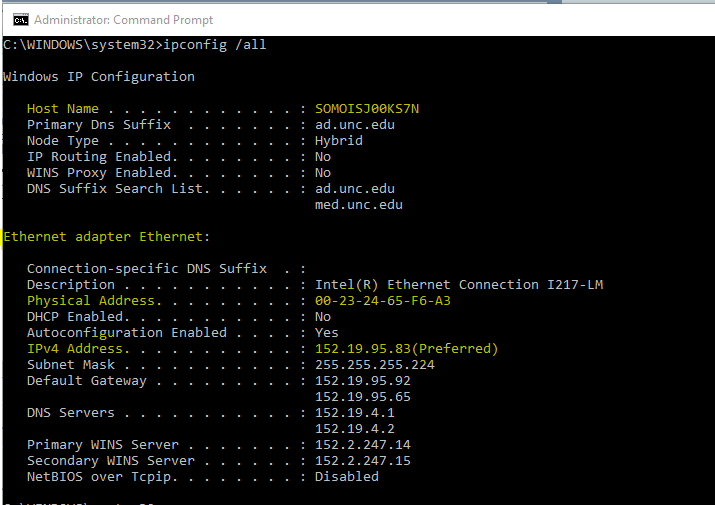
Source: med.unc.edu
How to find IP address on your devices | TP-Link
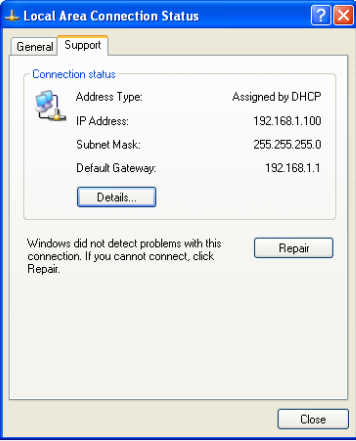
Source: tp-link.com
What Is My System Ip, Find your computer ip address | how to | Windows 10 | 2021 💻⚙️🐞🛠️, 2.75 MB, 02:00, 154,226, ALL In One Idea Exchange, 2020-11-29T07:03:05.000000Z, 2, How to Find Your Computer's IP Address on Windows, businessinsider.com, 501 x 1000, jpg, , 3, what-is-my-system-ip
What Is My System Ip.
Subscribe to ALL In One Idea Exchange
How to Find Your Computer's IP Address on Windows
What Is My System Ip, WebHow to see your IP address in the Settings app from Windows 11; How to see your IP address in the Settings app from Windows 10; 4. How to find your IP address in. WebPrivate IP address on Windows. To find your private IP on a Windows system, simply open up the command prompt. To do that on Windows 10, type ‘cmd’ in the.
Find your computer ip address | how to | Windows 10 | 2021 💻⚙️🐞🛠️
Source: Youtube.com
How do I find my IP address – How to find my IP address fast & free
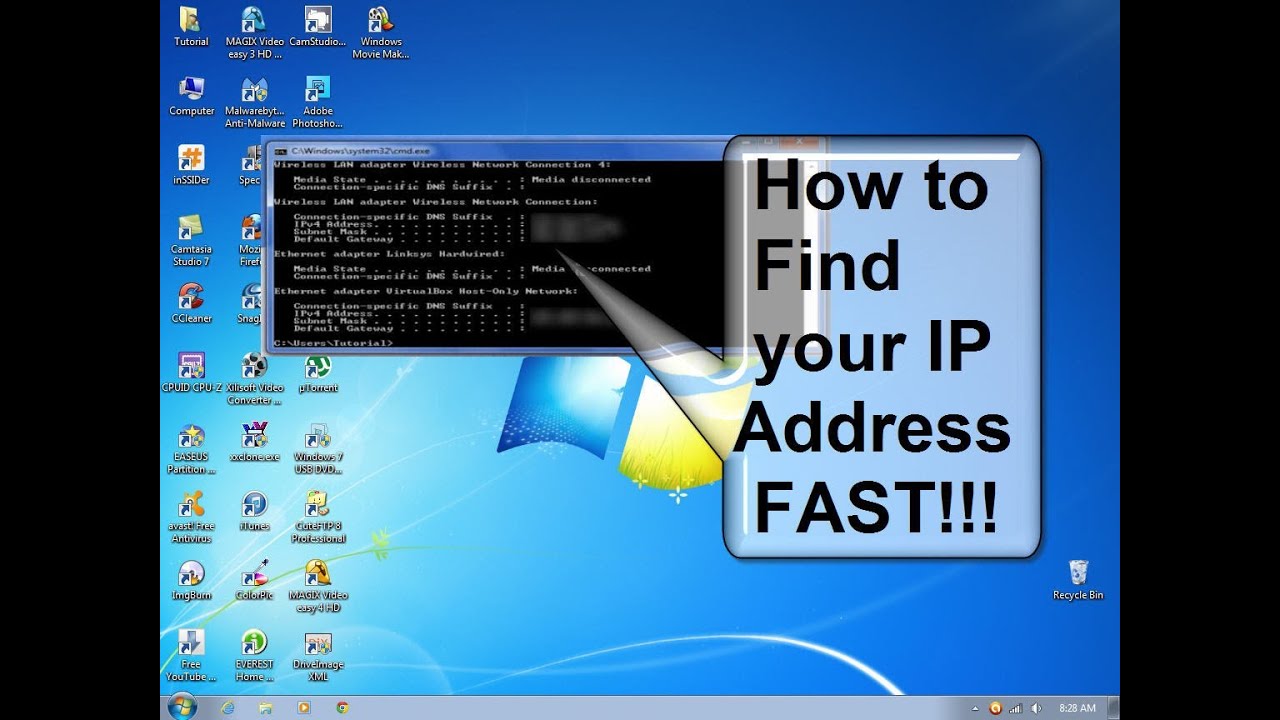
Source: Youtube.com
What is my operating system iphone How to Find Computer IP Address: 3 Easy Ways on PC or Mac
What is my operating system iphone Find your public IP address by searching for “What’s my IP address?” in Google. To find your local IP address on Windows, open the Command Prompt, type “ipconfig,” and press Enter. To find your local IP address on a Mac, open System Settings, select Network, choose your network, and click “Details.” What is my operating system on ipad.
What is my operating system on ipad
What is my operating system on ipad What is my system public ip address.
What is my system public ip address How to Find Your Computer IP Address | Windows & Mac | Avast
What is my system public ip address The easiest way to get your public IP address is to Google it. Type in “what is my IP address” or “how to find my IP address,” and Google will tell you — though it won’t reveal your ISP (internet service provider) or your location. What is my system ip address.
Windows 8 and 10- Finding the IP Number and MAC Address of a Network Card
Press the Windows Start key to open the Start screen · Type cmd and press Enter to launch the command prompt .
What is my system ip address What is My IP address? – Find your IP
What is my system ip address This webpage displays public IP address of your computer or router assigned by your ISP. What is my system ip.
Finding your IP address without using the command prompt – NETGEAR Support
Follow these steps to find the IP address of your computer or mobile device. .
What is my system ip
What is my system ip What is my system ip address.
What Is My IP Address – See Your Public Address – IPv4 & IPv6
Find out what your public IPv4 and IPv6 address is revealing about you! My IP address information shows your location; city, region, country, ISP and location on a map. Many proxy servers, VPNs, and Tor exit nodes give themselves away. .
What is my Local IP Address? – WhatIsMyBrowser.com
System Preferences will show you a list of your network adaptors up the side of the Network window; it will put the connected interfaces at the top (and highlight them with a Green dot). If you only have one connected network adaptor (as shown in the screenshot above), you simply need to look to the right of the Network window: macOS will show you what your local IP Address is , .
How to find my computer’s Private IP address? To find a public IP address of your home network, What is MY IP address will show you one. .
.
Find your PC’s IP address – Windows Help – Microsoft Support
Get info on how to find your IP address in Windows. .
Find your computer’s IP address
One simple way to determine your computer’s IP address is to visit whatsmyip.com. The site will display your IP address and other information about your system. If the page does not appear, you may not have a working internet connection and should try one of the methods below. .
How to Find the IP Address of Your Windows PC: 7 Easy Ways
Google “what is my IP address.” Google will show your IP address at the top of the search results. Alternatively, use a website like https://whatismyipaddress.com/ to find your IP address. You can also find your IP address in your computer settings. Go to “Settings,” “Network & Internet,” “Wi-Fi,” then “Hardware Properties.” , {“smallUrl”:”https:\/\/www.wikihow.com\/images\/thumb\/c\/cd\/Find-the-IP-Address-of-Your-PC-Step-1-Version-8.jpg\/v4-460px-Find-the-IP-Address-of-Your-PC-Step-1-Version-8.jpg”,”bigUrl”:”\/images\/thumb\/c\/cd\/Find-the-IP-Address-of-Your-PC-Step-1-Version-8.jpg\/v4-728px-Find-the-IP-Address-of-Your-PC-Step-1-Version-8.jpg”,”smallWidth”:460,”smallHeight”:345,”bigWidth”:728,”bigHeight”:546,”licensing”:”
License: Fair Use<\/a> (screenshot)
\n<\/p><\/div>“} .
How to find IP address of your computer (Windows XP, Vista, 7, 8, 10 …
Choose the operating system of your computer. Step 1Click Start->Control Panel->select and click Network and internet connections ( If you can´t find it, please go next) ->select and double-click Network Connections. , Highlight and right-click the Local Area Connection icon; click on Status and go to Support. The IP address will display. Note: If your computer is connected to a wireless network please click the Wireless network connection icon. .
How to Find Your Computer’s IP Address on Windows
The good news is that it’s very easy to find your computer’s IP address, and the process has been exactly the same, no matter what version of Windows you have. , You can open Command Prompt from your Start menu. Dave Johnson/Business Insider · 2. The Command Prompt window will open, which you can type operating system … .
How to find IP address on your devices | TP-Link
Choose the operating system of your computer. Step 1Click Start->Control Panel->select and click Network and internet connections ( If you can´t find it, please go next) ->select and double-click Network Connections. , Highlight and right-click the Local Area Connection icon; click on Status and go to Support. The IP address will display. Note: If your computer is connected to a wireless network please click the Wireless network connection icon. .
Find my computer’s IP address
The IP (Internet Protocol) address in your computer is a numerical label that identifies your computer on a network. This number is very helpful in troubleshooting connection issues. You may be asked to supply the address during a troubleshooting session. .
Find your IP address in Windows – Microsoft Support
Get info on how to find your IP address in Windows. What is my operating system iphone.


Post a Comment