

IPTV Router
An IPTV router is a type of router that is specifically designed to support IPTV services. IPTV, or Internet Protocol television, is a service that delivers television programming and other video content over the Internet. IPTV routers typically have features that are optimized for streaming video, such as high bandwidth support, Quality of Service (QoS) prioritization, and multicast routing.
Benefits of Using an IPTV Router
There are a number of benefits to using an IPTV router. First, IPTV routers can help to improve the quality of your IPTV service by providing a dedicated connection for your IPTV traffic. This can help to reduce buffering and improve overall performance. Second, IPTV routers can help to prioritize your IPTV traffic over other types of traffic on your network. This ensures that your IPTV video is always smooth and stutter-free, even when you are using your network for other activities, such as gaming or downloading files.
How to Choose an IPTV Router
When choosing an IPTV router, there are a few things to keep in mind. First, you need to make sure that the router is compatible with your IPTV service provider. Some IPTV service providers have specific requirements for the type of router that you can use. Second, you need to consider the bandwidth requirements of your IPTV service. If you have a high-definition IPTV service, you will need a router that can support the high bandwidth requirements of this type of service. Finally, you need to consider the features that are important to you. Some IPTV routers have additional features, such as parental controls, VPN support, and guest networking.
How to Set Up an IPTV Router
Setting up an IPTV router is typically a relatively straightforward process. Most IPTV routers come with a user manual that will walk you through the steps involved in setting up the router and connecting your IPTV set-top box. In general, you will need to connect the router to your modem and then connect your IPTV set-top box to one of the LAN ports on the router. Once the router is set up, you will need to configure it to work with your IPTV service provider. This is typically done by entering your IPTV service provider’s login credentials into the router’s configuration interface.
Troubleshooting IPTV Router Problems
If you are having problems with your IPTV service, one of the first things you should check is your IPTV router. Make sure that the router is properly configured and that it is compatible with your IPTV service provider. If you are still having problems, you may need to contact your IPTV service provider for assistance.
Common IPTV Router Problems
Here are some of the most common IPTV router problems and how to fix them:
- Buffering: Buffering is when your IPTV video stops and starts while it is playing. This can be caused by a number of factors, such as a slow internet connection, a congested network, or a problem with your IPTV service provider. To fix buffering, try restarting your IPTV router and modem. You may also need to check your internet connection speed and make sure that it is sufficient for your IPTV service. If you are still having problems, you may need to contact your IPTV service provider for assistance.
- No signal: If you are not getting any signal from your IPTV set-top box, check to make sure that the set-top box is properly connected to the IPTV router. You may also need to check the cables to make sure that they are not damaged. If you are still not getting any signal, you may need to restart your IPTV router and modem. If you are still having problems, you may need to contact your IPTV service provider for assistance.
- Pixelation: Pixelation is when the image on your IPTV video appears to be breaking up into small blocks. This can be caused by a number of factors, such as a weak internet connection, a congested network, or a problem with your IPTV service provider. To fix pixelation, try restarting your IPTV router and modem. You may also need to check your internet connection speed and make sure that it is sufficient for your IPTV service. If you are still having problems, you may need to contact your IPTV service provider for assistance.
Best IPTV Routers
Here are a few of the best IPTV routers on the market:
- Asus RT-AX86U: The Asus RT-AX86U is a high-end IPTV router that offers excellent performance and features. It has a tri-band design that supports speeds of up to 6000 Mbps. It also has a number of features that are optimized for streaming video, such as QoS prioritization and multicast routing.
- Netgear Nighthawk X4S: The Netgear Nighthawk X4S is another high-end IPTV router that offers excellent performance and features. It has a quad-band design that supports speeds of up to 5.4 Gbps. It also has a number of features that are optimized for streaming video, such as QoS prioritization and multicast
WebIPTV (Internet Protocol television) is a service that provides television programming and other video content using the Transmission Control Protocol/Internet Protocol ( TCP/IP). WebIPTV is the abbreviation of Internet Protocol Television. The service can only be delivered through the Internet, and our modem router provides a specific LAN port for.
How to configure IPTV function on wireless router (For new logo)? | TP-Link Indonesia
Source: tp-link.com
How to configure IPTV function on wireless router (For new logo)? | TP-Link
Source: tp-link.com
IPTV – A simple explanation of Web TV (Internet television)

Source: https://www.explainthatstuff.com/how-iptv-works.html
What Is Iptv Router, tp link router iptv. #shorts, 843.75 kB, 00:36, 6,468, AR IT SOLUTION, 2022-12-09T02:45:01.000000Z, 2, How to configure IPTV function on wireless router (For new logo)? | TP-Link Indonesia, tp-link.com, 412 x 1149, jpg, , 3, what-is-iptv-router
What Is Iptv Router. WebBagaimana cara set up IPTV? Langkah1: Hubungkan komputer Anda ke router melalui koneksi kabel atau WiFi dan masuk ke http://www.asusrouter.com ke WEB.
#shorts #shortsvideo #short
Welcome to My Channel.
Please Subscribe My Channel.
Facebook Page : facebook.com/ARITSolution95
How to configure IPTV function on wireless router (For new logo)? | TP-Link Indonesia
What Is Iptv Router, WebIPTV is the abbreviation of Internet Protocol Television. The service can only be delivered through the Internet, and our modem router provides a specific LAN port for.
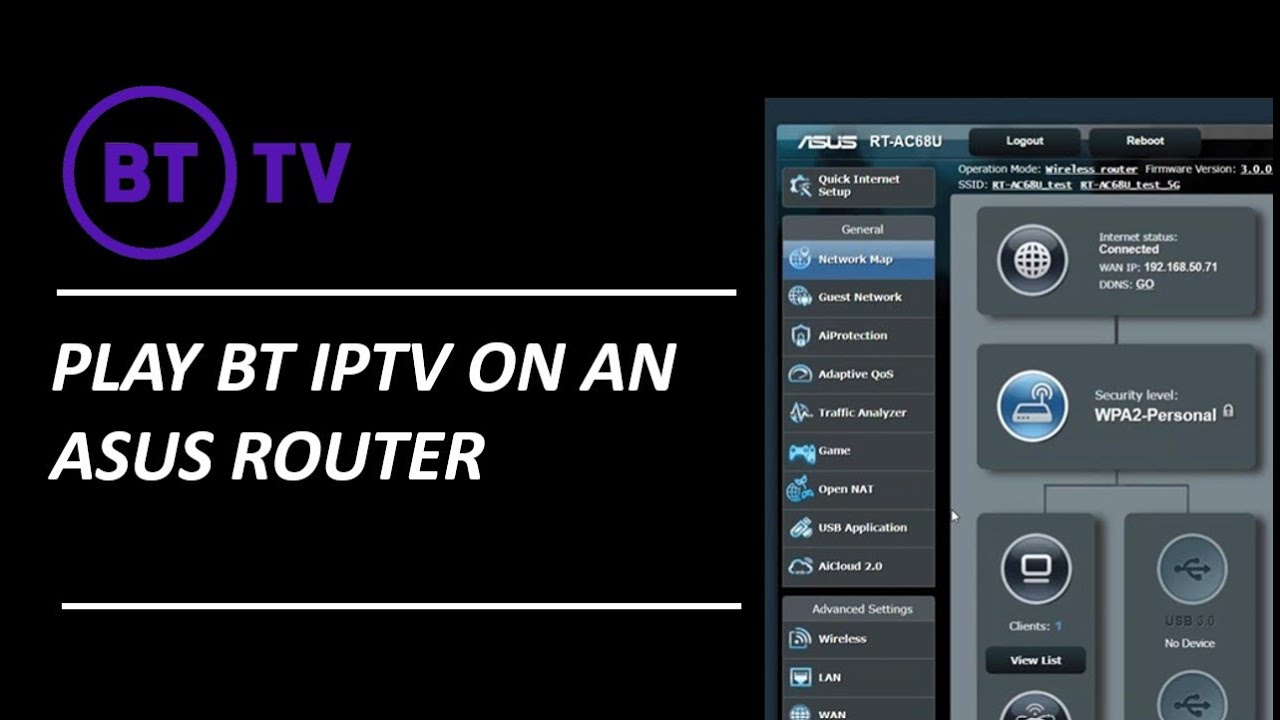
What is iptv on tp-link router [Wireless Router] How to set up IPTV on ASUS Router? | Official Support | ASUS Global
What is iptv on tp-link router Note: The related information needs , (ISP) Step4. Check [Choose IPTV STB Port] Connect your cable between IPTV STB and the router, and choose which LAN port you plug the cable into. Note: The router does not supports the enable multicast routing(IGMP Proxy). Step5. Check [Use DHCP routes] Choose what DHCP routes … What is iptv port on router.
What is iptv port on router
What is iptv port on router What is iptv in tenda router.
What is iptv in tenda router
What is iptv in tenda router What is iptv in router settings.
What is IPTV setting on TP Link router? – JanetPanic.com
IPTV is the abbreviation of Internet Protocol Television. The service can only be delivered through the Internet, and our modem router provides a specific LAN port for IPTV. By automatically separating IPTV from Internet surfing, we guarantee you a high quality of video streaming and a high , .
What is iptv in router settings What is IPTV on my TP-link router. What does it do? – Quora
What is iptv in router settings Answer (1 of 3): Nowadays more and more households are enjoying diverse IPTV services such as live or time-shifted media. As you continue to add more smart home devices, you may have already discovered your router getting overwhelmed, which leads to buffering. TP-Link provides a wide array of ro, What is iptv router.
How do you get IPTV to work — What does IPTV give?
The next thing to do is hook up your set-top box to the router (via Ethernet cable or Wi-Fi). Then connect the set-top box to your TV and set it up. Finally, you need to activate your subscription and get a downloadable playlist or a dedicated IPTV app from your provider. , If the set-top box has no apps for watching pirated content installed, IPTV is considered legal. Any third-party apps that provide access to pirate resources violate copyright law. IPTV is what … .
What is iptv router How to set up IPTV on the AC VDSL/ADSL Modem Router | TP-Link United Arab Emirates
What is iptv router By automatically separating IPTV from Internet surfing, we guarantee you a high quality of video streaming and a high speed of Internet surfing. Note: Archer VR2600 is used for demonstration in this article. , Configure the modem router to enable Internet Protocol Television (IPTV) Services. What is iptv in router settings.
Internet Protocol television – Wikipedia
Internet Protocol television (IPTV) is the delivery of television content over Internet Protocol (IP) networks. This is in contrast to delivery through traditional terrestrial, satellite, and cable television formats. Unlike downloaded media, IPTV offers the ability to stream the source media continuously. .
.
Iptv prefix connection. Current list of IPTV-compatible routers Home network.</h3
If your model is not included in , multicast (IGMP), you can still watch IPTV through the console. … 1. Problem: The latest firmware on the router is in the list of devices, but the TV on the computer still does not work. What to do?… .
IPTV – A simple explanation of Web TV (Internet television)
Why should someone you’ve never met decide what you can watch on TV and when you can watch it? True, there’s always a choice of channels, but the selection is still quite limited and unless you record programs in advance, you can only watch them when they’re broadcast. Wouldn’t it be better if watching TV were more like browsing the Web, so you could pick the program you wanted to watch whenever and wherever you felt like watching it? That’s one of the promises of IPTV (Internet Protocol Television), which uses Internet technology to deliver TV programs “on demand.” .
How to use and set up IPTV?
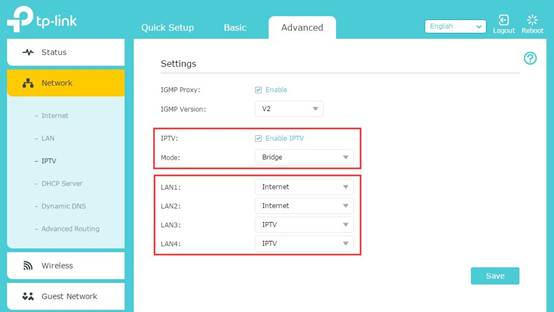
Please keep the IGMP Proxy and IGMP version as default, unless your ISP told you to modify. This article will guide you to configure the IPTV mode and LAN ports. STEP-4: What’s the difference between different IPTV modes .
What is IPTV (Internet Protocol television) and how does it work?
Learn about IPTV (Internet Protocol television), which provides television programming and other video content using the TCP/IP protocol suite, and how it works. .
How to configure IPTV function on wireless router (For new logo)? | TP-Link
For the ISP Singtel, Please verify , Network Router (ONR). We will take Archer C9 as an example. Part A: Introduce of IPTV setting page. We can see the configuration webpage of the IPTV as below. Please keep the IGMP Proxy and IGMP version as default, unless your ISP told you to modify. This article will guide you to configure the IPTV mode and LAN ports. Part B: What’s the difference … .
Best Routers For IPTV Streaming [2023 Buying Guide] – AntennaJunkies.com
If you plan on streaming flawless IPTV with your standard router, you’re about to witness buffering like you never have before. Think about it. If your router can barley handle basic high definition streaming, how do you think it will perform when trying to stream 4 times that? That’s exactly what 4K is, .
Network tips about IPTV – Zyxel Support Campus EMEA
Distribution of IPTV data via the Internet Group Management Protocol IPTV has special requirements for the hardware used. The Internet Group Management Protocol (IGMP) ensures efficient distributi, .
IPTV, ER-X: Connecting 2 routers (one ISP’s) to a VLAN switch …
Loading Ubiquiti Community .
What is IPTV on the router and what does it mean?
In fact, we use the term only to define the configuration of access to an IPTV by your router. That’s what we’re going to show you in this article. In addition to the best apps for watching movies and series, IPTV services are also one of the best to keep up with your favorite shows! Acronym for Internet Protocol Television – internet protocol television -, IPTV is nothing more than television being transmitted and accessed by internet signals. Should i enable iptv on router.
Should i enable iptv on router Linksys Official Support – How to enable IPTV on your Linksys router
Should i enable iptv on router If your Internet Service Provider (ISP) is PCCW and you have subscribed to PCCW’s IPTV (NowTV) feature, you can enable the IPTV feature in the router’s web interface. NOTE: This feature is supported on the Linksys MX4050-HK, EA9350-HK v1, EA9350-HK v2, WHW0301-AH v1, WHW0301-AH v2, MX5300-AH, , What is iptv on tp-link router.


Post a Comment