

What Is IPTV QoS?
Introduction
IPTV QoS stands for Internet Protocol Television Quality of Service. It is a set of techniques and mechanisms that can be used to ensure that IPTV traffic is prioritized and delivered reliably over a network. IPTV is a technology that delivers television content over Internet Protocol (IP) networks. It is a growing alternative to traditional cable and satellite TV services.
Why is IPTV QoS important?
IPTV QoS is important because it helps to ensure that IPTV traffic is delivered with the highest possible quality. IPTV streams are typically high-bandwidth and require a consistent level of performance in order to avoid buffering and other problems. Without QoS, IPTV traffic can be impacted by other traffic on the network, such as web browsing, file transfers, and online gaming. This can lead to a poor viewing experience for users.
How does IPTV QoS work?
IPTV QoS can be implemented at different levels of the network, including the core network, the edge network, and the home network. At the core network level, QoS mechanisms can be used to prioritize IPTV traffic over other types of traffic. At the edge network level, QoS mechanisms can be used to ensure that IPTV traffic is delivered to users with a consistent level of performance. At the home network level, QoS mechanisms can be used to prioritize IPTV traffic over other traffic on the user’s network.
Common IPTV QoS mechanisms
There are a number of different IPTV QoS mechanisms that can be used. Some of the most common mechanisms include:
- Prioritization: Prioritization is a technique that assigns a higher priority to IPTV traffic than other types of traffic. This ensures that IPTV traffic is processed and forwarded before other types of traffic.
- Reservation: Reservation is a technique that reserves a certain amount of bandwidth for IPTV traffic. This ensures that IPTV traffic has a guaranteed level of bandwidth, even if the network is congested.
- Shaping: Shaping is a technique that limits the amount of bandwidth that can be used by other types of traffic. This helps to ensure that IPTV traffic has access to the bandwidth it needs.
- Packet dropping: Packet dropping is a technique that discards packets that are not considered to be important. This can be used to reduce congestion on the network and improve the performance of IPTV traffic.
Implementing IPTV QoS
The specific mechanisms that are used to implement IPTV QoS will vary depending on the network and the equipment that is being used. However, there are some general principles that can be applied.
First, it is important to identify the IPTV traffic that needs to be prioritized. This may include live TV streams, on-demand video content, and interactive TV applications.
Once the IPTV traffic has been identified, it is important to prioritize it over other types of traffic. This can be done using a variety of mechanisms, such as prioritization, reservation, and shaping.
It is also important to monitor the performance of the IPTV network to ensure that the QoS mechanisms are working properly. This can be done by monitoring the bandwidth utilization, latency, and packet loss rate.
Benefits of IPTV QoS
There are a number of benefits to implementing IPTV QoS. These benefits include:
- Improved IPTV video quality
- Reduced buffering and other problems
- More consistent IPTV performance
- Increased user satisfaction
Conclusion
IPTV QoS is an important technology for ensuring that IPTV traffic is delivered with the highest possible quality. There are a number of different IPTV QoS mechanisms that can be used, and the specific mechanisms that are used will vary depending on the network and the equipment that is being used. However, there are some general principles that can be applied to implement IPTV QoS.
Keyword silo
The following keywords are relevant to the topic of IPTV QoS:
- IPTV
- QoS
- prioritization
- reservation
- shaping
- packet dropping
- bandwidth utilization
- latency
- packet loss rate
HTML format and HTML tags
The following HTML format and HTML tags can be used to create a blog post about IPTV QoS:
<!DOCTYPE html> <html> <head> <title>What Is IPTV QoS?</title> </head> <body> <h1>What Is IPTV QoS?</h1> <h2>Introduction</h2> <p>IPTV QoS stands for Internet Protocol Television Quality of Service. It is a set of techniques and mechanisms that can be used to ensure that IPTV traffic is prioritized and delivered reliably over a network.</p> <h2>Why is IPTV QoS important?</h2> <p>IPTV QoS is important because it helps to ensure that IPTV traffic is delivered with the highest possible quality. IPTV streams are typically high-bandwidth and require a consistent level of performance in order to avoid buffering and other problems.</p> <h2>How does IPTV QoS work?</h2> <p>IPTV QoS can be implemented at different levels of the network, including the core network, the edge network, and the home network.</p> <p>At the core network level WebHey guys, I'm trying to configure my ASUS router with QoS to prioritize IPTV over all traffic. I'm also using a VPN tunnel to be able to watch TV since my ISP blocks it,. WebAbstract. This paper introduces an approach for measuring the Quality of Experience (QoE) and. Quality of Service (QoS) for Internet Protocol Television (IPTV) services employing. WebOnce logged in, select the NAT/QoS tab, then the QoS tab. First, select "Enable" next to "Start QoS". Leave the port set to WAN. Leave the Packet Scheduler. WebQOS management in IPTV are simplified compare to the QOS in the Internet. ISP is able to control the IPTV system as IPTV is a closed network. With the control of internet. WebSuppose the topology is as below, please follow the steps to make IGMP/IPTV data have the highest priority for the whole network. Configuration for QoS:. WebTo enable them, you need to activate QoS using the global command "mls qos". With the 4 egress queues active, you need to "map" VLAN 10 traffic into one queue.
Quality of Service (QOS) in Internet Protocol Television (IPTV) – Network – Quality of Service
Source: networknauts.wordpress.com
How to set up QoS for IGMP/IPTV in TD-8816/8817,TD-W8961ND/W8951ND/W8151N/W8901G/W8901N | TP-Link
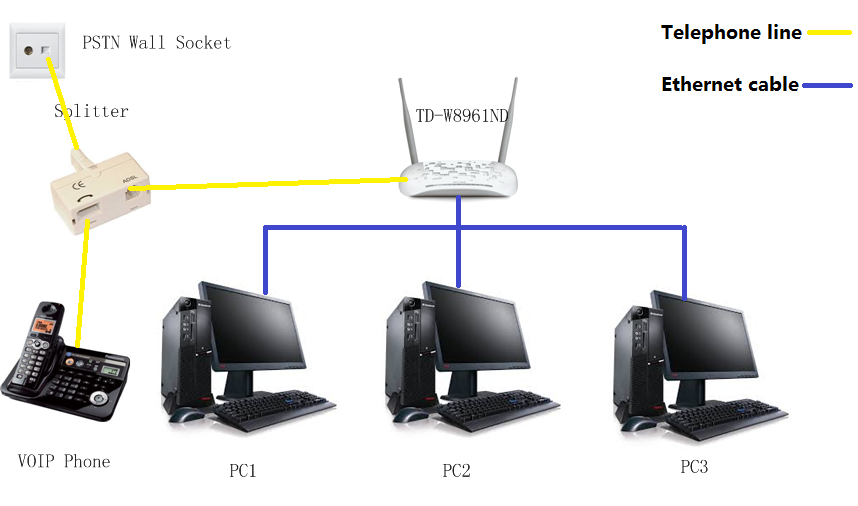
Source: tp-link.com
How to set up QoS for IGMP/IPTV in TD-8816/8817,TD-W8961ND/W8951ND/W8151N/W8901G/W8901N | TP-Link
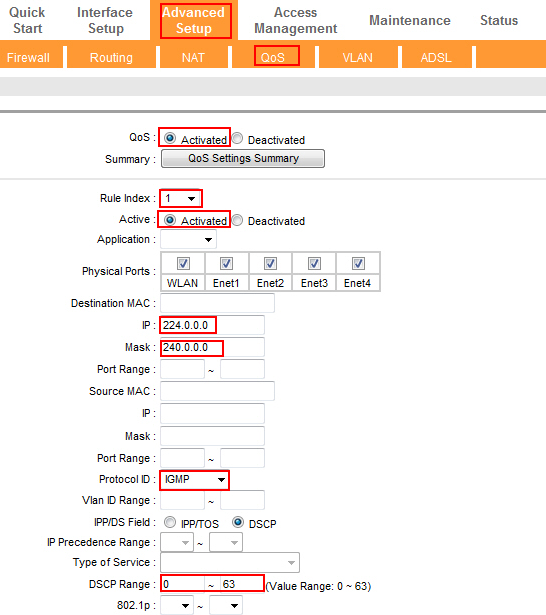
Source: tp-link.com
What Is Iptv Qos, QoE/QoS Mapping Models to measure QoE to IPTV Service, 1.3 MB, 00:57, 192, Juan Carlos Cuéllar Q., 2018-09-21T14:21:16.000000Z, 2, Quality of Service (QOS) in Internet Protocol Television (IPTV) – Network – Quality of Service, networknauts.wordpress.com, 378 x 600, jpg, , 3, what-is-iptv-qos
What Is Iptv Qos. WebIn general, IPTV is a term applicable to the delivery of traditional television content, such as movies and on-demand video, over a private network. From a service.
Narración: Juan Carlos Cuéllar Q.
Diseño y Animación: Paola Parra y José Pineda.
Quality of Service (QOS) in Internet Protocol Television (IPTV) – Network – Quality of Service
What Is Iptv Qos, WebQOS management in IPTV are simplified compare to the QOS in the Internet. ISP is able to control the IPTV system as IPTV is a closed network. With the control of internet. WebSuppose the topology is as below, please follow the steps to make IGMP/IPTV data have the highest priority for the whole network. Configuration for QoS:. WebTo enable them, you need to activate QoS using the global command "mls qos". With the 4 egress queues active, you need to "map" VLAN 10 traffic into one queue.
QoE/QoS Mapping Models to measure QoE to IPTV Service

Source: Youtube.com
EGC&C IPTV EGCAST QOS DEMO

Source: Youtube.com
QoS for IPTV – MikroTik
Because what you say would mean that there is no way for the bandwidth of the incoming IPTV streams themselves to be automatically reduced, so dropping more IPTV packets cannot lead to such reduction, whereas running the packet sniffer just causes more load to the CPU. What is iptv on router.
What is iptv on router Measuring IPTV QOS (Quality Of Service)
What is iptv on router Another article will follow shortly describing how to build a robust IPTV network What is iptv mode.
What is iptv mode
What is iptv mode What is iptv setting on router.
A new architecture for enhancing the QoS of IPTV video components in LTE systems | IEEE Conference Publication | IEEE Xplore
IMS (IP Multimedia Subsystem) technologies cannot perform its highest QoS (Quality of Service) approaches as they aren’t able to distinguish between the priorities of IPTV (Internet Protocol Television) video components. IMS system also cannot ensure high IPTV data transfer due to the limitation , .
What is iptv setting on router IPTV QoS and QoE measurements in wired and wireless networks | IEEE Conference Publication | IEEE Xplore
What is iptv setting on router Internet Protocol Television or IPTV is a multimedia content delivery service that is increasingly proliferating in the consumers lives and a hot-topic for telecommunication companies to gain a share on consumers’ entertainment budget. This alternate method of distributing television content over IP requires a high level of network performance and guaranteed Quality of Service (QoS) in order for the end user to have an assured and high-quality viewing experience. What is iptv qos.
Is QoS the Streaming Fix for You?
Learn how to configure your routers QoS settings to limit dropped video streams and help stop buffering when watching TV and movies online. .
What is iptv qos Quality of Service (QOS) in Internet Protocol Television (IPTV)
What is iptv qos Internet Protocol Television (IPTV) IPTV is a technology that delivers the digital television service that are mostly dependent on ISP as ISP provides the minimum requirement of IPTV which is the IP network. ISP not just only provide IPTV services but also VoIP and Internet access but in this , What is iptv setting on router.
What are the main IPTV QoS standards and metrics and how do you apply them?
To ensure customer satisfaction and loyalty, IPTV providers need to monitor and troubleshoot the quality of service (QoS) of their IPTV streams. QoS refers to the performance and reliability of the network and the application, and it is measured by various metrics and standards. .
.
How to set up QoS for IGMP/IPTV in TD-8816/8817,TD-W8961ND/W8951ND/W8151N/W8901G/W8901N | TP-Link How to set up QoS for IGMP/IPTV in TD-8816/8817,TD-W8961ND/W8951ND/W8151N/W8901G/W8901N .
On the QoS of IPTV and its effects on home networks
Access 160+ million publications and connect with 25+ million researchers. Join for free and gain visibility by uploading your research. .
QoS and VPN for IPTV – Network and Wireless Configuration – OpenWrt Forum
I have a Linksys with Luci connected to the internet provider’s router,I would like to make on Linksys router a QoS configuration of this type: assign to each connected device a guaranteed minimum speed and a maximum s… .
Improving QoS of IPTV and VoIP over IEEE 802.11n – ScienceDirect
Our major contributions include the analytical and experimental investigations of (1) transport layer protocol UDP/TFRC for IPTV and VoIP, (2) optimal physical layer parameters for IPTV and VoIP, (3) proposition of wireless enhancement of TFMCC (W-TFMCC) to enhance the capacity and Quality of Service (QoS) of wireless IPTV and VoIP. Analytical and experimental evaluations show a 25% increase in capacity using TFRC with 167% more bandwidth share to TCP. Our study shows that use of W-TFMCC with optimal parameters can enhance IPTV and VoIP capacity by 44%. , Saad Saleh received his MS and BS degrees in Electrical Engineering from National University of Sciences and Technology (NUST), Islamabad in 2013 and 2011, respectively. .
Major QoS Parameters Used for Fault Identification in IPTV and OTT content delivery | by Elecard Company | Medium
To maintain high quality and detect violations in the stream, it is important to track various parameters. All monitored parameters are divided into two types: relating to Quality of Service (QoS) and Quality of Experience (QoE). In this article, we will consider QoS parameters that are most important for OTT/IPTV content delivery. .
IPTV and QoS | SNBForums
Is there something weird in multicast IPTV streaming , a problem with Adaptive QoS, or something else I don’t understand? Click to expand, I’m still trying to work out my original query which looks very much like multicast is either being sent back out of my WAN port, or at least that’s what the … .


Post a Comment