

A request on Facebook is a notification that someone has asked to be your friend or has sent you a message. You can view all of your pending requests by clicking on the Requests link in the top right corner of your Facebook page.
Friend requests
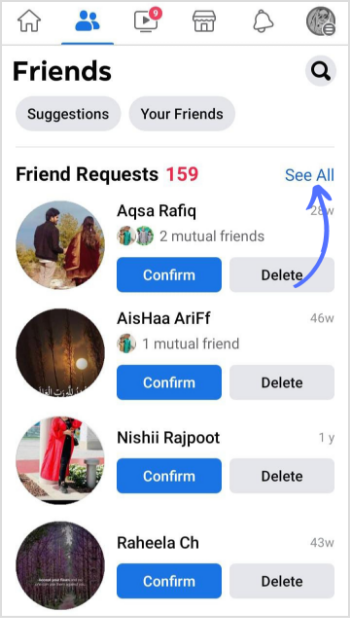
When someone sends you a friend request, you will see their name and profile picture in the Friend requests section of your Requests page. You can choose to accept or decline the request by clicking on the corresponding button.
If you accept a friend request, the person will be added to your friends list and you will be able to see their posts and updates in your News Feed. You can also send them messages and tag them in photos and posts.
Message requests
If someone who is not your friend sends you a message, you will see their name and profile picture in the Message requests section of your Requests page. You can choose to accept or decline the request by clicking on the corresponding button.
If you accept a message request, the person will be added to your Contacts list and you will be able to send and receive messages from them. You can also see their profile picture and name in your Messenger inbox.
How to manage your requests
You can manage your requests by clicking on the Requests link in the top right corner of your Facebook page. Here, you can view all of your pending friend and message requests. You can also choose to accept or decline requests, or ignore them altogether.
To ignore a request, click on the X next to the person's name. This will remove the request from your Requests page. You can still accept or decline the request later by going to the person's profile and clicking on the Add Friend or Message button.
How to avoid unwanted requests
You can adjust your privacy settings to limit who can send you friend and message requests. To do this, click on the down arrow in the top right corner of your Facebook page and select Settings & Privacy > Privacy.
Friend requests
In the How people can find and contact you section, you can choose who can send you friend requests. You can choose to receive friend requests from everyone, only from friends of friends, or only from people you know.
Message requests
In the Who can contact you section, you can choose who can send you messages. You can choose to receive messages from everyone, only from friends, or only from people you know.
You can also block specific people from sending you friend and message requests. To do this, click on the Blocking tab in the Privacy settings menu. Then, enter the person's name or email address in the Block users field and click on the Block button.
Tips for managing your requests
Here are a few tips for managing your Facebook requests:
- Review your requests regularly. Don't let your requests pile up. Take some time each week to review your pending requests and accept or decline them.
- Be careful about who you accept as friends. Only accept friend requests from people you know and trust.
- Don't feel obligated to accept every friend request. It's okay to decline friend requests from people you don't know or don't want to be friends with.
- Block people who are sending you unwanted requests. If you're getting unwanted friend or message requests from someone, block them.
- Report any suspicious or inappropriate requests. If you receive a friend or message request that is suspicious or inappropriate, report it to Facebook.
Types of requests on Facebook
There are two main types of requests on Facebook: friend requests and message requests.
Friend requests are sent when someone wants to be added to your friends list. Once you accept a friend request, the person will be able to see your posts and updates in their News Feed, and you will be able to see theirs. You can also send and receive messages from each other.
Message requests are sent when someone who is not your friend wants to send you a message. You can choose to accept or decline the request, or ignore it altogether. If you accept a message request, the person will be added to your Contacts list and you will be able to send and receive messages from them.
How to send a request on Facebook
To send a friend request, go to the person's profile and click on the Add Friend button. To send
WebThe verified badge means Facebook has confirmed that the Page or profile is the authentic presence of the individual, public figure or brand it represents. Previously, the verified. WebAdjust settings, manage notifications, learn about name changes and more. Fix login issues and learn how to change or reset your password. Control who can see what you share. WebTo cancel a friend request you sent: Go to your View Sent Requests or search for the person you previously sent a friend request to. Click View sent request in the top left. Click. WebCreate new account. Create a Page for a celebrity, brand or business. Log into Facebook to start sharing and connecting with your friends, family, and people you know.
How To Check Facebook Friend Request Sent List

Source: Youtube.com
How to Check Facebook Friend Request Sent List 2021 #shorts

Source: Youtube.com
What Is A Request On Facebook, How To Check Facebook Friend Request Sent List, 1.95 MB, 01:25, 318,846, Trevor Nace, 2020-12-06T21:13:57.000000Z, 2, How to Stop Receiving Friend Requests on Facebook, 803 x 539, jpg, , 3, what-is-a-request-on-facebook
What Is A Request On Facebook.
Did you know there is a list of every friend request you've sent that hasn't been accepted or rejected? The list is a great way to see which friends haven't responded to your request. From there, you can always delete or cancel the friend request, which they won't be notified of. I recommend checking your friend request sent history to make sure you still want to be friends with those people. The date when you initially sent it may be months or years ago and you no longer want to connect with them.
I hope this video helped solve your problem. Do you still have a question about this app? Leave a comment below!
What Is A Request On Facebook, WebCreate new account. Create a Page for a celebrity, brand or business. Log into Facebook to start sharing and connecting with your friends, family, and people you know.
How to Stop Receiving Friend Requests on Facebook - Source: linkedin.com

How to Send a Friend Request on Facebook: Mobile + Computer - Source: wikihow.com
How to See Sent Friend Requests on Facebook? - Source: blog.contentstudio.io
What is request a review on facebook www.facebook.com › help › 907368596013605About message requests on Facebook | Facebook Help Center
What is request a review on facebook For help with the Messenger app or messenger.com, visit the Messenger Help Center. Message requests tell you when someone you're not friends with on Facebook has sent you a message. Learn how to check message requests. Messages we think are spam will be filtered out of your requests. Learn more about the messages you'll get in your Chat list. What is request on facebook.
What is request on facebook www.dummies.com › article › technologyHow to Send and Respond to Facebook Friend Requests
What is request on facebook To respond to a friend request, you have two choices. One is to click one of the two buttons to the right of your potential friend's name. One button reads Confirm and one reads Not Now. Click one of those buttons and (respectively) you add a friend or ignore the request quietly. When you ignore a friend request, an e-mail isn't sent to the , What is a cancel request on facebook.
What is a cancel request on facebook
What is a cancel request on facebook What is a friend request on facebook.
.
What is a friend request on facebook
What is a friend request on facebook What is a message request on facebook.
.
What is a message request on facebook
What is a message request on facebook What is a friend request on facebook.
What is a roll call on facebook www.facebook.com › help › messenger-appAbout message requests on Facebook | Messenger Help Center
What is a roll call on facebook For help with the Messenger app or messenger.com, visit the Messenger Help Center. Message requests tell you when someone you're not friends with on Facebook has sent you a message. Learn how to check message requests. Messages we think are spam will be filtered out of your requests. Learn more about the messages you'll get in your Chat list. What is a audio call on facebook.
What is a roll call on facebook.
.
www.makeuseof.com › tag › facebook-friend-requestsFacebook Friend Requests: Unwritten Rules and Hidden Settings
Click a person's name or profile image on the left to see their full profile on the right. Select Confirm to add a friend or Delete Request to deny the request. When you remove or deny a friend request, Facebook won't notify them about it. However, they won't be able to send you another request for an entire year. .
.
.
.
.
What is a audio call on facebook www.facebook.com › help › friendsFriending | Facebook Help Center
What is a audio call on facebook Friending. Friending on Facebook helps you stay connected with people you care about. Adding a friend means you may see each other's activity in Feed, Stories and Photos. When you want to add a friend on Facebook, keep in mind: You should send friend requests to people you know and trust. What is a video call on facebook.
What is a video call on facebook www.howtogeek.com › 805793 › how-to-send-a-friendHow to Send a Friend Request on Facebook - How-To Geek
What is a video call on facebook You may use the search box or any other way to find the profile page. When you reach the profile page, beneath the person's name, tap "Add Friend." Facebook will send your friend request to your selected person. When they accept it, you'll get a notification. If they choose to decline your request, you won't be notified. Enjoy befriending people! What is device request on facebook.
What is device request on facebook
What is device request on facebook What is a close friend request on facebook.
What is a close friend request on facebook nerdschalk.com › how-to-request-a-friend-onHow to Request a Friend on Facebook: All You Need to Know
What is a close friend request on facebook What is request a review on facebook.


Post a Comment