
Introduction
A pull request (PR) is a way to propose changes to a codebase. It is a feature of GitHub, a popular code hosting platform. PRs are used to request that the changes you have made to a branch be merged into the main branch of the repository.
How Pull Requests Work
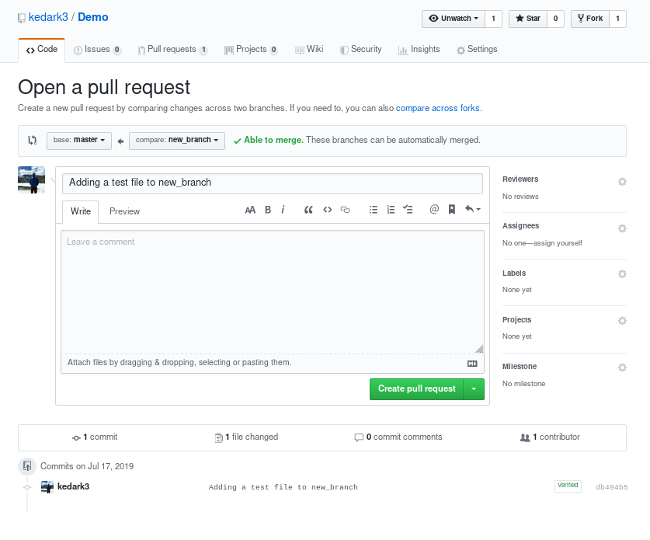
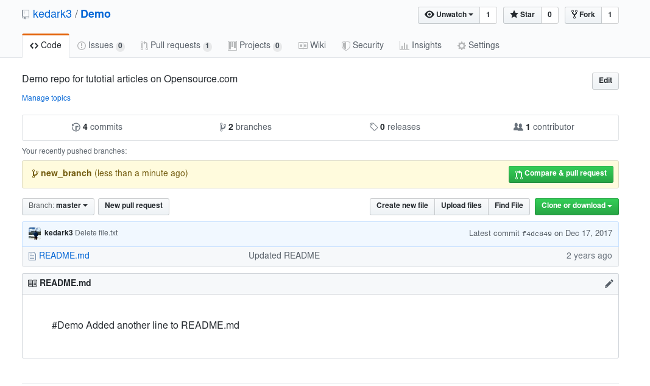
To create a pull request, you must first create a branch in the repository where you want to make your changes. Once you have made your changes, you push your changes to the branch. Then, you can create a pull request to request that your changes be merged into the main branch.
The pull request will show the changes that you have made to the codebase. Other developers can then review your changes and provide feedback. Once the changes have been reviewed and approved, the pull request can be merged into the main branch.
Benefits of Using Pull Requests
There are many benefits to using pull requests, including:
- Collaboration: Pull requests make it easy for developers to collaborate on code changes. Other developers can review your changes and provide feedback before the changes are merged into the main branch.
- Code review: Pull requests are a great way to get code review from other developers. This can help to identify and fix bugs before they are merged into the main branch.
- Quality control: Pull requests help to ensure that the codebase is of high quality. By requiring code review and approval before changes are merged, pull requests help to prevent bad code from being merged into the main branch.
Creating a Pull Request
To create a pull request, follow these steps:
- Create a branch in the repository where you want to make your changes.
- Make your changes to the codebase.
- Push your changes to the branch.
- Click the Pull requests tab in the repository.
- Click the New pull request button.
- Select the branch that you want to merge into the main branch.
- Click the Create pull request button.
Pull Request Workflow
Once you have created a pull request, the following workflow will take place:
- Other developers will review your changes.
- Developers can leave comments on your changes and suggest changes.
- You can make changes to your codebase based on the feedback you receive.
- Once the changes have been reviewed and approved, the pull request can be merged into the main branch.
Tips for Creating Pull Requests
Here are some tips for creating pull requests:
- Write descriptive commit messages. Your commit messages should clearly describe the changes that you have made. This will help other developers to understand your changes and review them more effectively.
- Make small, incremental changes. It is easier for other developers to review small changes than it is to review large changes. If you have a large change, break it down into smaller changes and create a pull request for each change.
- Test your changes. Before you create a pull request, make sure to test your changes thoroughly. This will help to identify and fix any bugs before they are merged into the main branch.
- Be responsive to feedback. If other developers leave comments on your pull request, be responsive to their feedback. Make changes to your codebase based on their feedback and update the pull request.
Conclusion
Pull requests are a valuable tool for collaboration and code review. By using pull requests, developers can ensure that the codebase is of high quality and that changes are made in a controlled and collaborative way.
Keyword Silo
- pull request
- GitHub
- code review
- collaboration
- quality control
- branching
- merging
- workflow
- commit messages
- testing
- feedback
HTML Format
WebVlastné riešenia (Pull request) s revíziou kódu a komentármi História verziovania (Commit) Grafy: verziovanie, sieť prispievateľov a jej členovia, dierne štítky, frekvenciu. WebSemi push or Push-pull : Succeeding node makes order request for preceding node. Preceding node reacts by replenishing from stock that is rebuilt every fixed period. Pull :. WebPython. PyCharm – Cross-platform Python IDE with code inspections available for analyzing code on-the-fly in the editor and bulk analysis of the whole project. PyDev – Eclipse. WebMerge Request auf GitLab. Ein Pull Request oder Merge Request bezeichnet in der Versionsverwaltung einen (webbasierten) Arbeitsablauf, Quellcode-Änderungen in. WebOverview A repository being shown in GitLab, an open source code forge. In software engineering, a version control system is used to keep track of versions of a set of files,. WebPull requests. Contributions to a source code repository that uses a distributed version control system are commonly made by means of a pull request, also known as a merge.
GitHub Pull Request in 100 Seconds - Git a FREE sticker 🔥

Source: Youtube.com
What is a pull request

Source: Youtube.com
What Is A Pull Request In Github, GitHub Pull Request in 100 Seconds - Git a FREE sticker 🔥, 2.56 MB, 01:52, 284,357, Fireship, 2020-03-17T14:40:32.000000Z, 2, How to create a pull request in GitHub | Opensource.com, 540 x 650, jpg, , 3, what-is-a-pull-request-in-github
What Is A Pull Request In Github. WebFork and pull model. Fork and pull model refers to a software development model mostly used on GitHub, where multiple developers working on an open, shared project make their own contributions by sharing a main repository and pushing changes after granted pull.
How to submit your first pull request on GitHub in 100 seconds. Fork the repo below, then contribute a PR to receive a free hologram sticker in the mail github.com/fireship-io/git-sticker
How to Participate on Github fireship.io/snippets/git-how-to-participate-on-github/
GitHub PR Docs Official help.github.com/en/github/collaborating-with-issues-and-pull-requests/about-pull-requests
#git #freestuff #100SecondsOfCode
Install the quiz app 🤓
iOS itunes.apple.com/us/app/fireship/id1462592372?mt=8
Android play.google.com/store/apps/details?id=io.fireship.quizapp
Upgrade to Fireship PRO at fireship.io/pro
Use code lORhwXd2 for 25% off your first payment.
My VS Code Theme
- Atom One Dark
- vscode-icons
- Fira Code Font
What Is A Pull Request In Github, WebMerge Request auf GitLab. Ein Pull Request oder Merge Request bezeichnet in der Versionsverwaltung einen (webbasierten) Arbeitsablauf, Quellcode-Änderungen in. WebOverview A repository being shown in GitLab, an open source code forge. In software engineering, a version control system is used to keep track of versions of a set of files,. WebPull requests. Contributions to a source code repository that uses a distributed version control system are commonly made by means of a pull request, also known as a merge.
How to create a pull request in GitHub | Opensource.com - Source: opensource.com
How to create a pull request in GitHub | Opensource.com - Source: opensource.com

How To Create a Pull Request on GitHub | DigitalOcean - Source: digitalocean.com
What is draft pull request in github www.howtogeek.com › devops › what-are-git-pullWhat Are Git Pull Requests, And How Do You Use Them?
What is draft pull request in github A pull request is a way to request changes to be added to a Git repository without having direct access to it. Learn how pull requests work, how to use them for open source collaboration, and how they differ from issues. What is close pull request in github.
What is close pull request in github docs.github.com › en › pull-requestsAbout pull requests - GitHub DocsMake a ContributionClosing a Pull RequestCreating a pull requestBest practices for pull requests
What is close pull request in github A pull request is a proposal to merge a set of changes from one branch into another. In a pull request, collaborators can review and discuss the proposed set of changes before they integrate the changes into the main codebase. Pull requests display the differences, or diffs, between the content in the source branch and the content in the target ,The open-source repo for docs.github.com. Contribute to...In the "Pull Requests" list, click the pull request you'd...Creating the pull request. On GitHub.com, navigate to the...Provide context and guidance. Write clear titles and... What is merge pull request in github.
What is merge pull request in github
What is merge pull request in github What is pull request in github example.
.
What is pull request in github example
What is pull request in github example What is a pull request in github.
.
What is a pull request in github
What is a pull request in github What is pull request in github example.
What is the use of pull request in github
What is the use of pull request in github What is meant by pull request in github.
github.com › HarshCasper › NeoAlgoWhat is a Pull Request and how to do it? - GitHub
From Github's Using Pull Requests Page. Pull requests let you tell others about changes you've pushed to a GitHub repository. Once a pull request is sent, interested parties can review the set of changes, discuss potential modifications, and even push follow-up commits if necessary. Pull Requests are commonly used by teams and organizations , What is the use of pull request in github.
.
.
.
.
.
.
What is meant by pull request in github stackoverflow.com › questions › 14680711git - How to do a GitHub pull request - Stack Overflow
What is meant by pull request in github If you're reading this you won't have write access to the repository (project folders) so GitHub will create a copy of the repository (actually a branch) in your account. Click the Create pull request button. Give the Pull Request a description and add any comments then click Create pull request button. What is push and pull request in github.
What is push and pull request in github www.geeksforgeeks.org › how-to-create-a-pullHow To Create a Pull Request in GitHub? - GeeksforGeeks
What is push and pull request in github Step 8: Now go to the repository on GitHub & above will appear a message that this repository had recent pushes. Choose to create a pull request by comparing the changes between both branches, one main branch & the other one 'UI'. Compare & Pull request. Step 9: Add details of the PR & also prefer to add a screenshot for the PA to review , What is compare and pull request in github.
What is compare and pull request in github docs.github.com › en › pull-requestsBest practices for pull requests - GitHub Docs
What is compare and pull request in github Provide context and guidance. Write clear titles and descriptions for your pull requests so that reviewers can quickly understand what the pull request does. In the pull request body, include: the purpose of the pull request. an overview of what changed. links to any additional context such as tracking issues or previous conversations. What is merge request in github.
What is merge request in github docs.github.com › en › pull-requestsCreating a pull request - GitHub Docs
What is merge request in github A pull request is a way to propose and collaborate on changes to a repository. Learn how to create a pull request, change the branch range and destination repository, and link it to an issue. What is draft pull request in github.


 is a way to propose changes to a codebase. It is a feature of GitHub, a popular code hosting platform. PRs ...)
Post a Comment