
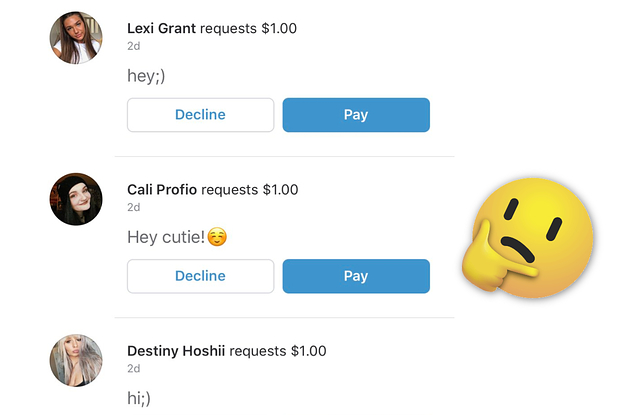
A request in Venmo is a way to ask someone to send you money. You can send a request to anyone you know, even if they don't have a Venmo account yet. When you send a request, the person you're requesting money from will receive a notification. They can then choose to pay you or ignore the request.
Why would I send a request in Venmo?
There are many reasons why you might send a request in Venmo. For example, you might use Venmo to split a bill with friends, pay someone back for something, or ask for money for a gift or other expense. Venmo is also a popular way to send money to businesses and organizations.
How do I send a request in Venmo?
To send a request in Venmo, follow these steps:
- Open the Venmo app and tap the Pay/Request button.
- Search for the person you want to request money from. If they're not already in your Venmo contacts, you can enter their phone number or email address.
- Enter the amount of money you're requesting and add a note (optional).
- Tap Request.
When will I receive the money from a request?
Once you send a request, the person you're requesting money from will have the option to pay you immediately or later. If they choose to pay you immediately, the money will be transferred to your Venmo account balance right away. If they choose to pay you later, the money will be transferred to your Venmo account balance once they send it.
What if the person I sent a request to doesn't pay me?
If the person you sent a request to doesn't pay you, you can try sending them a reminder. You can also try contacting Venmo customer support for assistance.
How do I avoid Venmo request scams?
There are a few things you can do to avoid Venmo request scams:
- Be careful who you send requests to. Only send requests to people you know and trust.
- Be suspicious of requests for large amounts of money, especially if they come from someone you don't know well.
- If you receive a request for money from someone you don't know, don't pay it. Instead, contact the person directly to verify that they really sent the request.
Here are some additional tips for using Venmo requests:
- Be clear in your note when you send a request. Let the person know what the request is for and when you need the money by.
- If you're sending a request to multiple people, you can group them together in a single request. This will make it easier for everyone to pay you.
- You can also use Venmo requests to collect money for a group expense. For example, if you're splitting a bill with friends, you can create a group and send a request to everyone in the group.
Here are some examples of how you might use Venmo requests:
- Split a bill with friends at a restaurant or bar.
- Pay someone back for a ride or for something they bought for you.
- Ask for money for a gift or other expense.
- Send money to a business or organization.
- Collect money for a group expense, such as a trip or a party.
Venmo requests are a convenient way to send and receive money. By following the tips above, you can avoid Venmo request scams and use this feature safely and effectively.
WebBut can you request money with Venmo? The answer is yes – Venmo makes it easy to request funds from other users with just a few taps. In this article, we'll look at. WebRequesting money from your friends on Venmo is a simple process that can be done in a few easy steps. Here's how you can request money using the Venmo app:. Web1. Open Venmo. 2. Tap the "Pay and Request" icon in the upper right hand corner. 3. Select a recipient by inputting a phone number, filling out someone's Venmo. WebCall for card support. Call the number on the back of your Venmo Debit or Credit Card. Phone support is offered from 8 a.m.–8 p.m. CT for Venmo Debit Cards and 24/7 for.
How To Request Money In Venmo

Source: Youtube.com
How to Request Money from People on Venmo

Source: Youtube.com
What Is A Request In Venmo, How To Request Money In Venmo, 2.06 MB, 01:30, 3,350, Quick Tech, 2021-12-01T04:54:43.000000Z, 2, Venmo Users Are Being Bombarded With Requests From Strangers After Making Public Transactions, 415 x 625, jpg, , 3, what-is-a-request-in-venmo
What Is A Request In Venmo. WebThe moment you send a payment on Venmo, we send a request to your bank/card company to debit the funds and make them available to the recipient. Learn about what.
How To Request Money In Venmo
In this quick tech how to video, I'm going to show you how to easily request money from a friend inside of the Venmo app. After that, we'll also look at where to see past requests that are still pending.
Apps like Venmo, Cash App, Google, or Apple Pay are getting more and more popular and easier to use. I use Venmo a lot when I'm picking up multiple tickets to a show, and having my friends pay me back for instance.
To do this, open the Venmo app, and tap the icon on the lower left.
Once on this screen, tap Pay or Request.
Next, search for your contact at the top, or enter their Venmo username, phone number, or email.
On the next page, enter the amount that you are requesting.
Below that, you have to enter what the request or payment is for.
Next, tap the privacy setting on the lower right above Pay. Here you can set who is able to see your activity in the Venmo feed. I default mine to Private.
Once you're finished, hit Request, and then again on the green confirm to send the money request.
It will then send you back to the activity feed, where if you've made it public or visible to friends, everyone will see it in the feed.
Finally, to view open requests that you've sent that haven't been paid, tap your account icon on the lower right. Inside of here, tap the history icon and you will then see incomplete requests and payments from your account.
And that's how request money from friends inside of the Venmo app.
Thanks for watching! Please like and subscribe and stay tuned for more quick tech how-to videos.
Make sure to subscribe to the channel! youtube.com/c/quicktechvideos?sub_confirmation=1
#venmo #venmorequest #venmotutorial #quicktechvideo #howto #tutorial
What Is A Request In Venmo, Web1. Open Venmo. 2. Tap the "Pay and Request" icon in the upper right hand corner. 3. Select a recipient by inputting a phone number, filling out someone's Venmo. WebCall for card support. Call the number on the back of your Venmo Debit or Credit Card. Phone support is offered from 8 a.m.–8 p.m. CT for Venmo Debit Cards and 24/7 for.
Venmo Users Are Being Bombarded With Requests From Strangers After Making Public Transactions - Source: buzzfeednews.com
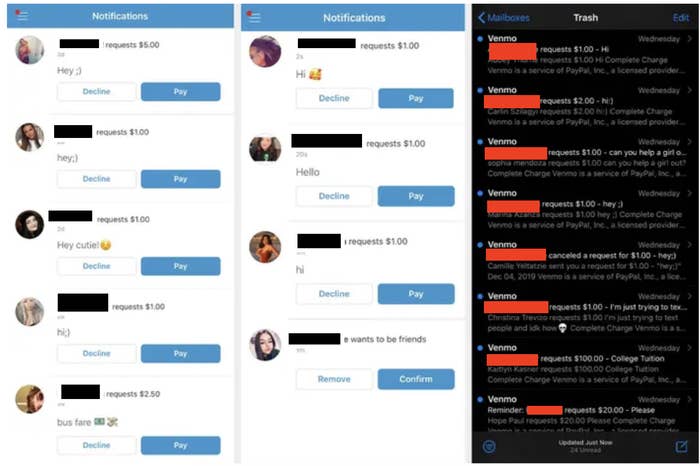
Venmo Users Are Being Bombarded With Requests From Strangers After Making Public Transactions - Source: buzzfeednews.com

Venmo Etiquette Tips That Everyone Should Know - Source: townandcountrymag.com
help.venmo.com › hc › en-usSending & Requesting Money – Venmo
Here's how to send or request money from the Venmo app: To quickly pay or charge one of your top payment partners, you can tap their avatar at the top of the Home tab in your Venmo app. You can also send payments and requests after signing in to your Venmo account on the web. Tap Pay or Request from the sidebar and follow the above steps. How does a venmo request work.
How does a venmo request work
How does a venmo request work What is a venmo request called.
What is a venmo request called
What is a venmo request called What is a friend request on venmo.
.
What is a friend request on venmo
What is a friend request on venmo What is a request in venmo.
.
What is a request in venmo
What is a request in venmo What is a friend request on venmo.
www.wikihow.com › Receive-Money-on-VenmoHow to Request & Receive Payments on Venmo: 2 Easy Ways - wikiHow
Request money (optional). If a Venmo user owes you money, you can request the funds from them. When they complete the request, you'll receive a notification, and the balance will show in your account. To request money, do the following: Click Pay or Request. Click the To field and select a user. Enter the amount. Enter a description. Click Request. .
.
.
www.tomsguide.com › how-to › how-to-use-venmoHow to use Venmo: How to send and receive money | Tom's Guide
1. Launch the app. Launch the Venmo app on your mobile device. (You can't send and receive money through the website). 2. Hit "Pay or Request". Find the Pay or Request button on the home , .
.
.
.
.
robots.net › ai › how-to-request-money-on-venmoHow To Request Money On Venmo | Robots.net
Here's how you can request money using the Venmo app: Open the Venmo app: Launch the Venmo app on your smartphone and log in to your account. Go to the "New Payment" section: Tap on the "New Payment" icon located at the bottom center of the screen. From the options that appear, select the "Request" tab. .
www.msn.com › en-us › money8 Dos and Don'ts When It Comes To Venmo Requests - MSN
Don't: Send Requests for Small Amounts. While Venmo is great for splitting expenses or nudging someone who owes you money, it's best to avoid sending requests for very small amounts, like a , .
www.wikihow.com › Pay-Someone-on-VenmoHow to Send Money to Others on Venmo: Payments & Requests
.
help.venmo.com › hc › en-usPayments & Requests - FAQ – Venmo
Each Venmo user involved in a payment can verify that the payment was successful if they received a notification and if the payment appears in their personal transactions feed. The payment will be listed in red with a minus sign on the sender's account to show that the money was sent. It'll be listed in green on the recipient's account to show , .


Post a Comment