
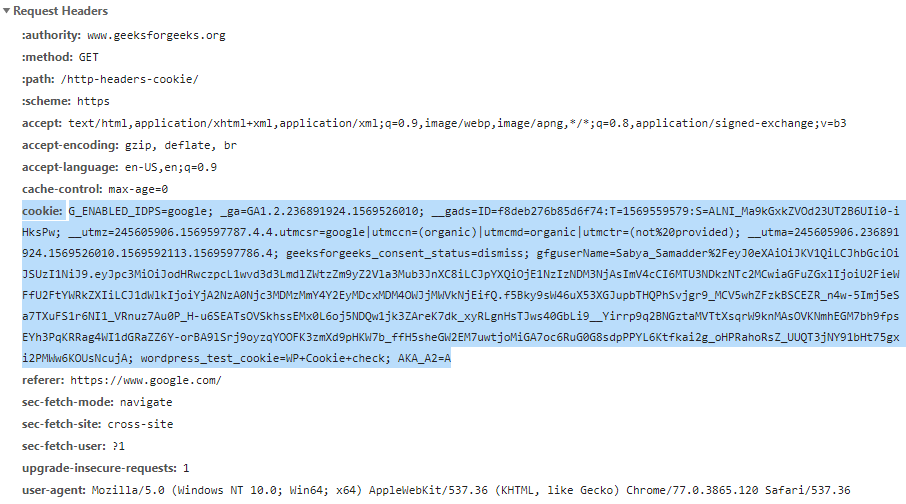
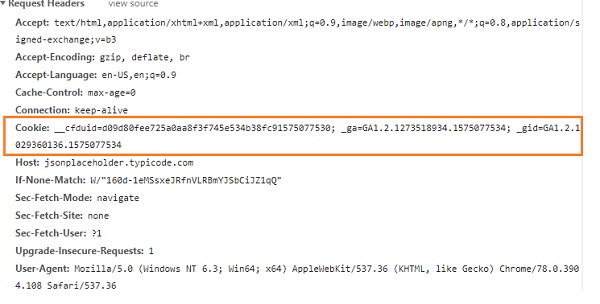
A request cookie is a small piece of text data that a web browser sends to a web server with each HTTP request. Cookies are used to store information about the user's visit to the website, such as login status, shopping cart contents, and language preferences.
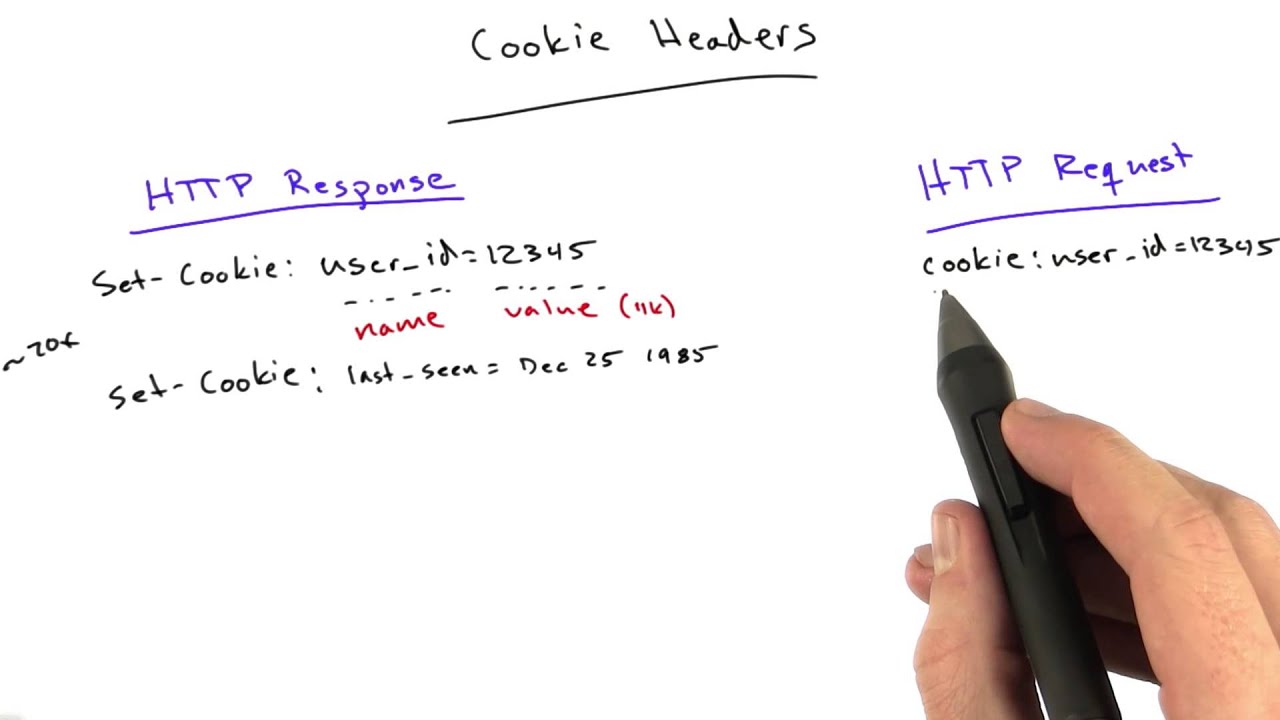
Request cookies are created by the web server and sent to the browser in the Set-Cookie header of a response. The browser then stores the cookie and sends it back to the server in the Cookie header of subsequent requests.
Request cookies can be used for a variety of purposes, including:
- Authentication: Request cookies can be used to keep a user logged in to a website. For example, when a user logs in to a website, the server may send a cookie to the browser containing the user's session ID. The browser then includes the cookie in all subsequent requests to the website. This allows the website to identify the user and keep them logged in.
- Personalization: Request cookies can be used to personalize the user's experience on a website. For example, a website may use cookies to store the user's language preferences or shopping cart contents.
- Tracking: Request cookies can be used to track the user's activity on a website. For example, a website may use cookies to track the pages that the user has visited or the products that they have viewed.
Request cookies are an important part of the web and are used by most websites. They can be used to improve the user experience and make websites more secure.
How to add a request cookie
To add a request cookie, you need to set the Cookie header in the HTTP request. The Cookie header should contain the name and value of the cookie. For example, to add a cookie named "session_id" with the value "1234567890", you would set the Cookie header to:
Cookie: session_id=1234567890 How to use request cookies
To use request cookies, you can access them using the Request.Cookies collection in ASP.NET or the document.cookie property in JavaScript.
For example, the following ASP.NET code shows how to get the value of the session_id cookie:
string sessionId = Request.Cookies["session_id"].Value; The following JavaScript code shows how to get the value of the session_id cookie:
var sessionId = document.cookie.match(/session_id=([^;]+)/)[1]; Once you have the value of the cookie, you can use it to perform any necessary actions, such as authenticating the user or personalizing their experience.
Example of a request cookie
The following is an example of a request cookie:
Cookie: session_id=1234567890 This cookie contains the name and value of the cookie, which is session_id=1234567890. The name of the cookie is used to identify the cookie, and the value of the cookie is the data that is stored in the cookie.
Benefits of using request cookies
There are a number of benefits to using request cookies, including:
- Improved user experience: Request cookies can be used to improve the user experience by keeping track of the user's state and preferences. For example, a website can use cookies to keep the user logged in or remember their shopping cart contents.
- Increased security: Request cookies can be used to increase the security of a website by authenticating users and protecting sensitive data. For example, a website can use cookies to keep track of the user's session ID or to store a hash of the user's password.
- Enhanced tracking: Request cookies can be used to track the user's activity on a website. This information can be used to improve the website's design and functionality, or to target advertising to the user's interests.
Drawbacks of using request cookies
There are also a few drawbacks to using request cookies, including:
- Privacy concerns: Request cookies can be used to track the user's activity on the web, which can raise privacy concerns. However, most users can choose to disable cookies in their browser settings if they are concerned about their privacy.
- Security risks: Request cookies can be vulnerable to theft and exploitation. For example, an attacker could steal a user's session cookie and use it to log in to the user's account. To mitigate this risk, it is important to use secure cookies and to protect them from unauthorized access.
- Performance impact: Request cookies can have a small impact on the performance of a website. This is because the browser needs to send the cookies with each HTTP
WebTo retrieve a cookie, you use the Request (you are Requesting), like: HttpCookie myCookie = Request.Cookies ["MyTestCookie"]; // Read the cookie. Webhttp.cookies. — HTTP state management. ¶. Source code: Lib/http/cookies.py. The http.cookies module defines classes for abstracting the concept of cookies, an HTTP. Web4 Answers. Sorted by: 352. The server sends the following in its response header to set a cookie field. Set-Cookie: name = value. If there is a cookie set, then the. WebWhen a browser requests a web page from a server, cookies belonging to the page are added to the request. This way the server gets the necessary data to "remember".
How to Use Cookies and Session in Python Web Scraping

Source: Youtube.com
Cookie Headers - Web Development
Source: Youtube.com
What Is A Request Cookie, How to Use Cookies and Session in Python Web Scraping, 32.52 MB, 23:41, 30,825, Worth Web Scraping - Mike, 2020-11-01T06:08:15.000000Z, 2, HTTP headers | Cookie - GeeksforGeeks, 504 x 906, jpg, , 3, what-is-a-request-cookie
What Is A Request Cookie. WebThe request cookie is what is send from the client to the server (thus what the browser provides). The response cookie are the cookies that you want to place in the browser.. WebThe Cookie HTTP request header contains stored HTTP cookies associated with the server (i.e. previously sent by the server with the Set-Cookie header or set in.
Get the Detailed code from Resources section at worthwebscraping.com/
In this tutorial we will learn what are Cookies and Session, its importance in scraping and ways to use them with python request library.
An HTTP cookie is a special type of request header that represents a small piece of data sent from a website and stored on the user's computer. It is different from other headers, as we are not the ones to choose it – it is the website that tells us how to set this field. Then, the cookie can be sent along with subsequent client requests.
Cookies were designed to be a reliable mechanism for websites to remember stateful information, such as items added in the shopping cart in an online store, or to record the user's browsing activity.
They can also be used to remember arbitrary pieces of information that the user previously entered into form fields, such as names, addresses, passwords, and credit-card numbers.
Each time the users' web browser interacts with a web server it will pass the cookie information to the web server. Only the cookies stored by the browser that relate to the domain in the requested URL will be sent to the server.
What Is A Request Cookie, Web4 Answers. Sorted by: 352. The server sends the following in its response header to set a cookie field. Set-Cookie: name = value. If there is a cookie set, then the. WebWhen a browser requests a web page from a server, cookies belonging to the page are added to the request. This way the server gets the necessary data to "remember".
HTTP headers | Cookie - GeeksforGeeks - Source: geeksforgeeks.org

HTTP Request cookies - Help - UiPath Community Forum - Source: forum.uipath.com
Requests - Working with Cookies - Source: tutorialspoint.com
How do i stop cookie requests.
How do i stop cookie requests
How do i stop cookie requests What is request and response cookies.
What is request and response cookies
What is request and response cookies What is filtered out request cookies.
.
What is filtered out request cookies
What is filtered out request cookies What is a request cookie.
.
What is a request cookie
What is a request cookie What is filtered out request cookies.
en.wikipedia.org › wiki › HTTP_cookieHTTP cookie - Wikipedia
t. e. HTTP cookies (also called web cookies, Internet cookies, browser cookies, or simply cookies) are small blocks of data created by a web server while a user is browsing a website and placed on the user's computer or other device by the user's web browser. Cookies are placed on the device used to access a website, and more than one cookie , .
developer.mozilla.org › Web › HTTPCookie - HTTP | MDN - MDN Web Docs
The Cookie HTTP request header contains stored HTTP cookies associated with the server (i.e. previously sent by the server with the Set-Cookie header or set in JavaScript using Document.cookie ). The Cookie header is optional and may be omitted if, for example, the browser's privacy settings block cookies. Header type. .
.
http.dev › cookiesHTTP Cookies explained
HTTP Cookies. An HTTP Cookie is a small, client-side dataset that contains information sent by the server. Also known as a web cookie, browser cookie, or internet cookie, it can be used to identify a client and acts as a way to maintain information about the client's state in an otherwise stateless system. Table of Contents. .
.
.
www.digitalocean.com › what-are-http-cookiesWhat are HTTP Cookies? | DigitalOcean
Manager, Developer Education. HTTP Cookies — also known as web cookies, browser cookies, or simply just cookies — are small pieces of data sent from a web server to a user's browser. Although it depends on how a website or application uses cookies, a user's web browser will typically store a cookie sent from a server as a way to retain , .
.
stackoverflow.com › questions › 3467114How are cookies passed in the HTTP protocol? - Stack Overflow
The server sends the following in its response header to set a cookie field. Set-Cookie:name=value. If there is a cookie set, then the browser sends the following in its request header. Cookie:name=value. See the HTTP Cookie article at Wikipedia for more information. .
www.cloudflare.com › learning › privacyWhat are cookies? | Cookies definition | Cloudflare
Cookies are small files of information that a web server generates and sends to a web browser. Web browsers store the cookies they receive for a predetermined period of time, or for the length of a user's session on a website. They attach the relevant cookies to any future requests the user makes of the web server. .
.
developer.mozilla.org › en-US › docsUsing HTTP cookies - HTTP | MDN - MDN Web Docs
A cookie (also known as a web cookie or browser cookie) is a small piece of data a server sends to a user's web browser. The browser may store cookies, create new cookies, modify existing ones, and send them back to the same server with later requests. Cookies enable web applications to store limited amounts of data and remember state information; by default the HTTP protocol is stateless. .


Post a Comment