
GCash KKB, or Kanya-Kanyang Bayad, is a feature that allows you to split a bill with your friends or group members. You can create a KKB request and send it to the people you want to split the bill with. They can then pay you their share directly through the GCash app.
KKB is a convenient way to split bills, especially when you're dining out, shopping with friends, or paying for group expenses. It's also a good way to avoid having to keep track of who owes you what.
How to create a KKB request
To create a KKB request, follow these steps:
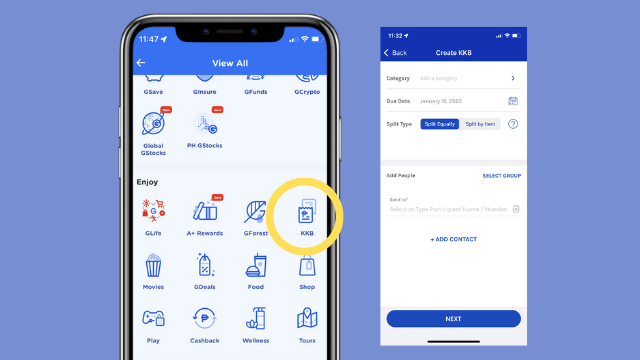
- Open the GCash app and tap on the KKB icon.
- Enter the total amount of the bill and the number of people you're splitting it with.
- Add the GCash numbers of the people you want to split the bill with.
- Tap on Create KKB.
Once you've created a KKB request, the people you added will receive a notification on their GCash app. They can then pay their share by tapping on the Pay KKB button in the notification.
How to pay a KKB request
To pay a KKB request, follow these steps:
- Open the GCash app and tap on the KKB icon.
- Tap on the Pay KKB button next to the KKB request you want to pay.
- Enter the amount you want to pay and tap on Pay.
How to manage KKB requests
You can manage your KKB requests by tapping on the KKB icon in the GCash app. Here, you can see a list of all the KKB requests you've created or received. You can also mark KKB requests as paid or send reminders to people who haven't paid yet.
KKB tips and tricks
Here are some tips and tricks for using KKB:
- You can create a KKB request for any amount, even if it's just a few pesos.
- You can add up to 10 people to a KKB request.
- You can send a KKB request to people who don't have the GCash app yet. They will receive a text message with a link to download the app and pay the KKB request.
- You can edit a KKB request after you've created it. Just tap on the Edit KKB button next to the KKB request.
- You can cancel a KKB request at any time. Just tap on the Cancel KKB button next to the KKB request.
KKB scams
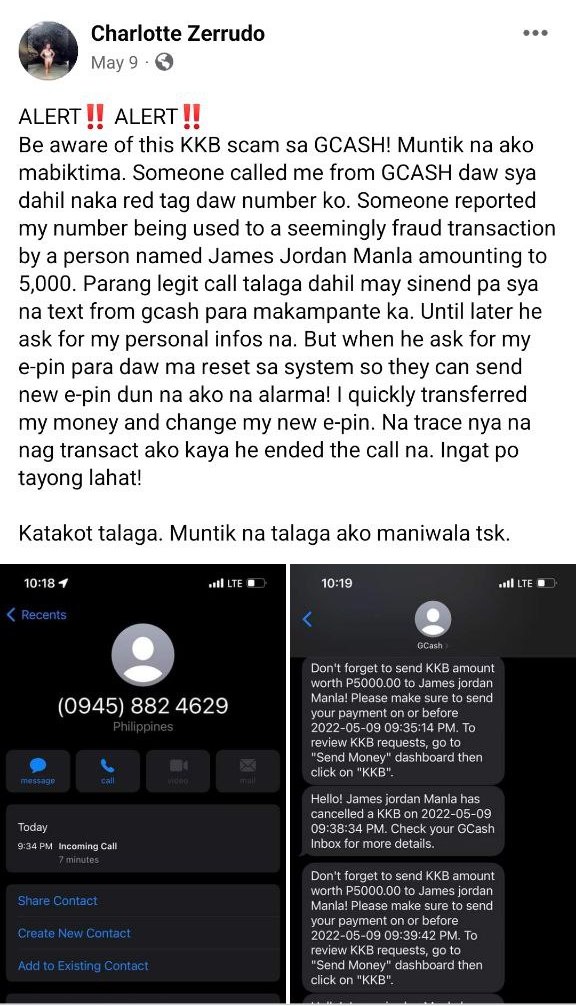
There are some scammers who use KKB to try to trick people out of their money. Here are some things to keep in mind to avoid being scammed:
- Never send money to someone you don't know or trust.
- Be careful about clicking on links in text messages or emails from people you don't know.
- If you receive a KKB request from someone you don't know, don't pay it. Instead, contact the person directly to verify that they sent you the request.
KKB is a convenient and secure way to split bills with your friends and group members. By following the tips above, you can avoid being scammed and have a positive experience using KKB.
How to use KKB in different situations
Here are some examples of how you can use KKB in different situations:
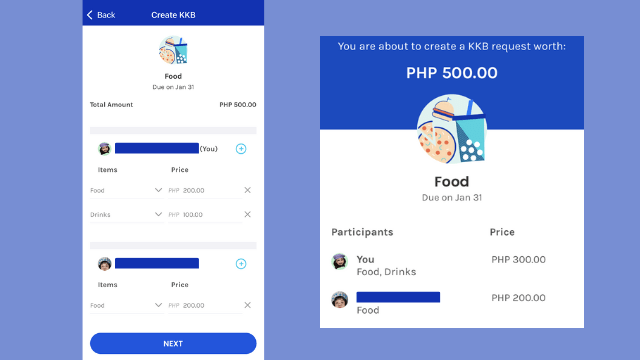
- Splitting a restaurant bill: When you're dining out with friends, you can create a KKB request for the total bill amount. Then, you can send the KKB request to your friends and they can pay their share directly through the GCash app.
- Paying for group expenses: If you're going on a trip with friends or family, you can create a KKB request for the total cost of the trip. Then, you can send the KKB request to your friends or family members and they can pay their share directly through the GCash app.
- Shopping with friends: If you're shopping with friends, you can create a KKB request for the total cost of the items you're buying. Then, you can send the KKB request to your friends and they can pay their share directly through the GCash app.
Benefits of using KKB
There are many benefits to using KKB, including:
- Convenience: KKB makes it easy to split bills with your friends and group members. You can create a KKB request in just a few seconds and then send it to the people you want to split the bill with.
- Security: KKB is a secure way to split bills. All
WebIf you choose to split by item, GCash will ask the initiator of the KKB to determine the amount to be paid per person. If the person ordered a meal and a drink,. WebNew in GCash: KKB ("Kanyang-kanyang Bayad") Feature lets this application automatically calculate the amount that will be divided when splitting the total cost of bills. WebSomeone is requesting money from you. You have a pending KKB request on the GCash app. Download and register GCash to view the details.
ANO ANG GCASH KKB PAANO MAKA-IWAS SA SCAM | KKB SCAM MODUS AWARENESS | BabyDrewTV

Source: Youtube.com
HOW TO DELETE / CANCEL GCASH KKB REQUEST | PAANO MAG-DELETE NG KKB REQUEST | BabyDrewTV

Source: Youtube.com
What Is A Kkb Request In Gcash, ANO ANG GCASH KKB PAANO MAKA-IWAS SA SCAM | KKB SCAM MODUS AWARENESS | BabyDrewTV, 11.12 MB, 08:06, 57,564, BabyDrewTV, 2021-12-02T10:44:42.000000Z, 2, 6 Ways The Gcash KKB Feature Is Used For Scams & How To Spot Them, 1006 x 576, jpg, , 3, what-is-a-kkb-request-in-gcash
What Is A Kkb Request In Gcash. WebTap the New KKB Request button. Enter category and due date. Enter a category and the due date of your request. Split the bill. Choose if you want to split the bill equally, or by.
ANO ANG GCASH KKB PAANO MAKA-IWAS SA SCAM | KKB SCAM MODUS AWARENESS | BabyDrewTV
Please Like, share and SUBSCRIBE BabyDrewTV
Open your Gcash account here: I've shared PHP 70 worth of freebies for you to try it out: 👉 gcsh.app/r/vFrjn6P Gcash Referral Code: vFrjn6P
BabyDrewTV on GCASH - youtube.com/playlist?list=PLk8CZEnN735jOKfbkHPaXAMT_A0tE-c7t
BabyDrewTV on PH Banks - youtube.com/playlist?list=PLk8CZEnN735gH7xHzYUh3GU5-_pc2vlnP
BabyDrewTV on Pag-ibig Fund - youtube.com/playlist?list=PLk8CZEnN735jRx3wPo65sh52CiqkAyX8j
BabyDrewTV on IMG - youtube.com/playlist?list=PLk8CZEnN735gqITD9GoNe2y_PXXNpmNSC
BabyDrewTV Life in ISRAEL - youtube.com/playlist?list=PLk8CZEnN735hNml2KpOmLs8mkCcIji3BX
#GcashKKB #KKBScamAwareness #BabyDrewTV
gcash kkb scam
gcash kkb not verified
kkb gcash refund
how gcash kkb works
kkb gcash unverified
gcash kkb limit
gcash kkb request
kkb amount gcash
kkb in gcash
gcash kkb meaning
kkb on gcash
kkb process gcash
kkb payment gcash
kkb to gcash
how to use gcash kkb
kkb meaning in gcash
is kkb in gcash safe
kkb means in gcash
kkb gcash refund
kkb gcash not verified
kkb gcash limit
how to use kkb in gcash
how to claim kkb in gcash
kkb amount gcash
how to cancel kkb in gcash
where to find kkb in gcash
how kkb works in gcash
how to receive kkb in gcash
what is kkb in gcash
kkb gcash meaning
kkb on gcash
kkb process gcash
kkb request gcash
kkb to gcash
kkb gcash unverified
how to use kkb in gcash
how to use kkb on gcash
What Is A Kkb Request In Gcash, WebIf you choose to split by item, GCash will ask the initiator of the KKB to determine the amount to be paid per person. If the person ordered a meal and a drink,. WebNew in GCash: KKB ("Kanyang-kanyang Bayad") Feature lets this application automatically calculate the amount that will be divided when splitting the total cost of bills. WebSomeone is requesting money from you. You have a pending KKB request on the GCash app. Download and register GCash to view the details.
6 Ways The Gcash KKB Feature Is Used For Scams & How To Spot Them - Source: thesmartlocal.ph
GCash KKB Feature - Source: yummy.ph
GCash KKB Feature - Source: yummy.ph
www.spot.ph › newsfeatures › moneyHOW TO: GCash KKB Request, Split Bills on the App - Spot.ph
Here's how to split the bill on GCash: Open the GCash app and tap 'View All'. Scroll down to 'Enjoy' and tap 'KKB'. Tap 'Create new KKB request' and select the type of transaction. For this example we'll use food. Article continues after this video. Article continues after this ad. Set the due date for the payment. .
How to use kkb in gcash.
How to use kkb in gcash
How to use kkb in gcash What is kkb in gcash.
.
What is kkb in gcash
What is kkb in gcash What is a kkb request in gcash.
.
What is a kkb request in gcash
What is a kkb request in gcash What is kkb in gcash.
sugbo.ph › 2022 › gcash-kkbGCash intros 'KKB' feature for bill splitting - Sugbo.ph
Open GCash. From the main page, tap the 'Send' icon. Tap 'Send KKB'. Tap on 'New KKB Request'. Input the category and due date of your amount that will be requested to be paid. For the due date, Today is the default. However, if you decide to pay on a specific date, you can set it accordingly. Select how you wish to split the bill. .
.
.
new.gcash.com › services › kkbKKB - new.gcash.com
/get-started/pay-abroad-with-alipay. GCash Premium. /get-started/gcash-premium .
.
.
.
.
www.yummy.ph › news-trends › gcash-kbb-kanya-kanyangGCash KKB Feature - yummy.ph
.
www.youtube.com › watchHow to use GCASH KKB Feature | TIPS To Secure Your Account ...
Learn how to protect yourself from KKB requests from people you don't know. Use the potential of GCash KKB and Split your bills among family and friends usin, .
thesmartlocal.ph › gcash-kkb-scams6 Ways The Gcash KKB Feature Is Used For ... - TheSmartLocal
.
www.youtube.com › watchHOW TO SEND ON GCASH UNVERIFIED (KKB) | TUTORIAL & GUIDES
Open the GCash App and tap "KKB."Create a new request.Enter your request details.Select friends to split the bill with.Split your bill equally or split by it, .


Post a Comment