
An Express request is a JavaScript object that represents the HTTP request received by an Express application. It contains information about the request, such as the HTTP method, URL path, query string, request headers, and request body.
The Express request object is passed to the callback function of every route that is defined in the Express application. The callback function can then use the request object to access the information about the request and to send a response back to the client.
Properties of the Express request object
The Express request object has a number of properties that can be used to access information about the request. Some of the most important properties include:
method: The HTTP method used in the request (e.g.,GET,POST,PUT,DELETE).url: The full URL of the request.path: The path portion of the URL (e.g.,/users/123).query: An object containing the key-value pairs in the query string.headers: An object containing the request headers.body: The request body, which can be parsed using a body parser middleware.
Using the Express request object
The Express request object can be used to access information about the request and to send a response back to the client. For example, the following code shows how to use the request object to get the HTTP method and the URL path of the request:
const express = require('express'); const app = express(); app.get('/', (req, res) => { const method = req.method; const urlPath = req.path; res.send(`The request method is ${method} and the URL path is ${urlPath}`); }); The Express request object can also be used to get the request body. To do this, you need to use a body parser middleware. For example, the following code shows how to use the body-parser middleware to parse the request body as JSON:
const express = require('express'); const bodyParser = require('body-parser'); const app = express(); app.use(bodyParser.json()); app.post('/users', (req, res) => { const user = req.body; // ... res.send(`The user ${user.name} has been saved successfully.`); }); Tips for using the Express request object
Here are a few tips for using the Express request object:
- Use the
methodproperty to determine the HTTP method used in the request. - Use the
urlproperty to get the full URL of the request. - Use the
pathproperty to get the path portion of the URL. - Use the
queryproperty to access the key-value pairs in the query string. - Use the
headersproperty to access the request headers. - Use the
bodyproperty to access the request body. - Use body parser middleware to parse the request body as JSON or other formats.
Example of using the Express request object
The following code shows an example of using the Express request object to create a simple blog application:
const express = require('express'); const bodyParser = require('body-parser'); const app = express(); app.use(bodyParser.json()); app.post('/users', (req, res) => { const user = req.body; // ... res.send(`The user ${user.name} has been saved successfully.`); }); app.get('/users', (req, res) => { const users = // ... res.send(users); }); app.listen(3000, () => { console.log('The Express application is listening on port 3000'); }); Conclusion
The Express request object is a powerful tool that can be used to access information about the request and to send a response back to the client. By using the
Webconst express = require('express'); const app = express (); app.use (express.json ()); app.post ('*', (req, res) => { req.body; res.json (req.body); }); const. WebA general understanding of server-side website programming, and in particular the mechanics of client-server interactions in websites. Objective: To gain. Webconst express = require('express') const app = express() const router = express.Router() // predicate the router with a check and bail out when needed router.use((req, res, next) =>. WebWhat is Express? Express is the most popular Node.js framework because it requires minimum setup to start an application or an API and is fast, and unopinionated.
GET And POST Method In Express JS | Handling HTTP GET And POST Request With Express JS | Simplilearn

Source: Youtube.com
Learn Express Middleware In 14 Minutes
Source: Youtube.com
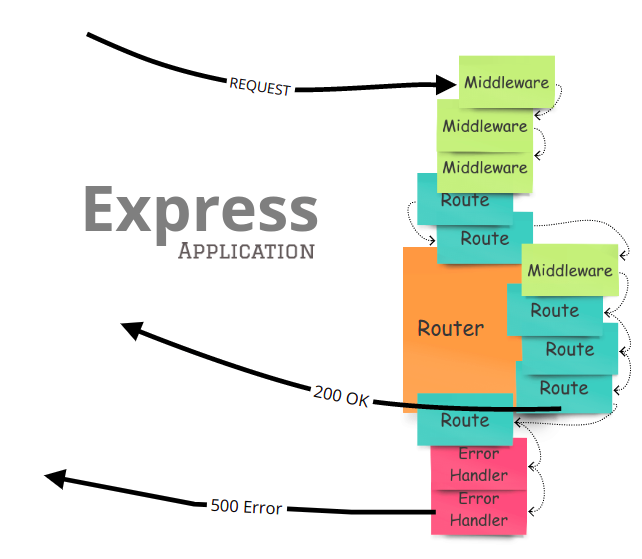
What Is A Express Request, GET And POST Method In Express JS | Handling HTTP GET And POST Request With Express JS | Simplilearn, 11.7 MB, 08:31, 27,816, Simplilearn, 2022-06-17T07:11:05.000000Z, 2, Express Middlewares, Demystified. Understanding the inner workings of… | by Viral Shah | Medium, 559 x 642, jpg, , 3, what-is-a-express-request
What Is A Express Request. WebShort for request, the req object is one half of the request and response cycle to examine calls from the client side, make HTTP requests, and handle incoming data whether in a string or JSON object. In this article, you will learn about the req object in.
Become A Full Stack Developer Today: taplink.cc/simplilearn_softwaredev
🔥 IITM Pravartak Professional Certificate Program In Full Stack Development - MERN (India Only): simplilearn.com/full-stack-developer-course-and-certification-iitm-pravartak?utm_campaign=SCE-FullstackIITM&utm_medium=DescriptionFF&utm_source=youtube
*Note: 1+ Years of Work Experience Recommended to Sign up for Below Programs⬇️
🔥 Post Graduate Program In Full Stack Web Development: simplilearn.com/pgp-full-stack-web-development-certification-training-course?utm_campaign=GETAndPOSTMethodInExpressJS&utm_medium=Descriptionff&utm_source=youtube
🔥 Caltech Coding Bootcamp (US Only): simplilearn.com/coding-bootcamp?utm_campaign=GETAndPOSTMethodInExpressJS&utm_medium=Descriptionff&utm_source=youtube
This Express tutorial will walk you through what is get and post methods and see how it works. Get and Post are the standard HTTP request used to create REST APIs, GET method is used to read data and Post method is used to create new or to edit already existing data.
✅Subscribe to our Channel to learn more about the top Technologies: bit.ly/2VT4WtH
⏩ Check out the Node.js training videos: bit.ly/2SDlHbu
#GETAndPOSTMethodInExpressJS #HandlingHTTPGetAndPostRequest #HTTPRequest #GetMethod #PostMethod #HTTPMethods #Express #ExpressJS #ExpressJSTutorial #ExpressForBeginners #Simplilearn
🔥Explore Our Free Courses With Completion Certificate by SkillUp: simplilearn.com/skillup-free-online-courses?utm_campaign=GETAndPOSTMethodInExpressJS&utm_medium=Description&utm_source=youtube
➡️ About Post Graduate Program In Full Stack Web Development
This program will give you the foundation for building full-stack web apps using the Java programming language. You'll begin with the basics of JavaScript, and then venture into some of the more advanced concepts like Angular, Spring Boot, Hibernate, JSPs, and MVC. Now is the perfect time to get started on your career as a full-stack web developer!
✅ Key Features
- Caltech CTME Post Graduate Certificate
- Enrolment in Simplilearn's JobAssist
- Receive up to 25 CEUs from Caltech CTME
- Simplilearn's JobAssist helps you get noticed by top hiring companies
- Attend Masterclasses from Caltech CTME instructors
- Live virtual classes led by industry experts, hands-on projects and integrated labs
- Online Convocation by Caltech CTME Program Director
- 20 lesson-end and 5 phase-end projects
- Capstone Project in 4 domains
- Caltech CTME Circle Membership
- Build your own portfolio on GitHub
✅ Skills Covered
- Agile
- JAVA
- Hibernate and JPA
- Spring Core 50
- DevOps
- HTML5 and CSS3
- AWS
- JavaScript ES6
- Servlets
- SOAP and REST
- JSP
👉 Learn More At: simplilearn.com/pgp-full-stack-web-development-certification-training-course?utm_campaign=GETAndPOSTMethodInExpressJS&utm_medium=Description&utm_source=youtube
🔥 Caltech Coding Bootcamp (US Only): simplilearn.com/coding-bootcamp?utm_campaign=GETAndPOSTMethodInExpressJS&utm_medium=Description&utm_source=youtube
🔥🔥 Interested in Attending Live Classes? Call Us: IN - 18002127688 / US - +18445327688
What Is A Express Request, Webconst express = require('express') const app = express() const router = express.Router() // predicate the router with a check and bail out when needed router.use((req, res, next) =>. WebWhat is Express? Express is the most popular Node.js framework because it requires minimum setup to start an application or an API and is fast, and unopinionated.
Express Middlewares, Demystified. Understanding the inner workings of… | by Viral Shah | Medium - Source: medium.com

Understanding Express Middleware{A beginners guide} - DEV Community - Source: dev.to

Introduction to Express.js | Engineering Education (EngEd) Program | Section - Source: section.io
Express request meaning
Express request meaning Express put request example.
Express put request example
Express put request example Express request example.
Express request example
Express request example What is jio express request.
.
What is jio express request
What is jio express request What is a express request.
.
What is a express request
What is a express request What is jio express request.
masteringjs.io › tutorials › expressThe `app.get()` Function in Express - Mastering JS
Express-compatible middleware, like `app.use(require('cors')())` Express 4.0 style subrouters; As a bonus, Espresso also supports async functions, unlike Express. Get the tutorial and master Express today! .
www.geeksforgeeks.org › properties-and-methods-ofProperties and Methods of Request and Response Objects in Express
In the context of Express , "intercept" usually refers to the process of capturing or modifying a request or response in a middleware function before it reaches its final destination (e.g., a route handler) or before it is sent back to the client. In Express, intercepting response.send() or response.json() can be achieved by using middleware functi .
.
.
.
blog.logrocket.com › extend-express-request-objectHow to extend the Express Request object in TypeScript
The first idea you might come up with to achieve code that is easier to maintain, is to extend the Request type locally. You can extend the Express Request interface for a single request, like so: import { NextFunction, Request, Response } from "express" export type Language = "en" | "es" | "it. export interface LanguageRequest extends Request {. .
.
.
apidog.com › blog › nodejs-express-put-requestEverything You Must Know About NodeJS Express PUT Request
First, click the New Request button to create a new request for the NodeJS Express PUT request. Next, make sure to change the request into a PUT request. On the highlighted box in the image, insert the API endpoint you wish to access. Proceed by including the necessary details for your PUT request. .
www.geeksforgeeks.org › explain-the-use-of-req-andExplain the use of req and res objects in Express JS
Steps to use req and res objects in Express. Step 1: In the first step, we will create the new folder as an http-objects by using the below command in the VScode terminal. mkdir http-objects. cd http-objects. Step 2: After creating the folder, initialize the NPM using the below command. Using this the package.json file will be created. .
www.freecodecamp.org › news › express-explained-withExpress Explained with Examples - Installation, Routing ...
Express request events.
Express request events expressjs.com › en › apiExpress 4.x - API Reference
Express request events This middleware is available in Express v4.16.0 onwards. This is a built-in middleware function in Express. It parses incoming requests with JSON payloads and is based on body-parser. Returns middleware that only parses JSON and only looks at requests where the Content-Type header matches the type option. Express request meaning.


Post a Comment