
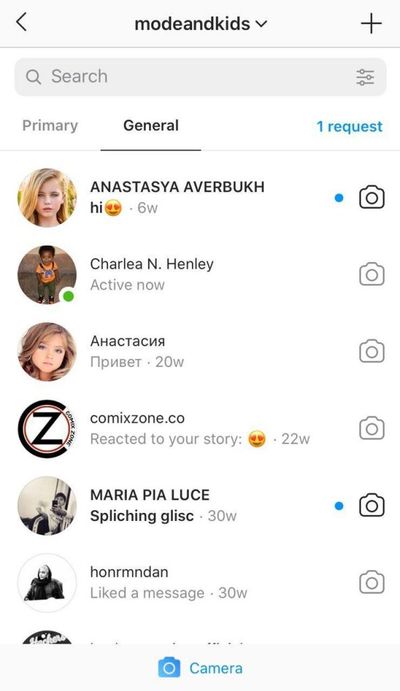
A DM request is a message sent to you on Instagram by someone you don't follow. These messages appear in the Message Requests folder, which is separate from your regular inbox.
Only people you follow can send you messages directly to your inbox. If someone you don't follow wants to send you a message, they will need to send you a request first. You can then choose whether to accept or decline the request.
Why do people send DM requests?
There are a variety of reasons why someone might send you a DM request. Some common reasons include:
- To introduce themselves and connect with you
- To collaborate on a project or partnership
- To ask for advice or help
- To promote their product or service
- To spam or harass you
How to view your DM requests
To view your DM requests, tap the paper airplane icon in the top right corner of the Instagram app. Then, tap the Requests tab.
You'll see a list of all the people who have sent you DM requests. You can tap on a request to view the message.
How to accept or decline a DM request
To accept a DM request, tap the Accept button. To decline a DM request, tap the Delete button.
If you accept a DM request, the person who sent the request will be able to send you messages directly to your inbox. If you decline a DM request, the person who sent the request will not be able to send you messages.
Tips for managing DM requests
Here are a few tips for managing DM requests:
- Be selective about who you accept requests from. Only accept requests from people you know or who have a legitimate reason to contact you.
- Be wary of requests from people who are trying to promote their product or service, or who are asking for personal information.
- If you receive a DM from someone you don't know and it seems suspicious, don't click on any links or open any attachments.
- You can report spam or abusive DM requests to Instagram.
How to report a DM request
To report a DM request, tap on the message and then tap the three dots in the top right corner. Then, tap Report.
You can choose to report the request for spam, harassment, or another reason.
How to prevent strangers from sending you DM requests
If you want to prevent strangers from sending you DM requests, you can change your privacy settings. To do this, go to your profile and tap the three horizontal lines in the top right corner. Then, tap Settings.
Tap Privacy and then tap Messages and story replies. Under Allow People to Message You, you can choose whether to allow everyone, only people you follow, or no one to send you messages.
Creative ways to use DM requests
DM requests can be used for more than just receiving messages from strangers. Here are a few creative ways to use DM requests:
- To run a contest or giveaway. You can ask people to send you a DM request to enter your contest or giveaway. This is a great way to collect contact information from potential customers or fans.
- To offer exclusive discounts or promotions. You can offer exclusive discounts or promotions to people who send you a DM request. This is a great way to reward your loyal customers or fans.
- To provide customer support. If you have a business, you can use DM requests to provide customer support to your customers. This is a convenient way for customers to get help with your products or services.
- To build relationships with influencers. If you're a brand, you can use DM requests to connect with influencers. You can send them messages to introduce yourself and see if they're interested in collaborating.
Conclusion
DM requests can be a great way to connect with new people, build relationships, and promote your business. However, it's important to be selective about who you accept requests from and to be aware of potential scams.
Keyword Silo
- DM request
- Instagram direct message
- message request
- Instagram inbox
- Instagram privacy settings
- Instagram contest
- Instagram giveaway
- Instagram discount
- Instagram promotion
- Instagram customer support
- Instagram influencer
WebIn the Inbox search bar, type the name of the Instagram account. Enter the account name in the search bar. From the search results, select the account you want to. WebA DM request on Instagram is a message sent to you by an Instagram account that you do not follow. Instagram message requests are an invitation to chat. At. WebInstagram is putting a limit on the number of DM requests someone you don't follow can send you. Now, people can only send you one text-only message request.
How to DM on Instagram - Instagram Direct Messages
Source: Youtube.com
Instagram Primary and General Messages | How Does it Work
Source: Youtube.com
What Is A Dm Request On Instagram, How to DM on Instagram - Instagram Direct Messages, 7.46 MB, 05:26, 211,563, Howfinity, 2020-11-13T21:56:39.000000Z, 2, Will people see if I've read their Instagram requested DM? In the corner of the messages page it says 'one request' and it says accept or decline when you go on it,, 1305 x 602, jpg, , 3, what-is-a-dm-request-on-instagram
What Is A Dm Request On Instagram. WebInstagram DMs are an in-app messaging feature that allow you to share and privately exchange text, photos, Reels, and posts with one or more people. Instagram DMs are a.
How to DM on Instagram
Instagram DM or Instagram direct messages are the messaging features inside the Instagram app on iPhone or Android.
You can simply send a private message or direct message to one person or a group of people using the DM feature.
You can access the DM feature in two ways. You can use the search icon and find someone you want to message and send them a message by pressing the message on their profile.
You can also click the message icon from the home page that you'll find on the top right of the app.
Select that icon and it will bring you to the Instagram direct message page. Here, you can compose a message by pressing the compose DM icon on the top right or you can simply reply to existing messages you have on this page.
Inside of each direct message, you can type out a text message, you can send pictures, send stickers, record and send video or even begin a video chat.
Thank you for watching this video! Please share and subscribe for more, easy to follow social media and tech videos.
======================================
Share this video: youtu.be/3uAgx1lLxwc
======================================
See more simple and easy to follow how-to videos.
Subscribe youtube.com/c/howfinity?sub_confirmation=1
Watch easy to follow how-to videos on social media and tech on our website.
howfinity.com
What Is A Dm Request On Instagram, WebA DM request on Instagram is a message sent to you by an Instagram account that you do not follow. Instagram message requests are an invitation to chat. At. WebInstagram is putting a limit on the number of DM requests someone you don't follow can send you. Now, people can only send you one text-only message request.
Will people see if I've read their Instagram requested DM? In the corner of the messages page it says 'one request' and it says accept or decline when you go on it, - Source: quora.com
The Ultimate Guide For Instagram Messages - Source: socialpilot.co

How To See Message Requests On Instagram | Social Tradia - Source: socialtradia.com
www.theverge.com › 2023/8/3 › 23818552Instagram now makes you ask for permission to DM someone you ...
Instagram is putting a limit on the number of DM requests someone you don't follow can send you. Now, people can only send you one text-only message request before they can start chatting with you. .
.
How to accept dm request on instagram.
.
How to accept dm request on instagram
How to accept dm request on instagram What is a dm request on instagram.
.
What is a dm request on instagram
What is a dm request on instagram How to accept dm request on instagram.
metricool.com › what-is-dm-on-instagramWhat is DM on Instagram and how to send one - Metricool
How to send a DM on Instagram. You have three methods on how to send an Instagram DM: From the message section. Direct messages are on the upper right side of the homepage, just when entering Instagram. You can write a user's name in the search engine and open a private conversation from this section. From the user's profile. .
blog.hootsuite.com › instagram-dmHow To Get More Out of Instagram DMs: The Ultimate Guide
1. First, open the Instagram app on your phone. 2. Click on the paper airplane or messenger icon in the top right corner of your feed. The messages icon that appears here depends on whether or not you've updated your Instagram account to connect with Facebook's Messenger. .
.
.
.
www.makeuseof.com › tag › instagram-dms-questionsThe 12 Most Common Instagram DM Questions, Answered - MUO
8. How to Like DMs on Instagram. You can like a DM in the same way you like normal posts on Instagram—just double-tap on the image or text. A small heart will appear underneath. You can also click on the post itself if your contact has shared a picture with you and like it once redirected to the relevant profile. 9. .
.
.
about.instagram.com › features › directInstagram Direct Messenger | Video Chat & Send DMs | About ...
Messages won't appear in feed, search or your profile. Send a message. To send a message to someone: Click or on the left. Click in the top left. Select the people you'd like to send a message to, then click Chat. Enter a message. You can also click to select a photo or video from your library. Click Send. .
www.makeuseof.com › instagram-hidden-requests-folderInstagram Has a Hidden Folder of DMs: How to Find and Use It
The messaging feature on Instagram is a large part of the app experience, and Instagram is constantly tweaking it to make it as user-friendly as possible. You may have noticed your message requests folder before when you open your Instagram messages. But there is another hidden folder buried even deeper, titled "Hidden Requests". .
www.lifewire.com › see-instagram-message-requestsHow to See Message Requests on Instagram - Lifewire
.
.


Post a Comment