

A title and vertical text slide layout is a type of slide layout that is designed to display a title and a vertical column of text. This layout is often used to create slides that contain lists, timelines, and other types of sequential information.
To create a title and vertical text slide layout in PowerPoint, you can use the built-in slide layouts or you can create your own custom layout. To use a built-in layout, simply select the Title and Vertical Text layout from the Layout gallery on the Home tab.
If you want to create your own custom layout, you can do so by switching to Slide Master view. In Slide Master view, you can add and remove placeholders, change the formatting of the placeholders, and add other design elements to the layout.
Once you have created the title and vertical text slide layout, you can apply it to individual slides in your presentation. To do this, select the slide that you want to apply the layout to and then click the Layout button on the Home tab. Select the Title and Vertical Text layout from the gallery of options that appears.
## How to use a Title and Vertical Text Slide Layout
Once you have applied the title and vertical text slide layout to a slide, you can start adding your content. The title placeholder should be used to display the title of the slide. The vertical text placeholder should be used to display the list, timeline, or other sequential information.
Here are some tips for using a title and vertical text slide layout:
- Use a large and bold font for the title of the slide. This will help the title stand out and make it easy for your audience to read.
- Use a smaller font for the vertical text. This will help to make the text more readable and less cluttered.
- Use bullet points or numbers to format the vertical text. This will make it easier for your audience to follow along.
- Consider using images or other graphics to break up the text and make the slide more visually appealing.
## Examples of Title and Vertical Text Slide Layouts
Here are a few examples of how to use a title and vertical text slide layout in your presentation:
- List: Use a title and vertical text slide layout to create a list of items, such as a list of features of a product or service, a list of steps in a process, or a list of key points in a presentation.
- Timeline: Use a title and vertical text slide layout to create a timeline, such as a timeline of a project, a timeline of historical events, or a timeline of your career.
- Comparison: Use a title and vertical text slide layout to compare two or more things, such as two products, two services, or two different approaches to a problem.
- Table: Use a title and vertical text slide layout to create a table, such as a table of data, a table of results, or a table of comparisons.
## Tips for creating effective Title and Vertical Text Slide Layouts
Here are a few tips for creating effective title and vertical text slide layouts:
- Use a clear and concise title. The title of your slide should be clear and concise so that your audience knows what the slide is about.
- Use a consistent font and font size. Use a consistent font and font size throughout your slide to make it look more professional and polished.
- Use bullet points and numbers to format the vertical text. This will make the text easier to read and follow along with.
- Use images and graphics to break up the text. Images and graphics can help to make your slide more visually appealing and easier to understand.
- Use white space to make your slide look less cluttered. White space is the empty space around and between the elements on your slide. Using white space can help to make your slide look more professional and easier to read.
By following these tips, you can create title and vertical text slide layouts that are both informative and visually appealing.
WebA page layout grid (shown in white lines) composed of a series of intersecting vertical and horizontal grid lines. The text ( content) is not part of the grid. The text content is applied. WebWhat links here; Related changes; Upload file; Special pages; Permanent link; Page information WebGoogle Slides is a presentation program included as part of the free, web-based Google Docs Editors suite offered by Google. Google Slides is available as a web application,. WebInnovations included: multiple slides in a single file, organizing slides with a slide sorter view and a title view (precursor of outline view), speakers' notes pages attached to each. WebIn typography, a column is one or more vertical blocks of content positioned on a page, separated by gutters (vertical whitespace) or rules (thin lines, in this case vertical).. WebScrolling Look up scrolling in Wiktionary, the free dictionary. Parallax scrolling In computer displays, filmmaking, television production, and other kinetic displays, scrolling is sliding.
Slide Layouts Within Slide Master View in PowerPoint 2010 for Windows
Source: indezine.com
Change Slide Layout in PowerPoint 2016 for Mac

Source: indezine.com
Vertical Text in PowerPoint 2010
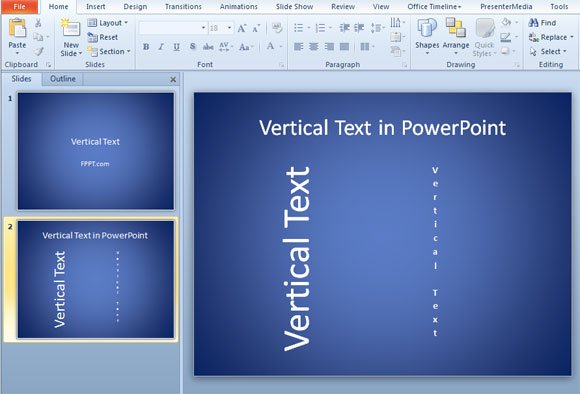
Source: free-power-point-templates.com
What Is Title And Vertical Text Slide Layout, Vertical Text in PowerPoint, 1.6 MB, 01:10, 5,155, Vishap TVplus, 2019-10-14T21:21:59.000000Z, 2, Slide Layouts Within Slide Master View in PowerPoint 2010 for Windows, indezine.com, 762 x 550, jpg, , 3, what-is-title-and-vertical-text-slide-layout
What Is Title And Vertical Text Slide Layout. WebThis guide presents the typical layout of Wikipedia articles, including the sections an article usually has, ordering of sections, and formatting styles for various elements of an article..
youtube.com/channel/UCmV5uZQcAXUW7s4j7rM0POg?sub_confirmation=1
Vertical Text in PowerPoint
Slide Layouts Within Slide Master View in PowerPoint 2010 for Windows
What Is Title And Vertical Text Slide Layout, WebInnovations included: multiple slides in a single file, organizing slides with a slide sorter view and a title view (precursor of outline view), speakers' notes pages attached to each. WebIn typography, a column is one or more vertical blocks of content positioned on a page, separated by gutters (vertical whitespace) or rules (thin lines, in this case vertical).. WebScrolling Look up scrolling in Wiktionary, the free dictionary. Parallax scrolling In computer displays, filmmaking, television production, and other kinetic displays, scrolling is sliding.
Vertical Text in PowerPoint
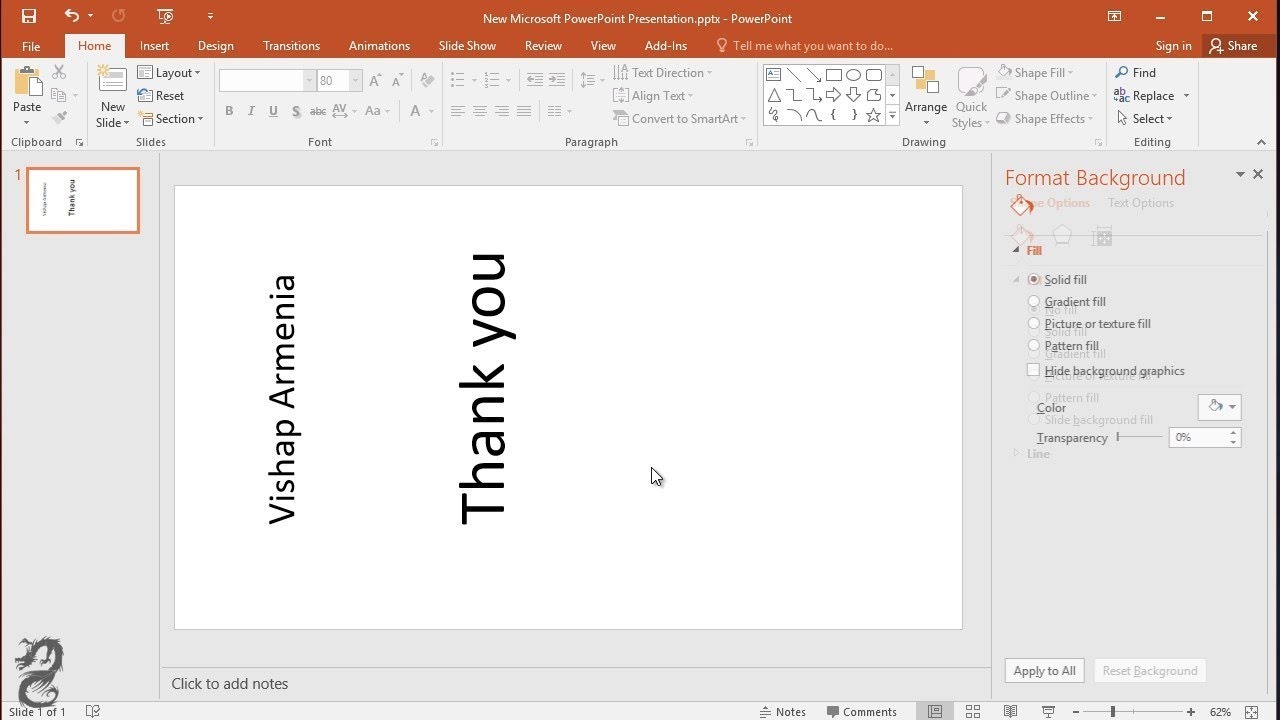
Source: Youtube.com
Change the slide layout in title and content layout. Use the text Organization Chart as title of...

Source: Youtube.com
What is a title and content slide in powerpoint support.microsoft.com › en-us › officeApply a slide layout - Microsoft Support
What is a title and content slide in powerpoint The predefined layouts include a Title slide to begin with, a general Title and Content layout, a side-by-side Comparison layout, and a Picture-with-Caption layout. For more information about slide layouts, see What is a slide layout? Windows macOS Web Android iOS What is a title slide in powerpoint.
What is a title slide in powerpoint
What is a title slide in powerpoint How to use title slide layout in powerpoint.
How to use title slide layout in powerpoint
How to use title slide layout in powerpoint Title and vertical text slide layout powerpoint.
.
Title and vertical text slide layout powerpoint
Title and vertical text slide layout powerpoint What is title and vertical text slide layout.
.
What is title and vertical text slide layout
What is title and vertical text slide layout Title and vertical text slide layout powerpoint.
.
www.lifewire.com › use-slide-layouts-in-powerpointSlide Layouts in PowerPoint - Lifewire
When you open a new presentation in PowerPoint, the first slide is the Title slide and contains text placeholders. To customize this slide layout, select the placeholder text and enter a new title and subtitle. Add a New PowerPoint Slide To add a new slide to your presentation, select Home > New Slide. This adds the Title and Content slide layout. .
.
jennifersharkey.com › slide-design-fundamentalsPowerPoint Slide Layouts Explained - Jennifer Sharkey
Explain of Each Layout Type. 1. The Title Slide is the default slide layout when you start creating a slide deck. The larger text is for the main title and smaller text if for a subtitle. 2. The Title and Content slide layout is the second most common layout used in traditional slide decks. .
.
.
.
.
nutsandboltsspeedtraining.com › title-slidePowerPoint title slide explained (it's not what you think it is)
A title slide in PowerPoint (as humans think of it as) is either the slide that is named "title slide" in your presentation, or the slide that looks like a title slide. Common elements include a large title, a subtitle, some kind of graphical element, etc. .
support.microsoft.com › en-us › officeWhat is a slide layout? - Microsoft Support
Slide layouts contain formatting, positioning, and placeholder boxes for all of the content that appears on a slide. Placeholders are the dotted-line containers on slide layouts that hold such content as titles, body text, tables, charts, SmartArt graphics, pictures, clip art, videos, and sounds. Slide layouts also contain the colors, fonts , .
What are the slide layout.
What are the slide layout support.microsoft.com › en-us › officeTitle a slide - Microsoft Support
What are the slide layout Microsoft security Accessibility center Add a title to your slides using the Layout feature, Outline view, or Accessibility ribbon in PowerPoint. What is a title and content slide in powerpoint.


Post a Comment