
IPTV (Internet Protocol Television) is a service that delivers television programming and other video content over the internet. It is a popular alternative to traditional cable and satellite TV, as it offers a wider range of channels and features, often at a lower cost.
An IPTV port is a specific port on a router or modem that is dedicated to IPTV traffic. This helps to ensure that IPTV traffic is prioritized over other types of traffic, such as web browsing and email, resulting in a smoother and more reliable streaming experience.
Benefits of using an IPTV port
There are several benefits to using an IPTV port, including:
- Improved streaming performance: By prioritizing IPTV traffic, an IPTV port can help to reduce buffering and improve overall streaming performance.
- More reliable connection: An IPTV port can also help to improve the reliability of your IPTV connection by reducing the risk of packet loss and jitter.
- Reduced network congestion: By separating IPTV traffic from other types of traffic, an IPTV port can help to reduce network congestion and improve overall internet performance.
How to set up an IPTV port
Setting up an IPTV port is relatively straightforward. Most routers and modems have a dedicated IPTV port or setting. To set up an IPTV port, simply consult your router or modem’s documentation for specific instructions.
Once you have set up an IPTV port, you will need to connect your IPTV device to the IPTV port on your router or modem. Once connected, your IPTV device should be able to access IPTV content without any problems.
Common IPTV ports
The following are some of the most common IPTV ports:
- 554 UDP: This is the most common IPTV port. It is used by many IPTV service providers to deliver live TV and on-demand content.
- 2000 UDP: This port is used by some IPTV providers to deliver live TV content.
- 4000 UDP: This port is used by some IPTV providers to deliver on-demand content.
- 8000 UDP: This port is used by some IPTV providers to deliver both live TV and on-demand content.
Troubleshooting IPTV port problems
If you are having problems with your IPTV connection, it is possible that there is a problem with your IPTV port. To troubleshoot IPTV port problems, you can try the following:
- Make sure that your IPTV device is connected to the correct port. Some routers and modems have multiple IPTV ports. Make sure that your IPTV device is connected to the correct port for your IPTV service provider.
- Try restarting your router and modem. This can sometimes fix minor problems with your IPTV connection.
- Check your router or modem’s documentation for specific troubleshooting instructions. Some routers and modems have specific troubleshooting instructions for IPTV port problems.
If you are still having problems with your IPTV connection, you may need to contact your IPTV service provider for assistance.
Additional information about IPTV ports
IPTV ports can also be used to configure parental controls and other features. For example, you may be able to configure your IPTV port to block certain channels or to only allow IPTV traffic from certain devices.
To learn more about how to configure your IPTV port, please consult your router or modem’s documentation or contact your IPTV service provider.
Benefits of using IPTV
IPTV offers a number of benefits over traditional cable and satellite TV, including:
- Wider range of channels: IPTV providers typically offer a wider range of channels than traditional cable and satellite providers. This includes channels from all over the world, as well as niche channels that may not be available on traditional cable and satellite TV.
- More features: IPTV providers also typically offer more features than traditional cable and satellite providers. These features may include on-demand content, DVR recording, and parental controls.
- Lower cost: IPTV is often less expensive than traditional cable and satellite TV. This is because IPTV providers do not have the same overhead costs as traditional cable and satellite TV providers.
How to choose an IPTV provider
When choosing an IPTV provider, there are a few things you should keep in mind:
- Channel selection: Make sure that the IPTV provider you choose offers the channels that you want to watch.
- Features: Consider the features that are important to you, such as on-demand content, DVR recording, and parental controls.
- Cost: Compare the prices of different IPTV providers before making a decision.
Conclusion
IPTV is a popular alternative to traditional cable and satellite TV. It offers a wider range of channels and features, often at a lower cost. An IPTV port can help to improve the performance and reliability of your IPTV connection.
Keyword silo
IPTV port
IPTV
IPTV connection
IPTV performance
IPTV reliability
IPTV troubleshooting
IPTV provider
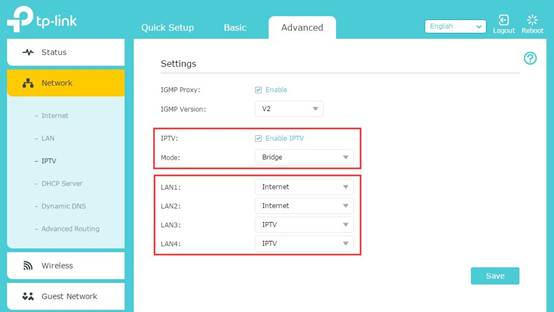
WebIPTV (Internet Protocol television) is a service that provides television programming and other video content using the Transmission Control Protocol/Internet Protocol ( TCP/IP). WebEnter the port (such as 4000) that you want to assign for the IPTV application, then use this format to enter the address in the play list to watch IPTV.
How to configure IPTV function on wireless router (For new logo)? | TP-Link
Source: tp-link.com
How to configure IPTV function on wireless router (For new logo)? | TP-Link

Source: tp-link.com
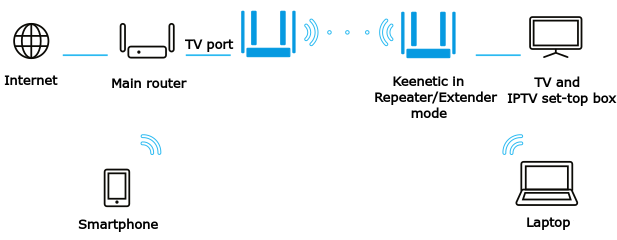
IPTV over Wi-Fi – Keenetic
Source: help.keenetic.com
What Is Iptv Port, What is IPTV and how does it work – Vimeo blog, 4.69 MB, 03:25, 102,668, Vimeo, 2022-01-25T22:21:19.000000Z, 2, How to configure IPTV function on wireless router (For new logo)? | TP-Link, tp-link.com, 312 x 554, jpg, , 3, what-is-iptv-port
What Is Iptv Port. WebMasukkan port (seperti 4000) yang ingin Anda tetapkan untuk aplikasi IPTV, lalu gunakan format ini untuk memasukkan alamat dalam daftar putar untuk menonton. WebThere is a local network. A switch is connected to the main router on port 3, which distributes the Internet to a TV, ps4 and a TV set-top box. For the television to.
IPTV is taking over the world of streaming but what the heck is it? In this video, we go over the basics of IPTV and how it can be useful for your business today.
Learn more about IPTV at vimeo.com/ott
Chapter breakdown:
00:00 Introduction
00:22 What is IPTV?
00:47 Examples of IPTV
00:56 How does IPTV work?
01:54 Three types of IPTV
How to configure IPTV function on wireless router (For new logo)? | TP-Link
What Is Iptv Port, WebIPTV (Internet Protocol television) is a service that provides television programming and other video content using the Transmission Control Protocol/Internet Protocol ( TCP/IP). WebEnter the port (such as 4000) that you want to assign for the IPTV application, then use this format to enter the address in the play list to watch IPTV.
What is IPTV and how does it work – Vimeo blog
Source: Youtube.com
What is IPTV & How IPTV works The Ultimate Guide to Understanding IPTV Technology 👀 #WhatIsIPTV
Source: Youtube.com
Iptv port number How to configure Wi-Fi Routers to support IPTV service on the Wi-Fi Routers (new logo) | TP-Link
Iptv port number If IGMP is not the technology your ISP applies to provide IPTV service: , 3) After you have selected a mode, the necessary parameters, including the LAN port for IPTV connection, are predetermined. If not, select the LAN type to determine which port is used to support IPTV service. What port does iptv use.
What port does iptv use Port and firewall information for IPTV Manager – Encoded Media Knowledge Base
What port does iptv use IPTV Manager is an application to administer and monitor the Encoded Media devices and servers on the network. To facilitate this, it uses various network commu What is iptv port on router.
What is iptv port on router
What is iptv port on router What is iptv port.
My IPTV set-top box only works on LAN with the specific LAN port on my router. Is there any reason behind it? – Quora
Answer (1 of 2): That depends on your router. Some routers have can have different IP ranges for different ports. Others can have disabled ports. Som3 just have broken ports. You may even have QOS (Quality if Service) set up in a per port basis, so certain ports do not allow IPTV. Difficult to sa, .
What is iptv port What is IPTV (Internet Protocol television) and how does it work?
What is iptv port What is Managed Google Play and how should IT teams use it? One of Android Enterprise’s significant components is Managed Google Play. IT should understand how the platform can aid app , Could the iPhone 15’s USB-C port drive device consolidation? What is iptv portal.
What is Internet Protocol Television (IPTV)? – Nevron
Technically, IPTV channels are IP addresses with dedicated ports provided to a host by middleware. A host can request a video stream from a certain port and IP address. The video stream is then sent to a host as a set of data packets defined by IP protocol, carrying compressed and encoded video, , .
What is iptv portal Internet Protocol television – Wikipedia
What is iptv portal Internet Protocol television (IPTV) is the delivery of television content over Internet Protocol (IP) networks. This is in contrast to delivery through traditional terrestrial, satellite, and cable television formats. Unlike downloaded media, IPTV offers the ability to stream the source media continuously. What is iptv port.
How to configure IPTV function on wireless router (For new logo)? | TP-Link
Please keep the IGMP Proxy and IGMP version as default, unless your ISP told you to modify. This article will guide you to configure the IPTV mode and LAN ports. Part B: What’s the difference between different IPTV modes? .
.
IPTV – A simple explanation of Web TV (Internet television) An easy-to-understand explanation of how you can watch television through a broadband Internet connection. .
router – How to properly configure the local network for the correct operation of iptv? – Super User
It sounds like you need to describe more about what is and isn’t working and how. , @Mokubai, The fact is that this network is given an ip from the provider and it changes every time. That is, I can’t configure constant access to it from the main LAN in any way. … I see, rereading your question again it sounds like you are going to have to split the IPTV output from your main network. You need to run a separate cable/switch on port … .
IPTV m3u playlist ports | Netgate Forum
Hi, Really sorry if this is answered but I’m a bit stuck. I have an m3u playlist that contains urls for the streams but they are using port 8000. I created a firewall rule to allow any source 8000 to any destination 8000 as a test to see if I could get th, .
Setting up an IPTV connection – Keenetic
In Keenetic routers, in most cases, digital television (IPTV) works right out of the box on both computers and set-top boxes. 1. Multicast is used to provide IPTV services. Ensure that your Keeneti, .
How to set up IPTV on the AC VDSL/ADSL Modem Router | TP-Link United Arab Emirates
The service can only be delivered through the Internet, and our modem router provides a specific LAN port for IPTV. By automatically separating IPTV from Internet surfing, we guarantee you a high quality of video streaming and a high speed of Internet surfing. Note: Archer VR2600 is used for , .
which ports are used? – IPTV Simple Client
Look into the m3u which you use for IPTV Simple Client. If the URL begins with http:// then it is port 80. rtmp:// usually uses Port 1935 Some URLs contain an explicit port number. This is separated with “:” from the URL or IP. Maybe your firewall disabled/limited internet access for certain , .
Uncovering the Benefits of Using the Right IPTV Port on Your Router – Optic STB
Have you ever heard of IPTV or , can offer many benefits to your home or business. In this blog, we’ll discuss what IPTV is, how to set it up, and the benefits of using the right IPTV port on […]… .
What Is The Best IPTV Port To Use On Your Router
In this short article we show you what is the best IPTV port to use on your router so you can make sure you ae getting the best iptv experience. .
[Wireless Router] How to set up IPTV on ASUS Router? | Official Support | ASUS Global
Note: The related information needs , (ISP) Step4. Check [Choose IPTV STB Port] Connect your cable between IPTV STB and the router, and choose which LAN port you plug the cable into. Note: The router does not supports the enable multicast routing(IGMP Proxy). Step5. Check [Use DHCP routes] Choose what DHCP routes … What is iptv mode.
What is iptv mode Create a Port Forward for MY-IPTV Anywhere in your Router
What is iptv mode A great guide to port forwarding for MY-IPTV Anywhere. Learn how how to forward a port. Iptv port number.


 is a service that delivers television programming and other video content over the internet. It is a pop...)
Post a Comment