
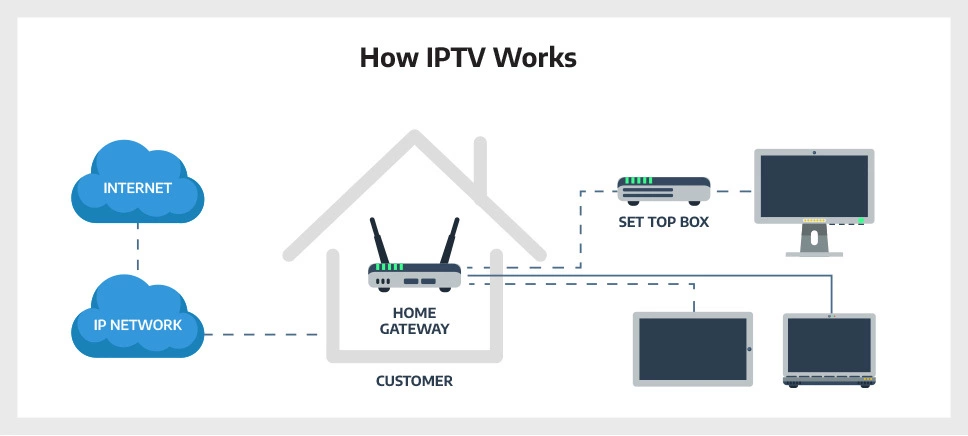
IPTV stands for Internet Protocol Television. It is a system for delivering television content over the internet, instead of through traditional cable or satellite. IPTV services can provide live TV channels, as well as on-demand video content.
IPTV works by streaming video content over the internet to a device, such as a smart TV, streaming device, or computer. The video content is typically compressed to reduce the amount of bandwidth required, but this can also reduce the quality of the video.
IPTV services can be offered by a variety of providers, including telecommunications companies, internet service providers, and content providers. Some IPTV services are free, while others require a subscription fee.
How Do I Get IPTV?
To get IPTV, you will need to subscribe to an IPTV service provider. There are many different IPTV service providers available, so it is important to compare their features and pricing before choosing one.
Once you have chosen an IPTV service provider, you will need to download and install their app on your device. You will then need to create an account with the service provider and enter your subscription credentials.
Once you have logged in to the IPTV service provider’s app, you will be able to browse and watch the available TV channels and video content.
Benefits of IPTV
IPTV offers a number of benefits over traditional cable and satellite TV, including:
- Lower cost: IPTV services are typically less expensive than traditional cable and satellite TV services.
- More flexibility: IPTV services typically offer more flexibility than traditional cable and satellite TV services. For example, with IPTV, you can often choose to pay for only the channels that you want to watch.
- More choices: IPTV services typically offer a wider range of channels and video content than traditional cable and satellite TV services.
- Better quality: IPTV services can offer better quality video and audio than traditional cable and satellite TV services, especially if you have a high-speed internet connection.
Drawbacks of IPTV
IPTV also has some drawbacks, including:
- Internet requirement: IPTV requires a reliable internet connection. If your internet connection is slow or unreliable, you may experience buffering or other problems when streaming video content.
- Limited availability: IPTV services are not available in all areas.
- Illegal IPTV services: There are a number of illegal IPTV services available. These services often offer pirated content, and they may also be infected with malware.
How to Choose an IPTV Service Provider
When choosing an IPTV service provider, there are a few things to keep in mind:
- Price: Compare the prices of different IPTV service providers. Some providers offer free services, while others charge a monthly subscription fee.
- Channel selection: Make sure that the IPTV service provider offers the channels that you want to watch.
- Video quality: Check the video quality of the IPTV service provider. You can do this by reading reviews from other users or by trying out a free trial.
- Customer service: Make sure that the IPTV service provider has good customer service. This is important in case you have any problems with the service.
Popular IPTV Service Providers
Some popular IPTV service providers include:
- Sling TV: Sling TV is a popular IPTV service provider that offers a variety of live TV channels, as well as on-demand video content. Sling TV offers a variety of subscription plans, starting at $35 per month.
- Hulu + Live TV: Hulu + Live TV is another popular IPTV service provider that offers a variety of live TV channels, as well as on-demand video content. Hulu + Live TV offers a subscription plan that costs $69.99 per month.
- YouTube TV: YouTube TV is an IPTV service provider that offers a variety of live TV channels, as well as on-demand video content. YouTube TV offers a subscription plan that costs $64.99 per month.
How to Set Up IPTV on Your Device
To set up IPTV on your device, you will need to download and install the IPTV service provider’s app. You will then need to create an account with the service provider and enter your subscription credentials.
Once you have logged in to the IPTV service provider’s app, you will be able to browse and watch the available TV channels and video content.
IPTV Tips and Tricks
Here are a few tips and tricks for using IPTV:
- Use a high-speed internet connection: IPTV requires a reliable internet connection. If your internet connection is slow or unreliable, you may experience buffering or other problems when streaming video content.
- Use a VPN: A VPN can help to improve your privacy and security when using IPTV. It can also help to bypass geo-restrictions.
- Use a streaming device: A streaming device, such as a Roku or Amazon Fire TV, can provide a better IPTV experience than using a smart TV or computer. Streaming devices typically have more features
WebIn this article, I will break down the different types of IPTV services including free and paid services. IPTV stands for Internet Protocol Television. It's a service you.
What Is IPTV and How It Works | TargetVideo
Source: target-video.com
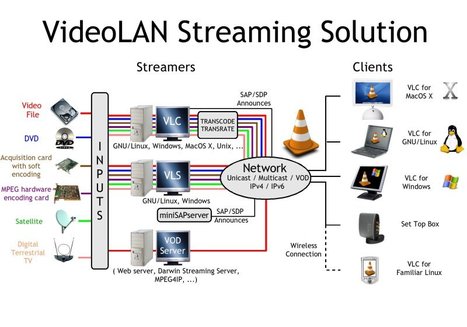
How To Build Your Own IPTV-VoD System | Video B…
Source: scoop.it
Best IPTV Service Provider Subscriptions [August Updated 2023]
.jpg "What Is Iptv And How Do I Get It")
Source: geeksforgeeks.org
What Is Iptv And How Do I Get It, What is IPTV and how does it work – Vimeo blog, 4.69 MB, 03:25, 102,668, Vimeo, 2022-01-25T22:21:19.000000Z, 2, What Is IPTV and How It Works | TargetVideo, target-video.com, 436 x 968, jpg, , 3, what-is-iptv-and-how-do-i-get-it
What Is Iptv And How Do I Get It.
IPTV is taking over the world of streaming but what the heck is it? In this video, we go over the basics of IPTV and how it can be useful for your business today.
Learn more about IPTV at vimeo.com/ott
Chapter breakdown:
00:00 Introduction
00:22 What is IPTV?
00:47 Examples of IPTV
00:56 How does IPTV work?
01:54 Three types of IPTV
What Is IPTV and How It Works | TargetVideo
What Is Iptv And How Do I Get It, WebIn this article, I will break down the different types of IPTV services including free and paid services. IPTV stands for Internet Protocol Television. It's a service you.
What is IPTV and how does it work – Vimeo blog
Source: Youtube.com
What is IPTV – How to tell if it is legal 2023

Source: Youtube.com
vWhat is IPTV? Beginner’s Guide to Streaming Live TV Online
Beginner’s Guide to Streaming Live TV Online September 12, 2023 / IPTV Tell your friends about this! This comprehensive resource guide will answer the question What is IPTV with details about services, setup, and more. IPTV stands for Internet Protocol Television and is the latest and greatest way to view live television.
at-is-iptvWhat Is IPTV? | CableTV.com
Enter your zip code below to find internet service providers near you. Find What Is IPTV? Internet protocol TV (IPTV) is TV delivered via the internet, and it comes in three flavors: video-on-demand IPTV, live TV streaming IPTV, and time-shifted IPTV. Video-on-demand (VOD) IPTV Video-on-demand IPTV has three subtypes:
t-is-iptvWhat Is IPTV? Everything You Need to Know About the … – Uscreen
We have the answers. What You’ll Learn Use the table of contents below to navigate through this post: What IPTV is How IPTV works IPTV Services The future of IPTV What Is IPTV? Let’s start with the basics. What, exactly, is IPTV? IPTV stands for “internet protocol television.”
how-iptv-worksIPTV – A simple explanation of Web TV (Internet television)
From a TV watcher’s point of view, IPTV is very simple: instead of receiving TV programs as broadcast signals that enter your home from a rooftop antenna, satellite dish, or fiber-optic cable, you get them streamed (downloaded and played almost simultaneously) through your Internet connection.
s › what-is-iptvWhat is IPTV | TechRadar
Software & Services What is IPTV Features By Stefan Ionescu published 28 October 2022 Stream media continuously from an online source (Image credit: Shutterstock.com / ImYanis) IPTV means,


Post a Comment